
Known Participant
Oct 20, 2021 4:52 PM UTC
Needs More Info

P: (Customer specific) LR Classic showing inconsistent details about synching with LR Mobile

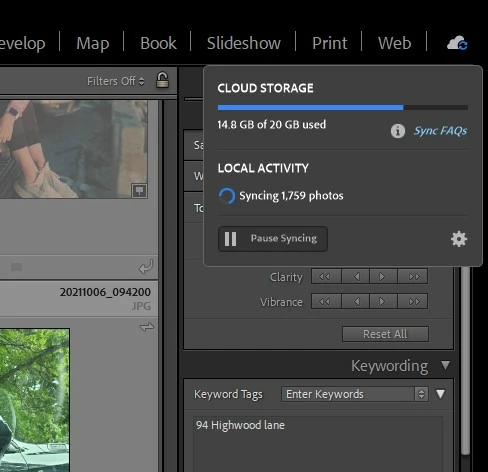
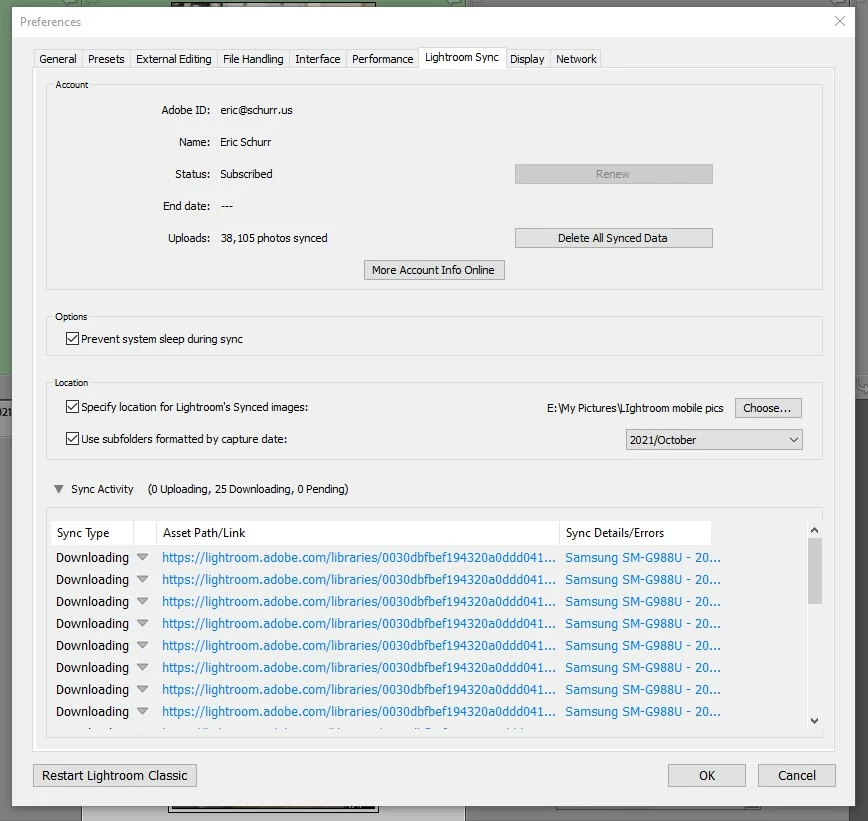
When I click on the cloud icon in the upper right hand of LR Classic it says it is synching 1,759 photos.  If i click on the gear icon and go to the sync dialog it says it is syncing 25 photos.  It's been saying this for many weeks. I can't figure out what photos it's syncing (or not) and what is going on...?
 

This topic is closed to new replies. Start a new post to keep the conversation going.

69 replies

eschurrAuthor
Known Participant
Mar 11, 2022 2:58 PM UTC

Rick, thank you again for all your help. Your instructions were very clear.


I ranomly selected a number of files from the list that i received in the private message. ALL of them are on my Android device and LrWeb but NONE of them are in my LR Classic catalog.


Here are a few that I selected:


E:\My Pictures\LIghtroom mobile pics\2020\July\20200725_135102.jpg
E:\My Pictures\LIghtroom mobile pics\2020\July\20200725_155549.jpg

E:\My Pictures\LIghtroom mobile pics\2020\July\20200723_193556.jpg


Those photos are part of a group of photos that are all in a shared album called "Cleveland Summer 2020."   Note that:

  • The shared album appears on my Android phone, LrWeb, and my LrC catalog.
  • That shared album on LrC only has five photos in it, but on my Android device and LrWeb there are 19 photos in the album.
  • All of the five photos in that album on LrC are also on my Android phone and LrWeb.


I hope this is clear and helpful.


Translate
Rikk Flohr-Retired
Adobe Employee
Mar 11, 2022 1:44 PM UTC

Locate one of the files I sent you privately on your Android device. 
In Lightroom Web (https://lightroom.adobe.com) verify that the same file is synced to the cloud and in the same folder/album as on the device. 


If you cannot locate the file on your Android device, then we have a different problem.

If you can locate the file on your Android device but it is not in the cloud then do you have a Sync Errors/Issues Album showing that lists that file name?

If you can locate the file on your Android device and in the cloud but it is not in your Classic Catalog - I need to know the file name. 


Translate
Rikk Flohr: Adobe Photography Org
eschurrAuthor
Known Participant
Mar 11, 2022 12:59 PM UTC

What must i do to "allow theose listed files to continue syncing?"  LrM on my Android phone says everything is synced...?

Translate
Rikk Flohr-Retired
Adobe Employee
Mar 10, 2022 5:27 PM UTC

The files I listed are in process from Android to the Cloud - they are holding things up right now. Can you log in your Android device and allow those listed files to complete syncing?

Translate
Rikk Flohr: Adobe Photography Org
eschurrAuthor
Known Participant
Mar 10, 2022 5:24 PM UTC

i really appreciate the quick action, thank you!  Unfortunately, i don't understand what the private message is asking me to do!  the only thing i can say is that i have not done anything special with those files.  

Translate
Rikk Flohr-Retired
Adobe Employee
Mar 10, 2022 5:18 PM UTC

Instructions are on a direct message. Replay back here on the thread when complete. Thank!

Translate
Rikk Flohr: Adobe Photography Org
eschurrAuthor
Known Participant
Mar 10, 2022 2:29 PM UTC

and if that doesn't work, you can also try this (this is the entire ZIP file)


https://eschurr-my.sharepoint.com/:u:/g/personal/eric_schurr_us/Eak98BRNyy5Hr3Lg7viTb_MBCHo3lYKisxj_G9JZE4zknQ?e=gvDb6b


Translate
eschurrAuthor
Known Participant
Mar 10, 2022 2:09 PM UTC

Thank you for your efforts and i'm sorry for trouble with the download. I'm having some challenges with DropBox.  Please try this link

https://www.dropbox.com/s/oa6kc4nhxuwwnhw/lrsync.lrcat?dl=0


Translate
Rikk Flohr-Retired
Adobe Employee
Mar 10, 2022 1:25 PM UTC

Neither I nor the engineer can download this file.  Can you review your sharing permissions?

Translate
Rikk Flohr: Adobe Photography Org
eschurrAuthor
Known Participant
Mar 9, 2022 3:30 PM UTC

thank you (again!). Here is the link to a new set of logs


https://www.dropbox.com/s/ipn5pn4456lizzy/LrSyncDiagnostic.zip?dl=0


Translate