
Inspiring
May 25, 2017

P: Develop module: Target Adjustment Tools not working

  • May 25, 2017
  • 68 replies
  • 2084 views

Bonjour à tous, suite à la mise à jour de LR CC 2017.10.1 je m’aperçois d'un petit soucis qui pourrait s'avérer fort gênant :
- Développement, mode normal, Courbe de tonalité, activation de cette option, on active la correction "sur l'image" par déplacement du curseur, tout est OK.
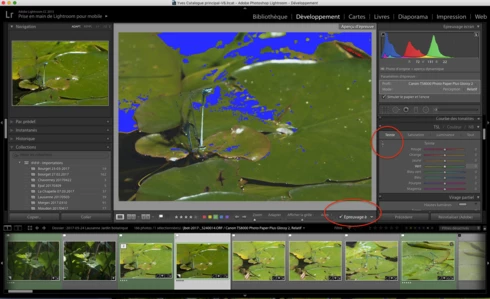
- Développement, Epreuvage, création d'une copie virtuelle, Courbe de tonalité, activation de cette option, on active la correction "sur l'image" par déplacement du curseur, le curseur n'est plus fonctionnel ?
Remarquez, la barre sous l'image n'apparaît plus non plus quand on active cette fonction.
Si on passe à nouveau en mode "Normal" sans épreuvage ou vers une autre photo, le comportement normal de cette fonction ne revient pas 😞 Il faut relancer LR.

J'ai rechargé la version 2017.10, ce bug n'existe pas 😞

Donc Adobe à ajouté un bug en plus des corrections......

macOS 10.12.5.

Hello everyone, following the update of LR CC 2017. 10. 1 I realize a little worry that could prove very troublesome:
- Development, normal mode, Tone curve, activating this option, the correction on the photo is activated by moving the cursor, this is OK.
- Development, SoftProofing mode, creation of a virtual copy, Tone curve, activation of this option, the correction on the photo is activated by moving the cursor, the cursor is no longer functional?
Notice, the bar below the image no longer appears when you activate this function.
If you switch back to 'Normal' mode without proofing or to another photo, the normal behavior of this function does not return 😞 LR must be restarted.

I reloaded version 2017. 10, this bug does not exist 😞

So Adobe added a bug in addition to the fixes. . . . . .

MacOS 10. 12. 5.
This topic has been closed for replies.

68 replies

Participant
August 14, 2017
The day I wrote my comment, I had been trying to edit a photo. I clicked on B&W, then clicked on the Target Adjustment Tool, and when I moved it over the photo, it wasn't selecting anything. I had been having this same problem for a while. So I went looking for answers and found this site. But after I got your response, I opened Lightroom and tried again to make sure and it appears to be working now. Thanks. 
Rikk Flohr_Photography
Community Manager
August 14, 2017
Previous users are reporting that it is working correctly. I have tested on Mac and Windows and the Target Adjustment Tool is working for me.  What exactly isn't working right? Is the failure you are seeing exactly as described above or are you seeing a new and different behavior.?
Rikk Flohr: Adobe Photography Org
Participant
August 12, 2017
I updated Lightroom 14 days ago, TAT still not working correctly. 

iMac running macOS Sierra v. 10.12.6

Running Adobe Photoshop Lightroom CC 
2015.12 
Build 1125239
Camera Raw 9.12
Inspiring
July 19, 2017
on first few times of testing looks to have stopped the bug. Fingers crossed it remains stable.
Rikk Flohr_Photography
Community Manager
July 19, 2017
Lightroom CC2015.12/6.12 was released today and should address this issue.  Please update your Lightroom to the latest version and let us know if you continue to see the issue. Thank you for your patience.

http://blogs.adobe.com/lightroomjournal/2017/07/lightroom-cc-2015-12-now-available.html
Rikk Flohr: Adobe Photography Org
Inspiring
July 19, 2017
Was this fixed in the CC2015.12 update?
Inspiring
July 19, 2017
Was this fixed in the CC2015.12 update?
johnrellis
Legend
July 19, 2017
I think the just-released CC 2015.12 / 6.12 fixes this problem: http://blogs.adobe.com/lightroomjournal/2017/07/lightroom-cc-2015-12-now-available.html
Inspiring
July 14, 2017


ln develop module the cursor type will lock to wrong type - often the zoom tool - when using options such as the details pointer (to adjust sharpening), or the slider tool in HSL tab. It means these options are unworkable/unusable. I have relaunched lightroom, deleted and reinstalled it all, and tried using a backup catalog. The error repeats after about 3 to 5 edits. If I click into another application it may reset for a couple of edits, but then locks again. I was running the latest version of Lightroom from Creative Cloud as of 14/July/17/ I have reverted to installing lightroom CC2015 which does not appear to suffer the same bug - so far. I am running lightroom on an Apple iMac (2015 model) MacOS Sierra with 32 GB RAM. I have tried switching the mouse and keyboard as well.
johnrellis
Legend
July 9, 2017