
Inspiring
May 25, 2017

P: Develop module: Target Adjustment Tools not working

  • May 25, 2017
  • 68 replies
  • 2084 views

Bonjour à tous, suite à la mise à jour de LR CC 2017.10.1 je m’aperçois d'un petit soucis qui pourrait s'avérer fort gênant :
- Développement, mode normal, Courbe de tonalité, activation de cette option, on active la correction "sur l'image" par déplacement du curseur, tout est OK.
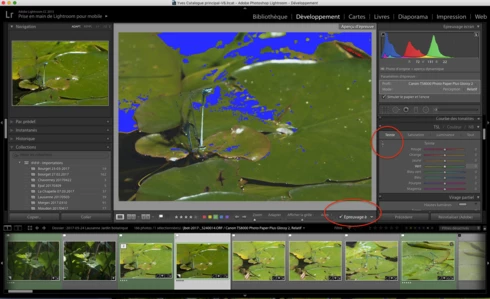
- Développement, Epreuvage, création d'une copie virtuelle, Courbe de tonalité, activation de cette option, on active la correction "sur l'image" par déplacement du curseur, le curseur n'est plus fonctionnel ?
Remarquez, la barre sous l'image n'apparaît plus non plus quand on active cette fonction.
Si on passe à nouveau en mode "Normal" sans épreuvage ou vers une autre photo, le comportement normal de cette fonction ne revient pas 😞 Il faut relancer LR.

J'ai rechargé la version 2017.10, ce bug n'existe pas 😞

Donc Adobe à ajouté un bug en plus des corrections......

macOS 10.12.5.

Hello everyone, following the update of LR CC 2017. 10. 1 I realize a little worry that could prove very troublesome:
- Development, normal mode, Tone curve, activating this option, the correction on the photo is activated by moving the cursor, this is OK.
- Development, SoftProofing mode, creation of a virtual copy, Tone curve, activation of this option, the correction on the photo is activated by moving the cursor, the cursor is no longer functional?
Notice, the bar below the image no longer appears when you activate this function.
If you switch back to 'Normal' mode without proofing or to another photo, the normal behavior of this function does not return 😞 LR must be restarted.

I reloaded version 2017. 10, this bug does not exist 😞

So Adobe added a bug in addition to the fixes. . . . . .

MacOS 10. 12. 5.
This topic has been closed for replies.

68 replies

Participant
July 9, 2017


When I choose the 'detail zoom area' in the sharpening module or try to adjust the HSL with the slider by clicking into the image, Lightroom automatically changes the cursor to the loupe and I can't choose the magnified section, resp. adjust HSL...
Inspiring
July 4, 2017
Thank you!
Victoria Bampton LR Queen
Community Expert
Community Expert
July 4, 2017
Stanley, press the H key. You've probably hidden the grad lines.
Victoria - The Lightroom Queen
Inspiring
July 3, 2017
The Gradient Tool is also malfunctioning, as the dividing lines do not show up. There is a gradient but without the lines it is hard to adjust.
The TAT for HSL on my version is not working. 
Inspiring
June 30, 2017


After booting Lightroom, I can click the little point-dragger tool in the upper corner of the Tone Curve section, and drag in the image to adjust the curve.

But if I put the tool back, or switch to another task, when I try to use the tool again, on the same image or a different one, I click the tool, but the cursor remains a Hand or Magnifying Glass, and just moves or zooms the photo! I tried switching the point-curve mode thing in the lower right corner, but that doesn't fix it. Shutting down Lightroom and rebooting fixes it - but for one use only, then the tool is unavailable again.
neo_adobe
Participating Frequently
June 29, 2017
Thanks Paul!
Participating Frequently
June 28, 2017


POSSIBLE WORKAROUND...
 
As many of us already know, The TAT (targeted adjustment) tool isn't working properly in the latest release (2015.10.1 / 6.10.1).  Somehow Adobe broke it in this latest release.

For those of you that don't already know, there's a workaround.  Just adjust the UI so you're only displaying one TAT at a time instead of all three.  This workaround has worked 100% of the time since Adobe introduced the bug in the latest upgrade.

Hopefully Adobe engineers will get around to fixing this quickly.  I would also be nice if Adobe could share the depth and breadth of testing performed before certifying and approving the upgrade to the public.

Cheers,
~Paul
Inspiring
June 17, 2017
I like to add that i have also the same compartmental issue with the Detail cursor, i can no longer select a zone to magnify.  it appear at the same time as the one describe for the HSL
Inspiring
June 16, 2017
Hi Jeffrey!

Yes! Please put me on the pre-release list!

Rikk, you reference the "Prerelease download site"; where is it? what's the link?

Thanks!

Henry
Participating Frequently
June 16, 2017
thanks.