
Inspiring
May 25, 2017

P: Develop module: Target Adjustment Tools not working

  • May 25, 2017
  • 68 replies
  • 2084 views

Bonjour à tous, suite à la mise à jour de LR CC 2017.10.1 je m’aperçois d'un petit soucis qui pourrait s'avérer fort gênant :
- Développement, mode normal, Courbe de tonalité, activation de cette option, on active la correction "sur l'image" par déplacement du curseur, tout est OK.
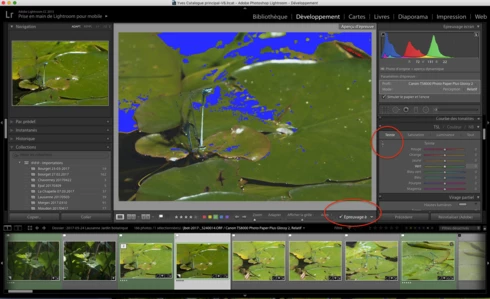
- Développement, Epreuvage, création d'une copie virtuelle, Courbe de tonalité, activation de cette option, on active la correction "sur l'image" par déplacement du curseur, le curseur n'est plus fonctionnel ?
Remarquez, la barre sous l'image n'apparaît plus non plus quand on active cette fonction.
Si on passe à nouveau en mode "Normal" sans épreuvage ou vers une autre photo, le comportement normal de cette fonction ne revient pas 😞 Il faut relancer LR.

J'ai rechargé la version 2017.10, ce bug n'existe pas 😞

Donc Adobe à ajouté un bug en plus des corrections......

macOS 10.12.5.

Hello everyone, following the update of LR CC 2017. 10. 1 I realize a little worry that could prove very troublesome:
- Development, normal mode, Tone curve, activating this option, the correction on the photo is activated by moving the cursor, this is OK.
- Development, SoftProofing mode, creation of a virtual copy, Tone curve, activation of this option, the correction on the photo is activated by moving the cursor, the cursor is no longer functional?
Notice, the bar below the image no longer appears when you activate this function.
If you switch back to 'Normal' mode without proofing or to another photo, the normal behavior of this function does not return 😞 LR must be restarted.

I reloaded version 2017. 10, this bug does not exist 😞

So Adobe added a bug in addition to the fixes. . . . . .

MacOS 10. 12. 5.
This topic has been closed for replies.

68 replies

Rikk Flohr_Photography
Community Manager
June 16, 2017
@Ellis

You should comment in the forum at the Prerelease download site as the engineers will be monitoring it for your feedback. 
Rikk Flohr: Adobe Photography Org
Participating Frequently
June 16, 2017
Removed
Yves-CHAuthor
Inspiring
June 16, 2017
+1 for me please, I can check the french version....
Yves Crausaz, Suisse, retraité actif dans le monde de la photo et des arts graphiques.
Participating Frequently
June 16, 2017
Downloading the OS X  version now.
Known Participant
June 16, 2017
I'm in! Thanks.
Participating Frequently
June 16, 2017
please add me as well.
edw93820691
Participating Frequently
June 16, 2017
Please add me to the evaluation group.
Legend
June 16, 2017
 Good morning. We'd like to invite you to our prerelease if you're interested in evaluating a fix for this issue. Let us know and we'll get you added.
Inspiring
June 13, 2017
Hi folks,

I am working on a MacBook Retina (2013 vintage) running OS 10.12.5 and LR 2015.10.1 with CR 9.10.1.

I have been using LR all day for 3 days. 

The latest LR update is falling apart, problems snowballing:  very slow, erratic movement of the cursor, spot removal very slow to respond and won’t settle on the spot, very slow overall.

None of these problems present in the latest update of PS to which I have had to resort and which reminds me how much I love LR (when it works).

Whatever the problem, it does not seem limited to the TAT in the HSL panel.

I have rolled back to LR 2015 and CR 9. No problems.

Hope you fix it soon.


Henry
jerryk20302970
Participant
June 12, 2017
Please fix as soon as possible. This should be a priority.