
Inspiring
May 25, 2017

P: Develop module: Target Adjustment Tools not working

  • May 25, 2017
  • 68 replies
  • 2084 views

Bonjour à tous, suite à la mise à jour de LR CC 2017.10.1 je m’aperçois d'un petit soucis qui pourrait s'avérer fort gênant :
- Développement, mode normal, Courbe de tonalité, activation de cette option, on active la correction "sur l'image" par déplacement du curseur, tout est OK.
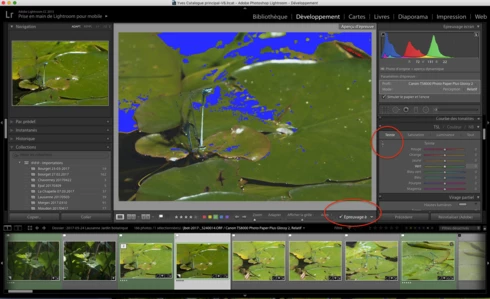
- Développement, Epreuvage, création d'une copie virtuelle, Courbe de tonalité, activation de cette option, on active la correction "sur l'image" par déplacement du curseur, le curseur n'est plus fonctionnel ?
Remarquez, la barre sous l'image n'apparaît plus non plus quand on active cette fonction.
Si on passe à nouveau en mode "Normal" sans épreuvage ou vers une autre photo, le comportement normal de cette fonction ne revient pas 😞 Il faut relancer LR.

J'ai rechargé la version 2017.10, ce bug n'existe pas 😞

Donc Adobe à ajouté un bug en plus des corrections......

macOS 10.12.5.

Hello everyone, following the update of LR CC 2017. 10. 1 I realize a little worry that could prove very troublesome:
- Development, normal mode, Tone curve, activating this option, the correction on the photo is activated by moving the cursor, this is OK.
- Development, SoftProofing mode, creation of a virtual copy, Tone curve, activation of this option, the correction on the photo is activated by moving the cursor, the cursor is no longer functional?
Notice, the bar below the image no longer appears when you activate this function.
If you switch back to 'Normal' mode without proofing or to another photo, the normal behavior of this function does not return 😞 LR must be restarted.

I reloaded version 2017. 10, this bug does not exist 😞

So Adobe added a bug in addition to the fixes. . . . . .

MacOS 10. 12. 5.
This topic has been closed for replies.

68 replies

Inspiring
June 10, 2017
Same here! Thanks for the update and looking forward to the future fix. 
Participant
June 9, 2017


There is a bug I discovered in LR. When adjusting HSL levels using the adjustment up/down arrow (as opposed to the sliders) the up/down arrow stops working when leaving the Develop module going to the Library module than back to the Develop module. The only workaround is to restart the LR program.
Rikk Flohr_Photography
Community Manager
June 8, 2017


Hi folks,

I have the problem. I am working on a MacBook Retina (2013 vintage) running OS 10.12.5 and LR 2015.10.1 with CR 9.10.1.

I just updated my OS because after updating LR with OS 10.11 I started to get the blanked out side panels.

If I use the HSL TAT tool and then use the Detail panel select zoom tool, the zoom tool can turn into the TAT or turns into the enlarge cursor. The TAT in the Tone Curve panel is also affected.

The solution seems to be to go back to the HSL panel change HSL mode, and then turn on and turn off the TAT.

I have reset Preferences but the problem persists.

Any help would be much appreciated.

Questions cheerfully answered.


Henry

Rikk Flohr: Adobe Photography Org
Steve Gandy
Inspiring
June 8, 2017


This problem surfaced for me after updating to 2015.10.1. I've seen it on my iMac and my MacBook Air. One of my clients asked about it recently as well.

Quickly, on going to the Dev Module and opening the HSL/Color/B&W panel the targeted tool will not be selected. The cursor remains set to the zoom tool. It appears to be a bit intermittent. Just now it happened 3 out of 4 times as I tried to isolate the problem. If you click between the Sat, Hue, and Luminance you can get the tool to activate but I can't figure out the exact work around.

Anyone else seeing this?

Steve GandyPhotographer - Instructorstevegandy.com
Participant
June 7, 2017
Thanks Rikk,

Do you think we are talking weeks or months till the next update?

Thanks, Michael
Inspiring
June 7, 2017
Thanks for the progress update, Rikk. I use TAT a lot, on nearly every image I touch, but will see if I can revert back to manual controls until the next update comes out. 
Rikk Flohr_Photography
Community Manager
June 7, 2017
At this time a fix for the Target-Adjustment-Tool (TAT) issue will be waiting for the next Lightroom update. 

In the interim, to avoid the issue you have two options:

1. Use Manual Controls rather than the TAT.  The Tone Curve and Adjustments (HSL) panels should function normally in CC2015.10.1/6.10.1. 

2. Revert to Lightroom CC2015.10/6.10 if the TAT is critical to your workflow.  Reversion requires an uninstall of Lightroom and a manual install of the 6.0 version and then the 6.10 patch.  See this document for links to the files: https://helpx.adobe.com/lightroom/kb/lightroom-downloads.html . You will need to enter your License Key or Adobe ID appropriately for your license after installation. 

Resetting Preferences and restarting Lightroom will temporarily restore the tool to functionality but are temporary measures that will likely not last a session. 

There are reports that toggling repeatedly between Hue/Saturation/Lightness will restore the TAT tool functionality but it is only temporary. 

Any updates on this issue will be posted here. 

Please note: this is a Mac-only issue. Windows TAT should be unaffected.

I do not have an ETA to share on the update yet.
Rikk Flohr: Adobe Photography Org
Participating Frequently
June 7, 2017
I am having this issue with the target adjustment tool (t.a.t.) in Lightroom CC 2015 10.1's H/S/L pane as well.  as well. My hardware configuration is an Apple 27" Retina 5K (late 2014) using OS X 10.12.5 with 32GB RAM and OS and Applications installed on the internal SSD. 

The t.a.t. does work for targeted tone curve adjustments. 

EDIT: and now  the t.a.t. control in the H/S/L panel is back to working. The only thing I did was move from Lightroom to Chrome to write my note and then I went back inot into Lightroom. Very strange.
Inspiring
June 7, 2017
I updated to 2015.10.1 and am also experiencing the same problem. Very frustrating as it's a feature I use on almost every photo that comes through my work flow. 
Participant
June 7, 2017
Me too. Looking forward to a fix soon...