
Inspiring
May 25, 2017

P: Develop module: Target Adjustment Tools not working

  • May 25, 2017
  • 68 replies
  • 2084 views

Bonjour à tous, suite à la mise à jour de LR CC 2017.10.1 je m’aperçois d'un petit soucis qui pourrait s'avérer fort gênant :
- Développement, mode normal, Courbe de tonalité, activation de cette option, on active la correction "sur l'image" par déplacement du curseur, tout est OK.
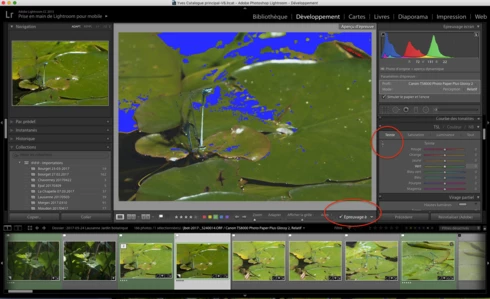
- Développement, Epreuvage, création d'une copie virtuelle, Courbe de tonalité, activation de cette option, on active la correction "sur l'image" par déplacement du curseur, le curseur n'est plus fonctionnel ?
Remarquez, la barre sous l'image n'apparaît plus non plus quand on active cette fonction.
Si on passe à nouveau en mode "Normal" sans épreuvage ou vers une autre photo, le comportement normal de cette fonction ne revient pas 😞 Il faut relancer LR.

J'ai rechargé la version 2017.10, ce bug n'existe pas 😞

Donc Adobe à ajouté un bug en plus des corrections......

macOS 10.12.5.

Hello everyone, following the update of LR CC 2017. 10. 1 I realize a little worry that could prove very troublesome:
- Development, normal mode, Tone curve, activating this option, the correction on the photo is activated by moving the cursor, this is OK.
- Development, SoftProofing mode, creation of a virtual copy, Tone curve, activation of this option, the correction on the photo is activated by moving the cursor, the cursor is no longer functional?
Notice, the bar below the image no longer appears when you activate this function.
If you switch back to 'Normal' mode without proofing or to another photo, the normal behavior of this function does not return 😞 LR must be restarted.

I reloaded version 2017. 10, this bug does not exist 😞

So Adobe added a bug in addition to the fixes. . . . . .

MacOS 10. 12. 5.
This topic has been closed for replies.

68 replies

June 6, 2017
Hello, I have similar problem in standard develop mode. The target adjustment pointer does zoom, or nothing while activated. I have learn, that is has something to do with the "Done" button. When I start the tool for the first time it works, after I finish, I press the "done" button right down corner and all target pointers stops to work after and need restart. Latest mac OS and Lighroom
Participant
June 5, 2017
Thanks. I actually rolled back to the previous version for now, as there are other glitches here and there.
Known Participant
June 5, 2017
Yes, we are all experiencing the same problem. If you reset the preference file when starting LR, the target tool works temporarily, but then stops again. No fix yet.
Participant
June 5, 2017


LR CC.10.1 After saving from PS and coming back to LR, in the Develop module, HSL, the target adjustment tool is not available. If I click on it, I get the zoom loupe.
Yves-CHAuthor
Inspiring
June 1, 2017
Seule solution, revenir à la version CC2015.10 que j'ai retrouvé dans mon bakup Time Machine, je n'ai fait que récupérer le fichier compressé Adobe lightroom ! C'est très ennuyeux car nous avons perdu environs trois jours de travaille pour mettre à jour et revenir à cette version précédente..... Adobe, vous êtes des développeur, nous nous sommes des clients et gagnons notre vie avec vos logiciels.... Arrêtez de nous agacer, surtout faites en sorte que d'autres clients sur macOS ne soient pas impactés par ce problème que vous avez vous-même pu reproduire, la version disponible sur Adobe Creative Cloud est toujours la 10.1, vos nouveaux clients recevront cette versions buguée... Ça ne renvoie pas l'impression que Adobe soit une entreprise sérieuse, ce que vous ne souhaitez pas je l'espère.... Vous subissez déjà assez de critiques concernant le Creative Cloud imposé ! Soyer professionnels s'il vous plaît !

Only solution, go back to version CC2015. 10 that I found in my bakup Time Machine, I only recovered the compressed file Adobe lightroom! This is very annoying because we have lost about three days of work to update and return to this previous version. . . . . Adobe, you are developer, we are customers and earn our living with your software. . . . Stop annoying us, especially make sure that other customers on MacOS are not impacted by this problem that you have been able to reproduce yourself, the version available on Adobe Creative Cloud is still the 10. 1, your new customers will receive This buggy version. . . It does not return the impression that Adobe is a serious business, which you do not hope I hope. . . . You already suffer enough criticism regarding the imposed Creative Cloud! Are you Professional please!
Yves Crausaz, Suisse, retraité actif dans le monde de la photo et des arts graphiques.
Rikk Flohr_Photography
Community Manager
June 1, 2017
If you reset the preferences they are gone. You can always make a backup copy prior to resetting in the event they need to be restored. This article describes what is at risk. https://www.lightroomqueen.com/articles-page/how-do-i-reset-lightrooms-preferences/
 
Rikk Flohr: Adobe Photography Org
neo_adobe
Participating Frequently
June 1, 2017
Rikk, could you please reply to above question: thanks
Rikk Flohr_Photography
Community Manager
June 1, 2017
Unfortunately an ETA is not yet available from the team.  We are looking in to a series of workarounds to:

1. Allow you to function without getting into this state.
2. Recover from this state

until a fix is released. 

It would be helpful to me if those who are having the problem hit the [Me Too] button at the top of this page as this is a relatively low reported issue.
Rikk Flohr: Adobe Photography Org
Yves-CHAuthor
Inspiring
June 1, 2017
Hello, Rikk Flohr, Official Rep 
Combien de temps faudra-t-il attendre encore jusqu'à la correction de ce bug vraiment très con !!! Ajouté par cette version et uniquement sur la version OSX quelque soit le langage ?

Nous payons notre abonnement, nous avons droit à une correction extrêmement rapide de ce problème qui nous a obligé d'aller rechercher dans nos backups la version précédente pour pouvoir travailler correctement, un geste de la part d'Adobe pour cet inconvénient serait un minimum, voir une année d'abonnement à CC pour photographe gratuit... nous aussi avons des coûts dus à ce bug.

Hello, Rikk Flohr, Official Rep
How long will it take to wait until the correction of this bug really con! Added by this version and only on OSX version whatever the language?

We pay for our subscription, we are entitled to an extremely fast correction of this problem which forced us to go to search in our backups the previous version to be able to work correctly, a gesture on the part of Adobe for this inconvenience would be a minimum, See a year subscription to CC for free photographer. . . We also have costs due to this bug.
Yves Crausaz, Suisse, retraité actif dans le monde de la photo et des arts graphiques.
neo_adobe
Participating Frequently
June 1, 2017
I have the same problem running on Macbookpro OS X 10.10.5. Will I loose my preferences if I reset? If so what do you recommend?
Thanks