
Inspiring
May 25, 2017

P: Develop module: Target Adjustment Tools not working

  • May 25, 2017
  • 68 replies
  • 2084 views

Bonjour à tous, suite à la mise à jour de LR CC 2017.10.1 je m’aperçois d'un petit soucis qui pourrait s'avérer fort gênant :
- Développement, mode normal, Courbe de tonalité, activation de cette option, on active la correction "sur l'image" par déplacement du curseur, tout est OK.
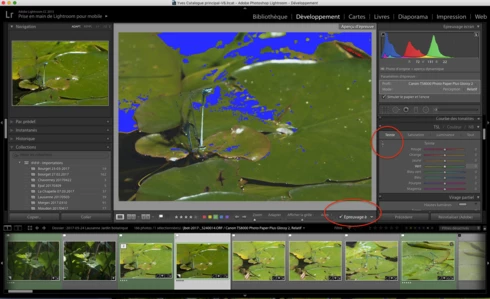
- Développement, Epreuvage, création d'une copie virtuelle, Courbe de tonalité, activation de cette option, on active la correction "sur l'image" par déplacement du curseur, le curseur n'est plus fonctionnel ?
Remarquez, la barre sous l'image n'apparaît plus non plus quand on active cette fonction.
Si on passe à nouveau en mode "Normal" sans épreuvage ou vers une autre photo, le comportement normal de cette fonction ne revient pas 😞 Il faut relancer LR.

J'ai rechargé la version 2017.10, ce bug n'existe pas 😞

Donc Adobe à ajouté un bug en plus des corrections......

macOS 10.12.5.

Hello everyone, following the update of LR CC 2017. 10. 1 I realize a little worry that could prove very troublesome:
- Development, normal mode, Tone curve, activating this option, the correction on the photo is activated by moving the cursor, this is OK.
- Development, SoftProofing mode, creation of a virtual copy, Tone curve, activation of this option, the correction on the photo is activated by moving the cursor, the cursor is no longer functional?
Notice, the bar below the image no longer appears when you activate this function.
If you switch back to 'Normal' mode without proofing or to another photo, the normal behavior of this function does not return 😞 LR must be restarted.

I reloaded version 2017. 10, this bug does not exist 😞

So Adobe added a bug in addition to the fixes. . . . . .

MacOS 10. 12. 5.
This topic has been closed for replies.

68 replies

Known Participant
May 31, 2017
Yes, same here even after resetting the pref. file. Quite a BUG!
Known Participant
May 31, 2017
I retract. It only worked for a while, and then stopped.
Known Participant
May 31, 2017
Rikk
I reset the file and it worked for a while. When I restarted again, it was back to the same problem of no targeted tool in the curves panel.
Known Participant
May 30, 2017
Haha, never mind--back to the bug. now...
Known Participant
May 30, 2017
Rikk, I've found a curious twist... I didn't quite follow all the info above very well but noticed it mentioned soft proofing. So, I went into the soft proofing mode and...ahem...voila..c'est marche bien! It worked well. I then got out of the soft proof mode and it was still working properly! Bizarre.
Known Participant
May 30, 2017


On mid-2010 iMac, El Capitan LR CC. Recently made the update to LR10.1. 
When I click in the panel to 'pick-up' the curve or HSL adjustment 'brush' to drag over the photo it appears that the brush was picked up but when the cursor gets over the picture--it's just the 'zoom' icon and adjustments can't be made. Can't tell if it's the same issue I've seen elsewhere here... sorry.
Yves-CHAuthor
Inspiring
May 26, 2017
thank you
best regards

Yves
Yves Crausaz, Suisse, retraité actif dans le monde de la photo et des arts graphiques.
Rikk Flohr_Photography
Community Manager
May 26, 2017
I was finally able to reproduce this and have issued a bug to the team. Thanks for all your hints and help. 
Rikk Flohr: Adobe Photography Org
Yves-CHAuthor
Inspiring
May 26, 2017


LR CC 2015.10.1 update sur macOS 10.12.5 Sierra

Si on active l'outil permettant de régler par glisser du curseur sur la photo la courbe des tons ou le même outil dans TSL, un bouton Terminer s'affiche en bas de la photo, permettant de désactiver ces 2 fonctions, idem si on clique à nouveau sur le signe activant ces fonctions.

Si on veut répéter activer/désactiver ces 2 fonctions, le bouton Terminer ne s'affiche plus, le curseur sur la photo reste inactif. Il faut impérativement relancer LR pour retrouver le fonctionnement normal

C'est un bug ajouté par cette dernière mise à jour.

J'ai déjà fait un rest des paramètres par défaut de LR, le bug est toujours présent.
J'ai désinstaller LR depuis l'application CC, redémarrer l'ordinateur, réinstaller LR depuis CC, le bug est toujours existant.

Seule solution j'ai dû reprendre LR dans mon backup Time Machine pour récupérer la version CC 2015.10 qui fonctionne correctement.

Même problème sur 2 ordinateurs un iMac fin 2013 et un MBA mi 2011, LR CC 2015.10 fonctionnant parfaitement sur ces 2 ordinateurs.

Même constat si LR en français ou en anglais.


LR CC 2015. 10. 1 update on macOS 10. 12. 5 Sierra

If you activate the tool that allows you to adjust the tone curve or the same tool in TSL by dragging the cursor on the photo, a Done button is displayed at the bottom of the photo, allowing you to deactivate these two functions, Again on the sign activating these functions.

If you want to repeat these two functions on / off, the Done button no longer appears, the cursor on the picture remains inactive. It is imperative to restart LR to regain normal operation

This is a bug added by this latest update.

I have already made a rest of the default settings of LR, the bug is still present.
I've uninstalled LR from the CC application, restart the computer, reinstall LR from CC, the bug is still existing.

Only solution I had to take back LR in my Time Machine backup to recover the version CC 2015. 10 that works correctly.

Same problem on 2 computers an iMac end 2013 and a MBA mid 2011, LR CC 2015. 10 working perfectly on these 2 computers.

Same observation if LR in French or in English.

Même constat si LR en français ou en anglais.
Yves Crausaz, Suisse, retraité actif dans le monde de la photo et des arts graphiques.
Adesculpture
Known Participant
May 26, 2017
Im having the same problem with OSX 10.11.6, CC15.10.1
I have cleared the preferences, closed and re-opened LR.  The first time I use TAT it works, as soon as I release the mouse button the cursor changes to a magnification glass and it doesn't work after that.  I think the problem is its stuck in the zoom mode, the TAT tool in the pallet indicates its active, its just that the cursor is locked in magnification mode.  The only way I have found to get it back is to quit and restart LR.