
Inspiring
May 25, 2017

P: Develop module: Target Adjustment Tools not working

  • May 25, 2017
  • 68 replies
  • 2084 views

Bonjour à tous, suite à la mise à jour de LR CC 2017.10.1 je m’aperçois d'un petit soucis qui pourrait s'avérer fort gênant :
- Développement, mode normal, Courbe de tonalité, activation de cette option, on active la correction "sur l'image" par déplacement du curseur, tout est OK.
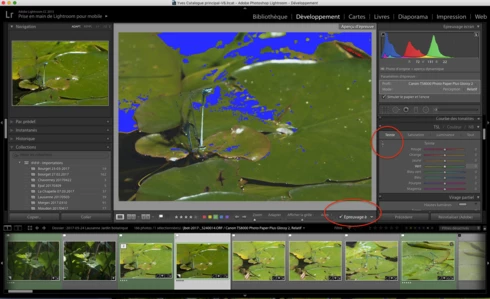
- Développement, Epreuvage, création d'une copie virtuelle, Courbe de tonalité, activation de cette option, on active la correction "sur l'image" par déplacement du curseur, le curseur n'est plus fonctionnel ?
Remarquez, la barre sous l'image n'apparaît plus non plus quand on active cette fonction.
Si on passe à nouveau en mode "Normal" sans épreuvage ou vers une autre photo, le comportement normal de cette fonction ne revient pas 😞 Il faut relancer LR.

J'ai rechargé la version 2017.10, ce bug n'existe pas 😞

Donc Adobe à ajouté un bug en plus des corrections......

macOS 10.12.5.

Hello everyone, following the update of LR CC 2017. 10. 1 I realize a little worry that could prove very troublesome:
- Development, normal mode, Tone curve, activating this option, the correction on the photo is activated by moving the cursor, this is OK.
- Development, SoftProofing mode, creation of a virtual copy, Tone curve, activation of this option, the correction on the photo is activated by moving the cursor, the cursor is no longer functional?
Notice, the bar below the image no longer appears when you activate this function.
If you switch back to 'Normal' mode without proofing or to another photo, the normal behavior of this function does not return 😞 LR must be restarted.

I reloaded version 2017. 10, this bug does not exist 😞

So Adobe added a bug in addition to the fixes. . . . . .

MacOS 10. 12. 5.
This topic has been closed for replies.

68 replies

Yves-CHAuthor
Inspiring
May 26, 2017
It's not the Tone curv, but the TSL local adjustment !!! Pleas look at my last post here above. Thank you

I make a new post more accurate here https://feedback.photoshop.com/photoshop_family/topics/lr-cc-2015-10-1-the-done-switch-for-tsl-local..., please close this one.
Yves Crausaz, Suisse, retraité actif dans le monde de la photo et des arts graphiques.
Known Participant
May 26, 2017


Just updated to latest version of LR and the tone curve targeted adjustment tool is not functioning. If I click on it to activate, it does not show the tool when I hover over the image.
Yves-CHAuthor
Inspiring
May 26, 2017
J'ai désinstallé cette version, redémarrer l’ordinateur, télécharger à partir de Creative Cloud
ça ne fonctionne pas

Module de développement, avec ou hors softproofing !
TSL, je me suis trompé !!!
Activation de l'outil Réglage direct de la teinte, idem avec les autres réglages...
Modification des réglages par déplacement du curseur sur l'image
Sortie de l'outil par un clic sur le bouton Arrêter en bas de l'image

A ce moment, l'icone d'activation de l'outil ne passe pas en mode désactivé....
Si à ce moment on clique sur ce bouton, il s'éteint, si on le clique de nouveau, il semble actif, mais le bouton au bas de l'écran n'apparaît plus.

Si je repasse en mode Bibliothèque et retour en Développement, le fonctionnement est toujours innactif. Je dois relancer LR pour pouvoir utiliser une seul fois cet outil.

Merci de refaire le teste complêt, avec les interface français et anglais, chez moi, le même comportement sur 2 ordinateurs différent un iMac 27' late 2013 et un MBA mi 2011

macOS 10.12.5

Je revient en LR 2017.10, le problème disparait !!!

I have uninstalled this version, restart the computer, download from Creative Cloud
it does not work

Development module in or out sofproofing !
TSL, I was wrong!
Activation of the tool Direct adjustment of the hue, same as the other settings. . .
Changing the settings by moving the cursor over the image
Exit the tool by clicking the Stop button at the bottom of the image

At this time, the tool activation icon does not go into the disabled mode. . . .
If this button is clicked, it will go out, if it is clicked again, it appears active, but the button at the bottom of the screen no longer appears.

If I go back to Library and Return to Development mode, the operation is still inactive. I have to restart LR to be able to use this tool once.

Thank you for repeating the complete test, with the French and English interface, at home, the same behavior on 2 different computers an iMac 27 'late 2013 and a MBA mid 2011

MacOS 10. 12. 5

I return in LR 2017. 10, the problem disappears !!!
Yves Crausaz, Suisse, retraité actif dans le monde de la photo et des arts graphiques.
Known Participant
May 25, 2017
Worked! Thanks.
Yves-CHAuthor
Inspiring
May 25, 2017
Yves Crausaz, Suisse, retraité actif dans le monde de la photo et des arts graphiques.
Yves-CHAuthor
Inspiring
May 25, 2017
1. Close Lightroom.
2. Hold down [Alt/Opt]+[Shift] while restarting Lightroom. 
3. Overwrite the Preferences when prompted by the dialog.
4. Close Lightroom.
5. Restart Lightroom.

macOS 10.12.5 in french, keyboerd QWERTZ swiss french
Afeter reset and restart, softproofing on/off, change photo, I can initiate targeted adjustment. then it will work if I select

Si je sélectionne cet outil, le curseur se transforme en icône du zoom et ensuite le poing !
If I select this tool, the cursor turns into a zoom icon and then the fist!
Yves Crausaz, Suisse, retraité actif dans le monde de la photo et des arts graphiques.
Rikk Flohr_Photography
Community Manager
May 25, 2017
Yves, With 10.12.5 and CC2015.10.1 I am not able to duplicate this.  I am seeing both the Tone Curve  and HSL Target Adjustment tools working in Soft Proofing mode. 

I would recommend resetting your preference file and see if the behavior is still wrong. 
Reset Procedure:

1. Close Lightroom.
2. Hold down [Alt/Opt]+[Shift] while restarting Lightroom. 
3. Overwrite the Preferences when prompted by the dialog.
4. Close Lightroom.
5. Restart Lightroom.

Does the behavior continue after resetting the preferences?
Rikk Flohr: Adobe Photography Org
Participant
May 25, 2017


in Mac version, the targeted adjustment for saturation will not work (become active) unless one first goes to select the Hue, only then I can initiate targeted adjustment. then it will work if I select Saturation. I think it is a new bug