Participant
April 3, 2018

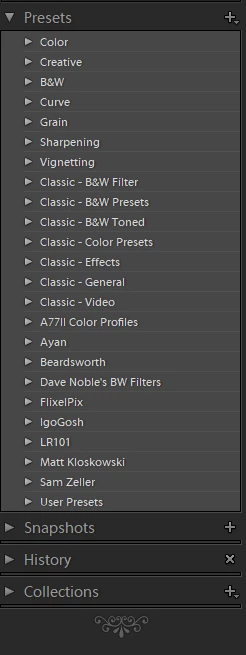
P: Develop presets not sorting correctly

  • April 3, 2018
  • 123 replies
  • 2273 views

They used to be sorted alphabetically. In version 7.3 the order is random

This topic has been closed for replies.

123 replies

Participating Frequently
April 5, 2018
I hope Adobe can solve this with an update, but since the file name / sort name discrepancy is already baked into the .XMP file itself, I'm not sure how Adobe could fix the problem with a Lightroom update itself.

On that note, can anybody figure out how to do this in KomodoEdit? (Notepad++?)
Participating Frequently
April 5, 2018

...Oh, this is going to be SO MUCH FUN!!! THANKS ADOBE!
Inspiring
April 5, 2018
I hope we get a fix soon, being a heavy user of Mastin Labs and VSCO Presets for my workflow it has disrupted my delivery to clients. I reached out to VSCO and Mastin Labs customer support who are aware of the issue but have little control on their side for a fix. What Nathan has highlighted seems to be correct and hopefully this helps Adobe release an update soon. Till then I have uninstalled Lightroom and re-installed and will not install my presets till there is a Lightroom update. Not going through the tiresome process of cleaning/renaming Presets directories. 
Inspiring
April 5, 2018
Dear Adobe - based on the above, it appears this is an Adobe created problem.  You have a LOT of preset developers scrambling.  Please provide a fix asap.  It should be much easier on your end - based on the info provided by Nathan Johnson above - on what needs to be done.
Legend
April 5, 2018
We're investigating this issue. Thanks for reporting.
Inspiring
April 5, 2018
for the meanwhile, I rolled back to an earlier version. 
Legend
April 5, 2018
Since xmp files are plain text, this could be fixed with a script in a text editor or something like Perl. I don't use presets so it isn't a problem for me, just saying.
Inspiring
April 5, 2018
Same here on Win10  - ‎Shai Bachar‎ to Adobe Photoshop LightroomYesterday at 1:12am · 
NEW update NEW PROBLEMS. Hi Adobe. now what? new updated ruined the order of my presets and it's all mess now. instead of improving your slowing Classic CC, you're adding unnecessary presets of your own. I've never thought I'd consider working with other application. You're making me think it's time to do so... 😞
Inspiring
April 5, 2018
Same here.
Cameron Braun
Known Participant
April 5, 2018
This is excellent work, and at the very least will help Adobe narrow down a solution. Thanks for sharing!