Participant
April 3, 2018

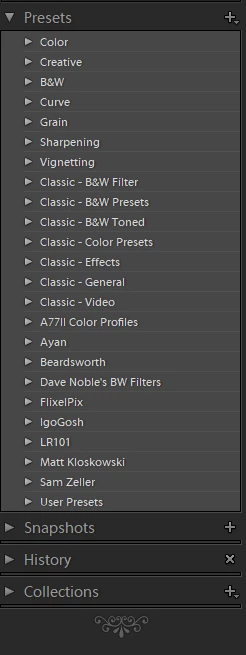
P: Develop presets not sorting correctly

  • April 3, 2018
  • 123 replies
  • 2273 views

They used to be sorted alphabetically. In version 7.3 the order is random

This topic has been closed for replies.

123 replies

Participating Frequently
April 7, 2018
Art, I agree this release is a bit of a mess... but they are bugs that will be ironed out in future updates.  In the meantime there is a simple solution - simply revert back to version 7.2 and it will work perfectly as it did before... (this is what I have done).

I do believe that the new 'Profiles' work a bit differently under the hood, but as far as my workflow goes they are just the same old profiles doing what they always did.  We've all been using them for years whether we were aware of it or not, the only difference is that now they are more visible at the top of the basic panel.  But as far as I see it is a UI change only, and it need only affect your workflow if you want it to.

Good luck anyway... !
ArtCDavis
Participating Frequently
April 7, 2018
I agree that the new version is a mess.  I too am seriously considering abandoning LR.  It will be painful, but so is dealing with Adobe's continual release of dysfunctional 'improvements'.
   In this release not only are they messing with how the user is able to customize and reorder presets, but the new Profiles functionally absolutely screws up and adds unnecessary / unwelcome complexity to managing image tonality. 
   You'd think that Adobe would be testing their products before release; and that they'd be using Focus Groups to assess their new ideas - apparently not.  Its up to the customer to find the problems after the buggy software is released.
Participating Frequently
April 7, 2018
Wow Nathan, great work and thanks alot for sharing!  
I notice that the script works on the original .lrtemplate files, and then LR Classic will re-convert them into the xml format.  My question is - what happens to the presets that have already been converted?
nathanj67028423
Participating Frequently
April 7, 2018
So... I got tired of updating presets manually, so I went ahead and built a bash script for Mac users that fixes sorting automatically...

Tested with around 1,000 presets on OS X El Capitan... took about 10 seconds for the script to go through all of them, restarted Lightroom Classic 7.3, and everything is ordered just like it was. 🙂

Just put the script and instructions to use up for free on my website. http://natephotographic.com/lightroom-classic-7-3-presets-sorted-wrong-order/

Really curious to hear how it works for other (especially Sierra and High Sierra folks)?
nathanj67028423
Participating Frequently
April 7, 2018
So... I got tired of updating presets manually, so I went ahead and built a bash script for Mac users that fixes sorting automatically...

Tested with around 1,000 presets on OS X El Capitan... took about 10 seconds for the script to go through all of them, restarted Lightroom Classic 7.3, and everything is ordered just like it was. 🙂

Just put the script and instructions to use up for free on my website. http://natephotographic.com/lightroom-classic-7-3-presets-sorted-wrong-order/

Really curious to hear how it works for other (especially Sierra and High Sierra folks)?
majello
Participant
April 6, 2018
Also, why are the default folders always stuck on the top? This is highly annoying, even with the favourites thing. It's getting in the way of my workflow.
Also, why is there no way to rename a folder, or delete it. Auto-Delete when empty is a bit silly, and breaks fodler creation right now.

The new update is awesome, but your changes to the preset interface are just no good.
nathanj67028423
Participating Frequently
April 6, 2018
Here's  a little trick... You can delete all the default "classic" folders, which makes it at least a little more usable.

On Mac, right-click on the Lightroom CC Classic (inside the Lightroom CC Classic folder, in your Application folder). And select "Show Package Contents"


Navigate to "Contents > Resources > Settings" and then delete the "Classic"  folder


Restart Lightroom CC Classic, and BOOM! No more of those annoying Classic folders!


There. That looks a little better.

I haven't been able to get the other defaults off... even after deleting them, they still persist.  It's like trying to delete Internet Explorer off of Windows...

Hope that helps!
-Nate
Inspiring
April 6, 2018
Thanks @188115 TheBikeman. I just read that link over in a LR Facebook group. Great minds think alike! You are so kind to respond. 
Inspiring
April 6, 2018
Here's a workaround from https://lightroomkillertips.com/managing-develop-presets-7-3-update-classic/

As far as I can tell, the only way within Classic to create new preset folders is to create a new (dummy) preset, and within the New Develop Preset dialog, you can click the Group drop-down menu and choose New Group to create a new group/folder for your new preset. Once the preset is created, it will be in the new folder you created at the same time. You can then drag and drop presets into that folder as needed. Note, empty folders disappear, so don’t get rid of your dummy preset until you put others in that folder. You can use this convoluted process to rename a folder by creating a new folder with the renamed-name, moving presets into that new folder, and the empty folder with the old name goes poof.
Check out the link for more info and photos of the steps required.
Participant
April 6, 2018
While you are at it - make it so we can delete the defaults 😉