Participant
April 3, 2018

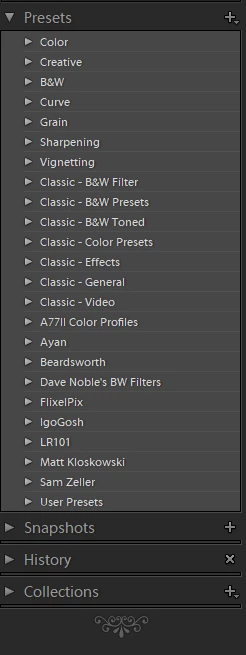
P: Develop presets not sorting correctly

  • April 3, 2018
  • 123 replies
  • 2273 views

They used to be sorted alphabetically. In version 7.3 the order is random

This topic has been closed for replies.

123 replies

Known Participant
April 17, 2018
I think that there should be some kind of quality control. If they are changing presets functionalities, someone should test if it works as it supposed to... Anyone familiar with presets would spot a bug like that in my opinion. And, it doesn't seem to be a very hard to fix it as it's just a naming issue from what I know.
Victoria Bampton LR Queen
Community Expert
Community Expert
April 17, 2018
It's been 2 weeks today. There will no doubt be a fix as soon as they possibly can, but you'd be really cross if they released a fix that made things worse, so they'll have to spend a bit of time testing after fixing the worst of these issues. Should such big bugs have slipped through? No. But we all make mistakes. In the meantime, it's very easy to step back to 7.2, so as not to mess up your workflow.
Victoria - The Lightroom Queen
ArtCDavis
Participating Frequently
April 17, 2018
I agree.  Being unable to prioritize your presets (etc) over the unwelcome, canned presets is a major frustration, headache, and productivity killer. 
   I think it is just bizarre that Adobe would choose to design their product in such a manner - and then to expect the established user base to support it is even more bizarre.
    I'd be happy if they rolled out a product that allow me to do my work my way - like it used to be.
Known Participant
April 16, 2018
Having the same problem, presets are a mess and it's not possible to find anything. It ruins the whole workflow I have created. I think Adobe you should stop charging a subscription fee until you fix your software so that users won't have to downgrade to be able to use it...
Inspiring
April 16, 2018
Will Adobe release a fix to this? It’s been few weeks now. Huge amount of Lightroom users are still having issues and are paying for a service. Rolling back to a previous version shouldn’t be a fix.
Participant
April 11, 2018
I just rolled back to previous version till this is resolved. https://forums.adobe.com/thread/2401313
Participant
April 11, 2018
Any progress on this Lightroom? It is a serious productivity crusher.
ArtCDavis
Participating Frequently
April 8, 2018
I agree with Stefan.  The inability to reorder to suit the User's preference is highly frustrating and impacts my workflow.  I believe this should be fixed as high priority matter.  (FYI: I'm on a Windows 10 system.)
Participating Frequently
April 7, 2018
Yeah, I deleted them, did a search for one of them (just to see if it was still anywhere on the system), and rebooted.  They're still there and still functioning.  Very frustrating.
nathanj67028423
Participating Frequently
April 7, 2018
You're welcome!

OK - so removing the ~ from the .lrdevelop file causes it to overwrite the equivalently named .xmp file when it is re-converted.

The script I wrote will only do this in cases where there is found to be a mismatch between the "internalName" and the "title". So it should only overwrite the .xmp files where there was a mismatch. This should help at least limit issues caused by conversion, or accidentally overwriting a .xmp file you have changed. That said, if you've made a lot of changes to the .xmp files directly, probably a good idea to backup before using the script.