


Participating Frequently
March 6, 2025

P: Do not scale videos during export

  • March 6, 2025
  • 9 replies
  • 562 views

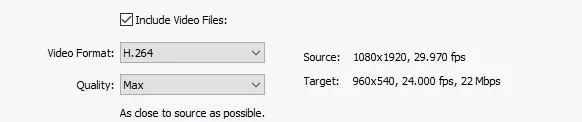
When a video is exported from Lightroom Classic that does not have the size 1920x1080 pixels, it is scaled down. Videos that are in portrait format (1080x1920 pixels) are scaled to 960x540 pixels. A video with 1440x1080 pixels becomes 1280x720 pixels when exported. Do not scale videos during export.
 

9 replies

Participating Frequently
October 1, 2026

Thank you very much for your response, ​@johnrellis.

Adobe seems to have recognized this issue as a bug. Please see the post by ​@Rikk Flohr-Retired:
https://community.adobe.com/bug-reports-674/p-do-not-scale-videos-during-export-664416?postid=7172400#post7172400

​@Rikk Flohr-Retired:

What is the current status of this issue? And could you please let me know why this bug has been marked as “Released” even though the problems are still present?

johnrellis
Legend
October 1, 2026

The exported file should retain the original pixel dimensions of the source video, regardless of whether the source video is portrait, landscape, or square.


That’s a sensible proposal, but it’s not what Adobe designed.  There are four built-in video presets, Max, High, Medium, and Low. They all export in landscape with aspect ratio 16:9 (width:height), except at the smallest source resolutions, which use 4:3 or 3:2.  Max has a maximum width of 3840, High of 1920, Medium of 1280, and Low of 480.


For source resolutions with different width:height aspect ratios, including portrait, LR adds borders to the sides or tops (e.g. "letterbox" for portrait). I think Adobe's intention was to fit the source video as large as possible inside the chosen export resolution, but as you've demonstrated and my bug report shows, LR often gratuitously makes the source video smaller.


In Adobe's terminology in this forum, a "bug" is when LR doesn't behave as was intended or designed by the developers.  If you want different behavior from what was intended by the developers, that's a "feature request". 


Your desired behavior, as desirable as it might be, clearly wasn't intended by Adobe. Thus, I recommend you post a feature request.


Participating Frequently
September 24, 2026

Thank you johnrellis for your response. However, I still see one issue rather than three separate issues:

Videos that are not exactly 3840 × 2160, 1920 × 1080, or 1280 × 720 pixels are being scaled during export and then either letterboxed or pillarboxed to fit the target resolution.

Videos should not be scaled, letterboxed, or pillarboxed during export. The original video resolution and aspect ratio should be preserved.


Regarding Issue 1

“A video with 1440 x 1080 pixels becomes 1280 x 720 pixels when exported.” This is not fixed. Please see the attached image.

The original 1440 × 1080 video is still being scaled to 1280 × 720 during export.


Regarding Issue 2

A portrait video with a resolution of 2160 × 3840 is now being scaled to 608 × 1080 and pillarboxed with black bars on the left and right. The exported video has a resolution of 1920 × 1080.

However, contrary to how you describe this in your new bug report, the video should not be scaled to 3840 × 2160 either.

It should not be scaled at all during export. The original 2160 × 3840 resolution should be preserved.\


Regarding Issue 3

Yes, but it is not only portrait videos that are being scaled and pillarboxed. Landscape videos are affected as well.

For example:

  • A 2400 × 1080 video becomes 1920 × 1080 after export. The video is scaled and letterboxed with black bars at the top and bottom.

  • A 4096 × 2160 video becomes 3840 × 2160 after export. The video is scaled and letterboxed with black bars at the top and bottom.

  • A 1920 × 1440 video becomes 1920 × 1080 after export. The video is scaled and pillarboxed with black bars on the left and right.

Here are some additional examples:

Original resolution After export Effective video area
720 × 1280 720 × 480 270 × 480
960 × 1200 960 × 540 432 × 540
1080 × 1080 960 × 540 540 × 540
1080 × 1920 960 × 540 304 × 540
1440 × 1080 1280 × 720 960 × 720
1920 × 1440 1920 × 1080 1440 × 1080
2160 × 3840 1920 × 1080 608 × 1080
2400 × 1080 1920 × 1080 1920 × 864
4096 × 2160 3840 × 2160 3860 × 2025


In all of these cases, the original video resolution and aspect ratio should be preserved. The video should not be scaled, letterboxed, or pillarboxed during export.

The exported file should retain the original pixel dimensions of the source video, regardless of whether the source video is portrait, landscape, or square.


johnrellis
Legend
September 22, 2026

[View this post in your web browser. It contains formatting and images that don't appear in email.]

​@Mathias32515695vfub Why does it say ‘Released’ here? The bug hasn’t been fixed.


There are three separate issues going on here that weren’t precisely disentangled.  My experience reporting bugs here for many, many years is that you have to provide precise, detailed steps of what you’re observing and what you expect to happen, in gory detail.


Issue 1: “A video with 1440x1080 pixels becomes 1280x720 pixels when exported.” This was fixed in LR 15.0, which increased the maximum output resolution to 4K. I think this is why this bug report was marked Released.


Issue 2: Exporting portrait videos still uses a target resolution lower than 4K. For example, exporting a 2160 x 3840 video produces a 1920 x 1080 video rather than a 3840 x 2160 video (sic).  I’ve filed a new bug report about this:

https://community.adobe.com/bug-reports-674/exporting-a-portrait-video-at-quality-max-chooses-the-wrong-target-resolution-1643374


Issue 3: The video export presets all specify landscape resolutions, and portrait videos are inserted into those landscape resolutions with black borders on the left and right (so-called letterbox format). I’ve observed there is ambiguity among apps about this -- in some apps, if you export a portrait video at “4K”, you’ll get 2160 x 3840, but in other apps (like LR), you need to explicitly specify the portrait dimensions you want to avoid letterboxing.


LR has always letterboxed exported portrait videos, so I think Adobe considers this “as designed” rather than a bug. But the obvious problem for users is that there are no portrait video export presets, which is a pain now that portrait cellphone videos are so prevalent.  


So if you want to avoid letterboxing, you should submit a feature request for portrait export presets.


Meanwhile, the Any Video Preset plugin provides portrait export presets that avoid letterboxing, e.g. export a portrait video without letterboxing at 2160 x 3840.

Participating Frequently
September 22, 2026

Why does it say ‘Released’ here? The bug hasn’t been fixed.


Participating Frequently
November 12, 2025

Is the bug (videos that are in portrait format (1080x1920 pixels) are scaled to 960x540 pixels) still present in Lightroom Classic 15.0? Unfortunately, I haven't had a chance to test it yet.

Exporting 4K videos should now be possible: "4K Video Export: When you're exporting videos, selecting the Max option now supports 4K videos." See: https://www.lightroomqueen.com/whats-new-in-lightroom-2025-10/


Participating Frequently
February 11, 2026

I'll answer it myself: the bug is still there. And it's still there even with 4K videos.


Rikk Flohr-Retired
Adobe Employee
March 7, 2025

We've reviewed this and opened a bug with the Classic Team. Please follow this thread for updates as they are available. 

Thank you for your report.

Rikk Flohr: Adobe Photography Org
johnrellis
Legend
March 7, 2025

[This post contains formatting and embedded images that don't appear in email. View the post in your Web browser.]


Adobe never finished the implementation of video in LR Classic after LR 4, and I quite doubt they'll put in any more effort. While waiting for them to improve this, you could use the Any Video Peset plugin: