Inspiring
June 9, 2016

P: Drop down menu position issue with high resolution screen

  • June 9, 2016
  • 23 replies
  • 608 views

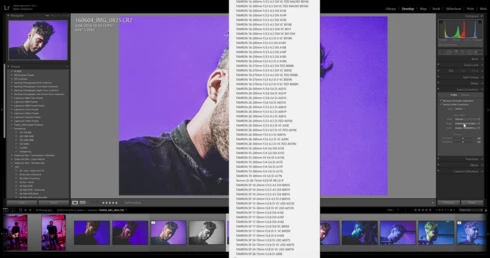
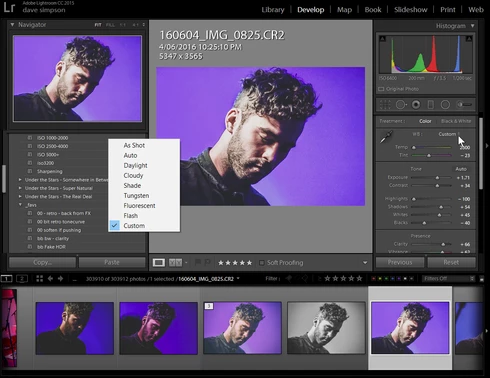
drop down menus on develop panel pop up in centre of screen not under the dropdown after upgrading to LR2015.6 cc release.  Problem can be avoided by lowering the display resolution from 2560 x 1440 to 1920 x 1080


Lightroom version: CC 2015.6 [ 1078672 ]License: Creative Cloud
Operating system: Windows 10
Version: 10.0
Application architecture: x64
System architecture: x64
Logical processor count: 8
Processor speed: 3.4 GHz
Built-in memory: 16320.4 MB
Real memory available to Lightroom: 16320.4 MB
Real memory used by Lightroom: 1592.7 MB (9.7%)
Virtual memory used by Lightroom: 1813.5 MB
Memory cache size: 26.7 MB
Maximum thread count used by Camera Raw: 8
Camera Raw SIMD optimization: SSE2,AVX,AVX2
System DPI setting: 120 DPI
Desktop composition enabled: Yes
Displays: 1) 2560x1440, 2) 1680x1050
Input types: Multitouch: No, Integrated touch: No, Integrated pen: Yes, External touch: No, External pen: Yes, Keyboard: No

Graphics Processor Info: 
GeForce GTX 960/PCIe/SSE2

This topic has been closed for replies.

23 replies

johnrellis
Genius
September 9, 2016
As Stefan Redel wrote in the original topic, make sure you have LR CC 2015.6.1 / 6.6.1.  Do Help > System Info to check your version.  Do Help > Updates to get 2015.6.1 / 6.6.1.
Known Participant
September 9, 2016


On a high DPI screen (specifically a Dell 4K monitor with 150% display scaling set), the dropdown list in dialogs is incorrectly placed.

Repro:
- Use a high DPI monitor with display scaling set to something other than 100%.
- Open the Export dialog and select "Hard Drive".
- Expand the "Existing Files" dropdown.

Expect:
- Dropdown menu should appear under the dropdown control.

Actual:
- Dropdown menu appears offset to the left.

Inspiring
July 27, 2016
I upgraded to the latest version 6.6.1 and Camera Raw 9.6 build 1083169

Drop down and position menu has been resolved. thanks
Legend
July 26, 2016
This issue is fixed but the Lightroom CC 2015.6.1 update that came out today: http://blogs.adobe.com/lightroomjournal/2016/07/lightroom-cc-2015-6-1-now-available.html
stawarz
Participating Frequently
July 2, 2016
Similar behaviour on Asus ZenBook Pro with UHD/4k display, dropdown option boxes appearing to somewhere to the left of the drop arrow in the man UI, preferences, etc... Good to see others are experiencing the same.

Annoying but have encountered far worse behaviour in other software at UHD/4k resolution and 200%+ scaling.
Inspiring
June 17, 2016
I have also the same issue here. Please fix it ASAP (Configuration: I5-6600, GTX960 and DELL P2415Q)
Inspiring
June 13, 2016
Someone from support linked me to the official Adobe blog to look for news... There weren't any news.
It seems there are lots of problems now with this update.
Syncing between RAW and TIF on portrait mode results in wrong positions of the brushes, no problem in landscape mode. Syncing between a RAW/DNG and TIF results in totally wrong white balance.

With "they don't care" I mean Adobe. Not the programmers themselves... As a leading company you don't have to give a f... because people won't change their software...

I'm looking forward so I can use Adobe on Linux in near future. But until then I want to use the software with the updates and don't want to do rollbacks and wait 2 months with an older version. 1 month for free would be a nice  deal - but as I said you don't have to care...
Legend
June 11, 2016
Hi Tom, I can promise you we do care and we're actively working on this issue. Which blog are you referring to? The official answer points to this document which gives instructions on how to roll back to the prior version: https://helpx.adobe.com/lightroom/kb/roll-back-to-prior-update.html
Inspiring
June 11, 2016
Yes, sure I can do. But both ways suck. The official respond links to a blog where exactly nothing is mentioned. They just don't care. They don't have to care. And that sucks. Showing dropdown menu at worng position should be just a litte bug and I'm sure it could be fixed very fast. Just release a hotfix update, maybe just stop rolling out the update until it is fixed. That way lots of people get pissed because the whole workflow is moving your mouse/tablet across half of screen or uninstall and install and configure software...  But no, they have <swearing removed> internal processes and don't care about customers. At least they should give 1 months CC for free - it won't hurt them but I pay 1 month without being able to properly use the software...
mickspawn
Inspiring
June 11, 2016
how bout you look into supporting Windows based machines as a whole.  The whole industry controls you.  You don't assign any assets to making compatible PC software.  I have tried 3 windows based laptops and recently bought a $6500 machine double the MacBook pro that runs Lr and Ps flawlessly and the windows based machine runs your software like a piece of turd.  Why can't you throw some assets at helping your windows based users.  And why haven't you been working tirelessly on 4k support?  Your Mac's have 4k too don't forget...  Absolute useless software if you aren't a Mac user.