Inspiring
June 9, 2016

P: Drop down menu position issue with high resolution screen

  • June 9, 2016
  • 23 replies
  • 614 views

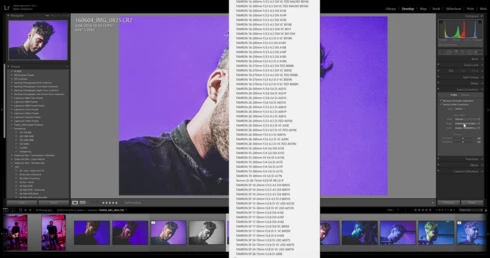
drop down menus on develop panel pop up in centre of screen not under the dropdown after upgrading to LR2015.6 cc release.  Problem can be avoided by lowering the display resolution from 2560 x 1440 to 1920 x 1080


Lightroom version: CC 2015.6 [ 1078672 ]License: Creative Cloud
Operating system: Windows 10
Version: 10.0
Application architecture: x64
System architecture: x64
Logical processor count: 8
Processor speed: 3.4 GHz
Built-in memory: 16320.4 MB
Real memory available to Lightroom: 16320.4 MB
Real memory used by Lightroom: 1592.7 MB (9.7%)
Virtual memory used by Lightroom: 1813.5 MB
Memory cache size: 26.7 MB
Maximum thread count used by Camera Raw: 8
Camera Raw SIMD optimization: SSE2,AVX,AVX2
System DPI setting: 120 DPI
Desktop composition enabled: Yes
Displays: 1) 2560x1440, 2) 1680x1050
Input types: Multitouch: No, Integrated touch: No, Integrated pen: Yes, External touch: No, External pen: Yes, Keyboard: No

Graphics Processor Info: 
GeForce GTX 960/PCIe/SSE2

This topic has been closed for replies.

23 replies

Victoria Bampton LR Queen
Community Expert
Community Expert
June 10, 2016
You could continue working with 2015.6 if you don't mind the menus being in the wrong place. Bugs do happen, and it'll get fixed as soon as they can.
Victoria - The Lightroom Queen
Inspiring
June 10, 2016
I've sent my logs to adobe. They answered:
- uninstall LR CC
- install the second last version
- wait for an update and look into adobe blog what will be changed in the future update

That sucks. I pay for updates with CC, not to downgrade and wait.
Inspiring
June 9, 2016

Same here on one-monitor setup. Updated graphics driver, but didn't make any change.

Lightroom version: CC 2015.6 [ 1078672 ]
License: Creative Cloud
Operating system: Windows 7
Version: 6.1
Application architecture: x64
System architecture: x64
Logical processor count: 8
Processor speed: 2,7 GHz
Built-in memory: 16315,4 MB
Real memory available to Lightroom: 16315,4 MB
Real memory used by Lightroom: 2017,4 MB (12,3%)
Virtual memory used by Lightroom: 1995,9 MB
Memory cache size: 3772,0 MB
Maximum thread count used by Camera Raw: 8
Camera Raw SIMD optimization: SSE2,AVX
System DPI setting: 115 DPI
Desktop composition enabled: Yes
Displays: 1) 2560x1440
Input types: Multitouch: No, Integrated touch: No, Integrated pen: Yes, External touch: No, External pen: Yes, Keyboard: No

Graphics Processor Info:
Quadro K2000M/PCIe/SSE2

Check OpenGL support: Passed
Vendor: NVIDIA Corporation
Version: 3.3.0 NVIDIA 368.39
Renderer: Quadro K2000M/PCIe/SSE2
LanguageVersion: 3.30 NVIDIA via Cg compiler

Thanks for getting this fixed asap,

Andreas

Inspiring
June 9, 2016


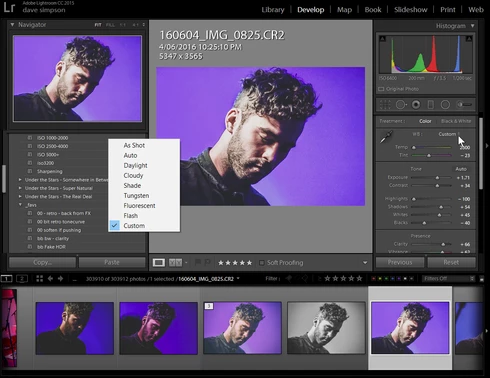
in whyte balance (library) same problem!!
Inspiring
June 9, 2016
same problem but with the display 1920 x 1080  to W10 and laptop screen
in develop fast on library panel , no problem

in white balance (library) same problem
ssprengel
Inspiring
June 9, 2016

On my Windows 10 1680x1050 monitor the dropdown is in a reasonable place:

Legend
June 9, 2016
We're looking into this issue. Thanks for reporting this issue.

As a workaround, you can roll back to the 2015.5.1 update: https://helpx.adobe.com/lightroom/kb/roll-back-to-prior-update.html
Inspiring
June 9, 2016
Same here with Win 7 x64, GTX850M and Intel 4400, 1920x1080 laptopn screen. Lowering resoultion does not solve the problem. 

Inspiring
June 9, 2016


After updating lightroom to 2015.6 i now have this strange problem that the WB box now pops up near the middle of the screen and you have to move back and forth to change it.

Windows 10 pro
geforce gtx 760
4k Dell monitor 3840*2160

Changing the screen size to another resolution, it fixes the problem but at maximum screen size it keeps showing in this position.
Inspiring
June 9, 2016
Same problem here with 4k resolution on a 1-monitor-setup