
Participant
November 12, 2014

P: "Edit in PS 2014" opens PS 2014 in Wrong Location

  • November 12, 2014
  • 32 replies
  • 945 views

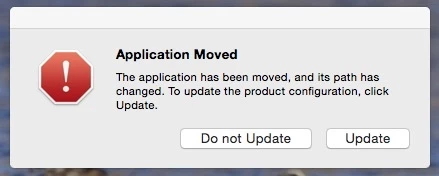
Software bug. MAC OS X Yosemite (and Mavericks before it). Using LR 5.6 & Photoshop CC2014.2.1 CC subscription. When an external firewire backup drive is connected (the backup drive is a clone of my MacBook Pro that stays connected for scheduled automatic backups, etc.), when I am in Lightroom and I select "Edit (an image) in Photoshop", Photoshop opens in the wrong location. In other words, it opens the Photoshop application on my backup drive instead and I get a warning dialogue box that says "The application has been moved, and its path has changed. To update the product configuration, click update". I have a choice to update or not. Of course, I choose to not update that. That's a bug (in my opinion.) When the backup drive is not connected the correct PS 2014 application opens. Bottom line: I should be able to keep a backup drive connected and have the Edit in Photoshop open the correct application.

One way you could easily solve this issue is to change External Editing in Preferences - change the first listing where it shows by default "Edit in Adobe PS CC 2014" - simply have the the user actually confirm where the application is located, thus forcing the user to choose (and thus confirm) the location of the PS 2014 application on the primary volume that the user intends to lave Lightroom open (would be similar to what the user has to do to choose an additional external editor in the same Preferences panel.

I'e tried everything to solve this bug. Reinstalling PS 2014 does not work. Deleting plists files does not work. There seems to be no user workaround available. Please solve this problem with a fix. Thank you. James Farrell, Prescott, AZ - jamesfarrell7681@gmail.com
This topic has been closed for replies.

32 replies

Inspiring
December 29, 2014
This really is not a bug - just normal OS behavior. We may see what we can do to make the OS behavior clearer, but it is not really something to fix.
Inspiring
December 29, 2014
Thanks for merging my thread.

Can we get Acknowledged status on this bug?
Inspiring
December 29, 2014


Even though PS is open on my start-up drive, LR seeks out my backup drive to open a second version of PS.

My start-up drive PS app is the one selected in Preferences > External Editing > Additional External Editor.

Where do I set my Primary External Editor?

LR 5.7.1, PS 15.2.2, OS 10.9.5
Known Participant
December 29, 2014


Whenever I open a file in Photoshop from Lightroom, it launches Photoshop from a backup drive, if I have it mounted. This is more than a nuisance, my boot drive is much faster. The only fix is to unmount that drive and relaunch Lightroom.

I don't understand why Lightroom (which, rather inconveniently, doesn't allow me to manually enter the correct path) wouldn't default to checking for PS on the same volume as itself.
Inspiring
December 13, 2014
I have this same problem. It keeps accessing my photoshop program on my external raid. It's a pain to have to disconnect it to open in the right copy. Also since usually open as a smart object, other workarounds don't work. When is there a fix for this?
Legend
December 10, 2014
We'll look into what's possible to make this better.
bradleykincaid
Participant
December 8, 2014
I have the same very annoying problem. I had not realized it was because of my backup on an external drive, however.

Please provide a more reasonable solution.
Participant
December 5, 2014
I agree with Jim,

I have tried getting rid of the Photoshop p.list preferences, etc. but the only fix that works for me is either discontinue making cloned backups of the hard drive or Eject the backup disk prior to any work in LightRoom. Both of these solutions are poor workarounds to a problem that could be remedied by Jim's suggestion above. Why Lightroom would keep trying to access the backup copy of Photoshop on a different disk makes no sense to me...

It's bug. Let's squash it.

-evan
James_FaAuthor
Participant
December 5, 2014
Thanks for posting, Evan. It sure is a problem and a fix should not be difficult.
James_FaAuthor
Participant
December 5, 2014
To Rikk Flohr: Sorry, but your response to me from three weeks ago that suggests I uninstall both Lightroom and Photoshop, both of which are huge downloads and to go through a ton of work to reinstall them is completely unrealistic and downright ridiculous.

Moreover, your tedious, time consuming "procedure" does not solve the problem. The same issue reappears even after going through all of the steps that you've suggested. It's a bug, a software programming glitch, Rikk. Please, pass the info about the problem along to the appropriate people so it can be fixed.

Now that another user has chimed in here with the same issue, maybe you'll take me more seriously. If you scout around you'll find other users with the same issue posting in other forums. The reason not more folks have posted here about the issue is that finding anything on Adobe's horribly bloated web sites is difficult very time consuming at best.

There is clearly a bug or some kind of programming error. The problem should be easy for Adobe to fix - if by doing nothing else than having the user choosing the location or pointing to the application location for PS CC 2014 in the external editing tab of the LR preferences pane. The fix that I suggest would require a user to do this only once. This method works fine for the second external editor that I can choose (there are two external editor choices I can make in case Adobe software engineers have not noticed.) For the second external editor, I only have to point to the application and its location once.

We appreciate your time to post a response. But your suggested solution does not work and is not Adobe's best effort to solve a real issue. I mean no disrespect, but if I knew to whom at Adobe I could send information about this issue, I would. >> Jim Farrell, Prescott, AZ - jamesfarrell7681@gmail.com