
P: "Edit in PS 2014" opens PS 2014 in Wrong Location
Software bug. MAC OS X Yosemite (and Mavericks before it). Using LR 5.6 & Photoshop CC2014.2.1 CC subscription. When an external firewire backup drive is connected (the backup drive is a clone of my MacBook Pro that stays connected for scheduled automatic backups, etc.), when I am in Lightroom and I select "Edit (an image) in Photoshop", Photoshop opens in the wrong location. In other words, it opens the Photoshop application on my backup drive instead and I get a warning dialogue box that says "The application has been moved, and its path has changed. To update the product configuration, click update". I have a choice to update or not. Of course, I choose to not update that. That's a bug (in my opinion.) When the backup drive is not connected the correct PS 2014 application opens. Bottom line: I should be able to keep a backup drive connected and have the Edit in Photoshop open the correct application.
One way you could easily solve this issue is to change External Editing in Preferences - change the first listing where it shows by default "Edit in Adobe PS CC 2014" - simply have the the user actually confirm where the application is located, thus forcing the user to choose (and thus confirm) the location of the PS 2014 application on the primary volume that the user intends to lave Lightroom open (would be similar to what the user has to do to choose an additional external editor in the same Preferences panel.
I'e tried everything to solve this bug. Reinstalling PS 2014 does not work. Deleting plists files does not work. There seems to be no user workaround available. Please solve this problem with a fix. Thank you. James Farrell, Prescott, AZ - jamesfarrell7681@gmail.com 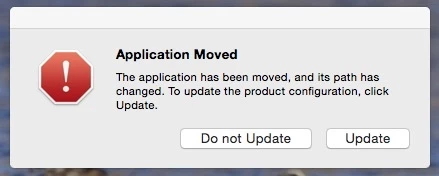


 AdChoices