Cletus
Known Participant
Dec 9, 2016 10:06 PM UTC
Released

P: Erroneous warning message on Catalog Backup

I now get a warning about  zipping backup catalog files larger than 4GB Even though the catalog file is only 1.6GB.   I'm running MacOS 10.12.1
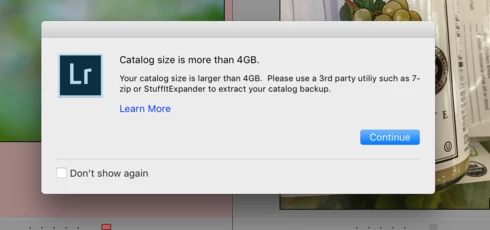

This topic is closed to new replies. Start a new post to keep the conversation going.

25 replies

Rikk Flohr-Retired
Adobe Employee
Mar 7, 2017 6:29 PM UTC
Adobe released Lightroom 6.9/CC2015.9 today.

This issue should be corrected in this release. Please give it a try and let us know if you see any further issues. 

Complete information about this update can be found at the Lightroom Journal: http://blogs.adobe.com/lightroomjournal/2017/03/lightroom-cc-2015-9-now-available.html

If you don’t see the update in your Creative Cloud App, you can use the kbsc [Cmd/Ctrl]+[Opt/Alt]+[ R ]  to refresh your app. If you are a perpetual license holder, you can access the update via Help>Updates...

Refer to this for any installation issues: http://blogs.adobe.com/lightroomjournal/2013/06/keeping-lightroom-up-to-date.html#lrcc2015
Translate
Rikk Flohr: Adobe Photography Org
Participant
Feb 24, 2017 8:42 AM UTC
Thank you so much Jeff. It has worked. It took too long from adobe to release the solution thought. Thank you
Translate
Participant
Feb 23, 2017 5:55 PM UTC


https://helpx.adobe.com/lightroom/kb/unable-to-back-up-catalog.html

THis is the Adobe help page that will fix the issue
Translate
Inspiring
Jan 18, 2017 11:17 AM UTC
I can access some parts but newer downloads just stop after 2 or 3 images have been downloaded. Never mind... I'll have to use back-dated stuff. Thanks for your prompt response. Tony
Translate
Victoria Bampton LR Queen
Community Expert
Community Expert
Jan 18, 2017 11:05 AM UTC
No, it's not fixed yet, but it's only a false warning message. It won't affect access to your catalogs at all. If you can't access your catalogs, there's something else going on.
Translate
Victoria - The Lightroom Queen
Inspiring
Jan 18, 2017 11:02 AM UTC
Has the bug been rectified yet? I updated to v.6.8 last night and I have NO access to any of my catalogues, which I need.
Translate
Inspiring
Jan 3, 2017 6:56 PM UTC


4gb warning since up grade to the cloud plus photos importing up side down ....what next ????
Translate
Art M.
Known Participant
Dec 27, 2016 12:26 PM UTC


Closing LR, it asks if I want to backup, then it complains that my catalog is over 4GB.   Actually the catalog is 60meg and previews are around 160meg.   This is a BUG.   I think it did a compressed backup anyway, despite the erroneous warning.    Please fix this, it is worrisome.  Using LR 2015.8 CC latest version on a 2015 MacBook Pro.   Thank you.
Translate
Participant
Dec 19, 2016 7:07 PM UTC
I have plenty of free space in the drives. It happened right after the updade.
Translate
Participant
Dec 14, 2016 6:56 PM UTC


When I quit Lightroom, I get the dialog saying that it can't compress my catalog because it's 4 GB and there's a macOS limitation with Zip files. However, the warning seems to be incorrect because (a) my catalog is only about 1.5 GB, and (b) Lightroom does create a .zip file of it in the Backups folder.
Translate