Cletus
Known Participant
December 9, 2016

P: Erroneous warning message on Catalog Backup

  • December 9, 2016
  • 25 replies
  • 846 views

I now get a warning about  zipping backup catalog files larger than 4GB Even though the catalog file is only 1.6GB.   I'm running MacOS 10.12.1
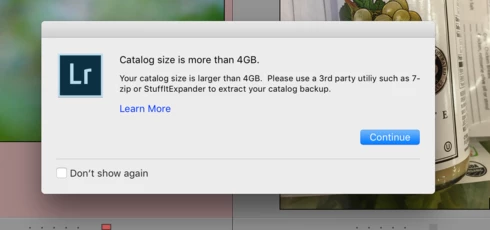

This topic has been closed for replies.

25 replies

Rikk Flohr_Photography
Community Manager
March 7, 2017
Adobe released Lightroom 6.9/CC2015.9 today.

This issue should be corrected in this release. Please give it a try and let us know if you see any further issues. 

Complete information about this update can be found at the Lightroom Journal: http://blogs.adobe.com/lightroomjournal/2017/03/lightroom-cc-2015-9-now-available.html

If you don’t see the update in your Creative Cloud App, you can use the kbsc [Cmd/Ctrl]+[Opt/Alt]+[ R ]  to refresh your app. If you are a perpetual license holder, you can access the update via Help>Updates...

Refer to this for any installation issues: http://blogs.adobe.com/lightroomjournal/2013/06/keeping-lightroom-up-to-date.html#lrcc2015
Rikk Flohr: Adobe Photography Org
Participant
February 24, 2017
Thank you so much Jeff. It has worked. It took too long from adobe to release the solution thought. Thank you
Participant
February 23, 2017


https://helpx.adobe.com/lightroom/kb/unable-to-back-up-catalog.html

THis is the Adobe help page that will fix the issue
Inspiring
January 18, 2017
I can access some parts but newer downloads just stop after 2 or 3 images have been downloaded. Never mind... I'll have to use back-dated stuff. Thanks for your prompt response. Tony
Victoria Bampton LR Queen
Community Expert
Community Expert
January 18, 2017
No, it's not fixed yet, but it's only a false warning message. It won't affect access to your catalogs at all. If you can't access your catalogs, there's something else going on.
Victoria - The Lightroom Queen
Inspiring
January 18, 2017
Has the bug been rectified yet? I updated to v.6.8 last night and I have NO access to any of my catalogues, which I need.
Inspiring
January 3, 2017


4gb warning since up grade to the cloud plus photos importing up side down ....what next ????
Art M.
Known Participant
December 27, 2016


Closing LR, it asks if I want to backup, then it complains that my catalog is over 4GB.   Actually the catalog is 60meg and previews are around 160meg.   This is a BUG.   I think it did a compressed backup anyway, despite the erroneous warning.    Please fix this, it is worrisome.  Using LR 2015.8 CC latest version on a 2015 MacBook Pro.   Thank you.
Participant
December 19, 2016
I have plenty of free space in the drives. It happened right after the updade.
Participant
December 14, 2016


When I quit Lightroom, I get the dialog saying that it can't compress my catalog because it's 4 GB and there's a macOS limitation with Zip files. However, the warning seems to be incorrect because (a) my catalog is only about 1.5 GB, and (b) Lightroom does create a .zip file of it in the Backups folder.