[View this post in your web browser. It contains formatting and images that don't appear in email.]
@hans_onepicture Whether the map display works or not could depend on the username (user) in the Windows account. My Windows username contains an umlaut ("ü").
Excellent discovery! I tested 8 diacritical marks and 1 ligature in Windows account usernames, and some worked and some didn’t. This explains why the bug reports mostly came from the same European countries, with a few from South America and other countries.
So the workaround is to create a username without any diacritical marks.
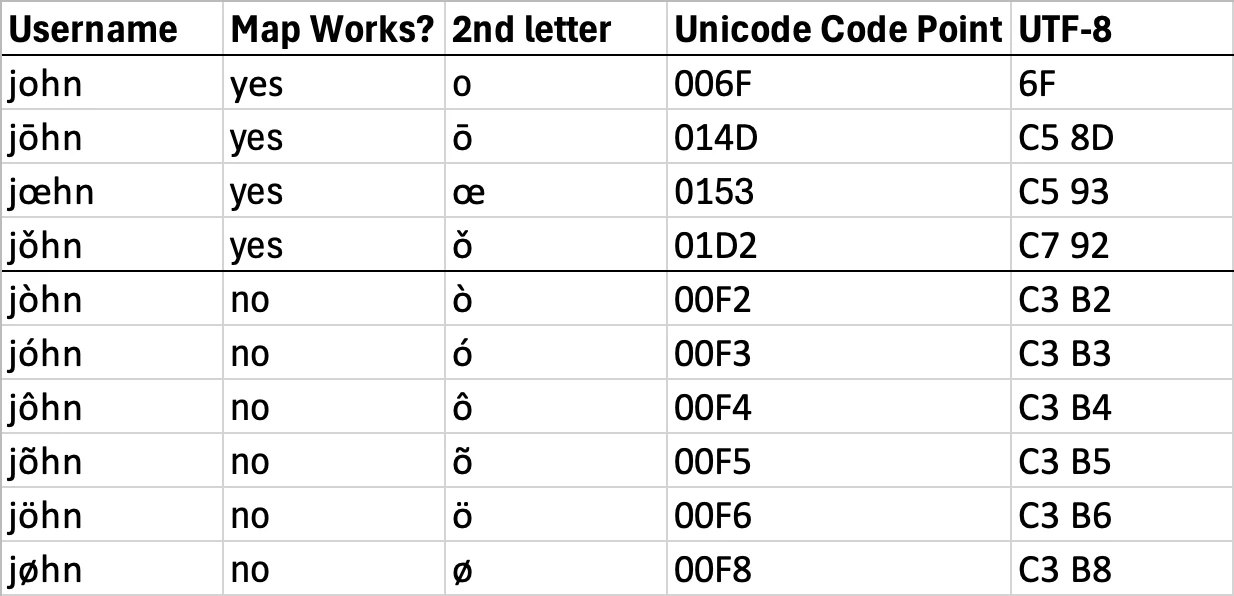
Looking at the Unicode representations, all of the problem-causing diacritical marks have code points starting with U+00, while the non-problematic marks and ligatures don’t:
It’s pretty clear that some software component invoked by the Map module has a bug in its handling of Unicode strings. Given that similar bugs haven’t cropped up in other parts of LR, this strongly suggests the problem is somewhere in the third-party components such as the Google Maps JSON library. I think that library caches map data in hidden folders inside C:\Users\<username>\AppData, and the caching could be getting tripped up by the bug in the Unicode handling.
As of some months ago, Adobe hadn’t updated that component -- it was many years out-of-date. And the engineer who originally wrote that part of LR is likely long gone from the team.
Tested on LR 16.0 / Windows 11 running in the US region with US English.
[View this post in your web browser. It contains formatting and images that don't appear in email.]
@hans_onepicture Whether the map display works or not could depend on the username (user) in the Windows account. My Windows username contains an umlaut ("ü").
Excellent discovery! I tested 8 diacritical marks and 1 ligature in Windows account usernames, and some worked and some didn’t. This explains why the bug reports mostly came from the same European countries, with a few from South America and other countries.
So the workaround is to create a username without any diacritical marks.
Looking at the Unicode representations, all of the problem-causing diacritical marks have code points starting with U+00, while the non-problematic marks and ligatures don’t:
It’s pretty clear that some software component invoked by the Map module has a bug in its handling of Unicode strings. Given that similar bugs haven’t cropped up in other parts of LR, this strongly suggests the problem is somewhere in the third-party components such as the Google Maps JSON library. I think that library caches map data in hidden folders inside C:\Users\<username>\AppData, and the caching could be getting tripped up by the bug in the Unicode handling.
As of some months ago, Adobe hadn’t updated that component -- it was many years out-of-date. And the engineer who originally wrote that part of LR is likely long gone from the team.
Tested on LR 16.0 / Windows 11 running in the US region with US English.
Ich bin auf folgende Möglichkeit gestoßen. Ob die Kartendarstellung funktioniert oder nicht, könnte am Benutzernamen (user) im Windows-Konto liegen. Mein Windows-Benutzername enthält ein Umlaut ("ü"). Die Kartendarstellung in Lightroom Classic 16.0 geht nicht.
Ich lege testweise zwei weitere Nutzerkonten in Windows an. Ein Benutzer-Konto ohne Umlaut, hier ist die Karte sichtbar, ein Benutzer-Konto mit Umlaut, die Kartendarstellung funktioniert wieder nicht. Alle Konten greifen auf die gleiche Lightroom Classic Version zu.
Möglicherweise betrifft es also User mit einem Umlaut oder eventuell Sonderzeichen (habe ich nicht getestet) im Windows-Benutzernamen.
Ich bin gespannt, ob es jemandem hilft. So wüsste man wenigstens die Ursache.
@JU313: "Deactivating all plug-ins and restart LR does not help in my system."
The only workaround posted in this thread that's worked for more than a couple people:
Try making a new user account and logging in to that. Lightroom and its components scatter all sorts of information in hidden user-account folders, and logging in as a new user is a quick way to test if it's gotten corrupted and causing the problem.
When you get to the dialog "How will this person sign in?", click "I don't have this person's sign-in information" to create a local account, not a "Microsoft" account.
Come on guys, I understand this Adobe bashing as they do not care at all about their Community - I think they just want to get rid of standalone versions and migrate us to the cloud
BUT: I assume the root cause lies in external modules, which might vary. As mentioned above, it took me a while to identify. But after disabling all modules and restart of lightroom, the issue was fixed
I'd be happy to help get you an answer to this issue, but first, I need a few more details. Can you share your system info? You can find this by going to Help > System Info while in Lightroom Classic.
^CM
P.S. I've also moved your post to the Lightroom Classic Board.
It is almost a year since i reported this error. Several updates later - including a major revision update - and Adobe has still not addressed this issue, expecting their customers to resort to all kinds of risky hacks in order to get their software working. Apprently they prioritize pumping Lightroom full og all kinds of A.I. crap-features, instead of making the core product work. I guess its time to move on from Adobe - that's a hard call after so many years

 AdChoices