[View this post in your web browser. It contains formatting and images that don't appear in email.]
@hans_onepicture Whether the map display works or not could depend on the username (user) in the Windows account. My Windows username contains an umlaut ("ü").
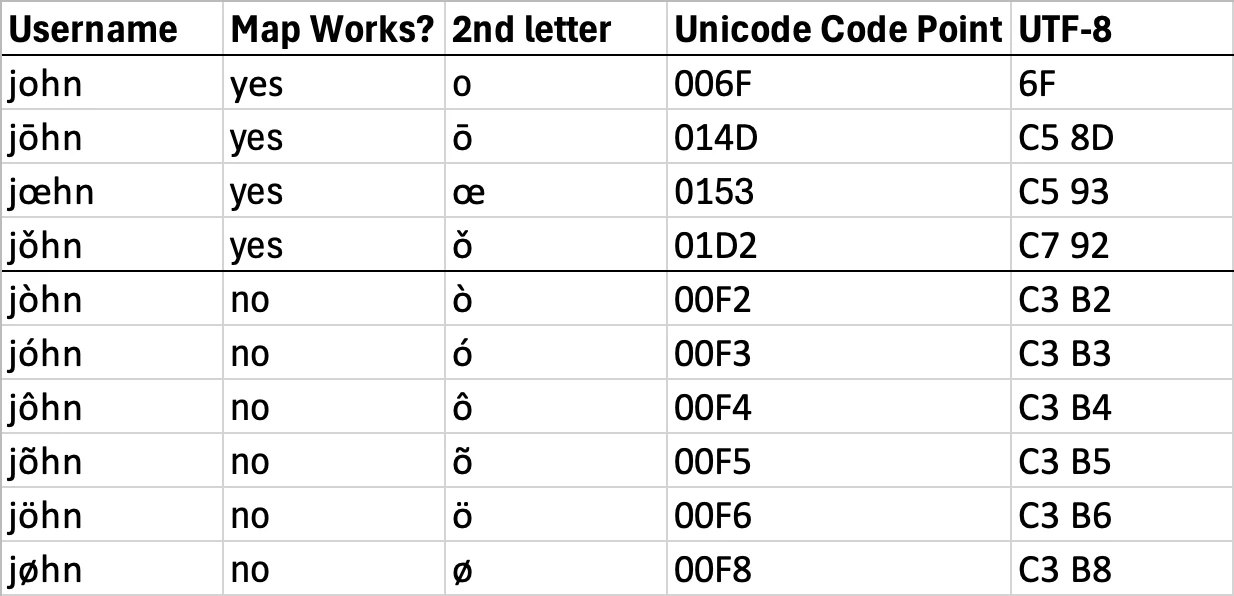
Excellent discovery! I tested 8 diacritical marks and 1 ligature in Windows account usernames, and some worked and some didn’t. This explains why the bug reports mostly came from the same European countries, with a few from South America and other countries.
So the workaround is to create a username without any diacritical marks.
Looking at the Unicode representations, all of the problem-causing diacritical marks have code points starting with U+00, while the non-problematic marks and ligatures don’t:
It’s pretty clear that some software component invoked by the Map module has a bug in its handling of Unicode strings. Given that similar bugs haven’t cropped up in other parts of LR, this strongly suggests the problem is somewhere in the third-party components such as the Google Maps JSON library. I think that library caches map data in hidden folders inside C:\Users\<username>\AppData, and the caching could be getting tripped up by the bug in the Unicode handling.
As of some months ago, Adobe hadn’t updated that component -- it was many years out-of-date. And the engineer who originally wrote that part of LR is likely long gone from the team.
Tested on LR 16.0 / Windows 11 running in the US region with US English.
Bonsoir, le module carte ne fonctionne pas sous win 11. En passant par un autre utilisateur, sur la même machine, le même catalogue : il fonctionne. Il fonctionne également sur un pc portable. L'origine du bug ne doit pas être très difficile à trouver. Adobe ne semble pas interessé par les relontées des utilisateurs européens.
Mes échanges avec les supports Microsof tet Adobe n'ont rien donné. Cela fait 10 mois que je subis ce dysfonctionnement.
Hello, This problem has been occurring for many users recently - usually it is because Lightroom loses the connection to the map servers (Google Maps / Mapbox).
Please try the following:
Close and restart Lightroom.
In the preferences under “Performance,” briefly deactivate the “Use graphics processor” option , then reactivate it.
If that doesn't help, log out of Adobe Creative Cloud and log back in.
Some users also report that the map module works automatically again after a day so it seems to be a server-side issue.
After much tinkering, I have it working but only with version 14.1. It may be there's a couple of versions ahead that it works but too tedious. It'll do for now but shame this isn't sorted in latestest update. Thank you all.
Update: I got a new PC. I installed Lightroom Classic afresh. Map module works. Can still only use earlier version on laptop.
imported photos using external hard drive. Decided to re-build catalogue - don’s ask why. Soon found Lightroom stuck. The noticed it had been installed into OneDrive by default. Why? Moved it to a folder outside OneDrive and it works again. However, now noticed that many face tags not read by new catalogue.
Previous face tags written to XMP automatically. Ran face detection again. Lots of faces previously tagged now not tagged. Annoying. Have looked at files from old photos on laptop and new imports using online EXIF and XMP reader. Exactly the same.
Not sure what is going on. Why bother to spend hours face tagging (again) only to have to do it again in the far future. Keywords by the way are there. This problem is not new and I think I posted about this the last time I did this… about 7 years ago. I was hoping things had progressed since then.
[This post contains formatting and embedded images that don't appear in email. View the post in your Web browser.]
@akuaba I installed Lightroom Classic afresh. Map module works. Can still only use earlier version on laptop.
This is consistent with the only known workaround for this problem, creating a new user account.
Try creating a new user account on your laptop, logging into it, and running LR from there -- do you still have the problem? See here for creating a new user account:
I have been unable to get map module to work for some time - months, a year. I have finally dedicated some time to this and have done everything recomended, short of use a different computer. I have reset preferences, played with firewalls and set up new catalogues. I have closed it on Library and re-opened it to switch to Maps. Nothing. The screen remains greyed out. Once, after clearing cache, I got a map for a few seconds but no tags. Another time a message briefly said LR couldn't connect to servers. Internet is good and Google maps works just fine on a browser. Below is a past of the system details. I am fully up to date with my subscription. Please help. Thank you. R
Lightroom Classic version: 14.5.1 [ 202508231203-c2638d01 ] License: Creative Cloud Language setting: en Operating system: Windows 11 - Home Premium Edition Version: 11.0.26100 Application architecture: x64 System architecture: x64 Logical processor count: 4 Processor speed: 1.6GHz SqLite Version: 3.36.0 CPU Utilisation: 28.0% Power Source: Battery Built-in memory: 16247.4 MB Dedicated GPU memory used by Lightroom: 133.2MB / 128.0MB (104%) Real memory available to Lightroom: 16247.4 MB Real memory used by Lightroom: 1545.3 MB (9.5%) Virtual memory used by Lightroom: 1586.8 MB GDI objects count: 708 USER objects count: 2667 Process handles count: 2620 Memory cache size: 1378.1MB Internal Camera Raw version: 17.5 [ 2318 ] Maximum thread count used by Camera Raw: 3 Camera Raw SIMD optimization: SSE2,AVX,AVX2 Camera Raw virtual memory: 175MB / 8123MB (2%) Camera Raw real memory: 193MB / 16247MB (1%)
Graphics Processor Info: DirectX: Intel(R) UHD Graphics 615 (27.20.100.9664) Init State: GPU for Display supported by default with image processing and export supported in the custom mode User Preference: Auto Enable HDR in Library: OFF GPU for Preview Generation: Auto (S4_0)

 AdChoices