
FuturamaFry
Participating Frequently
November 18, 2020

P: Export Tiff/PSD with Transparency to PNG with Upscale produces unexpected render

  • November 18, 2020
  • 11 replies
  • 510 views
When enlarging and exporting a file with a transparent background as a PNG file from Lightroom this happens
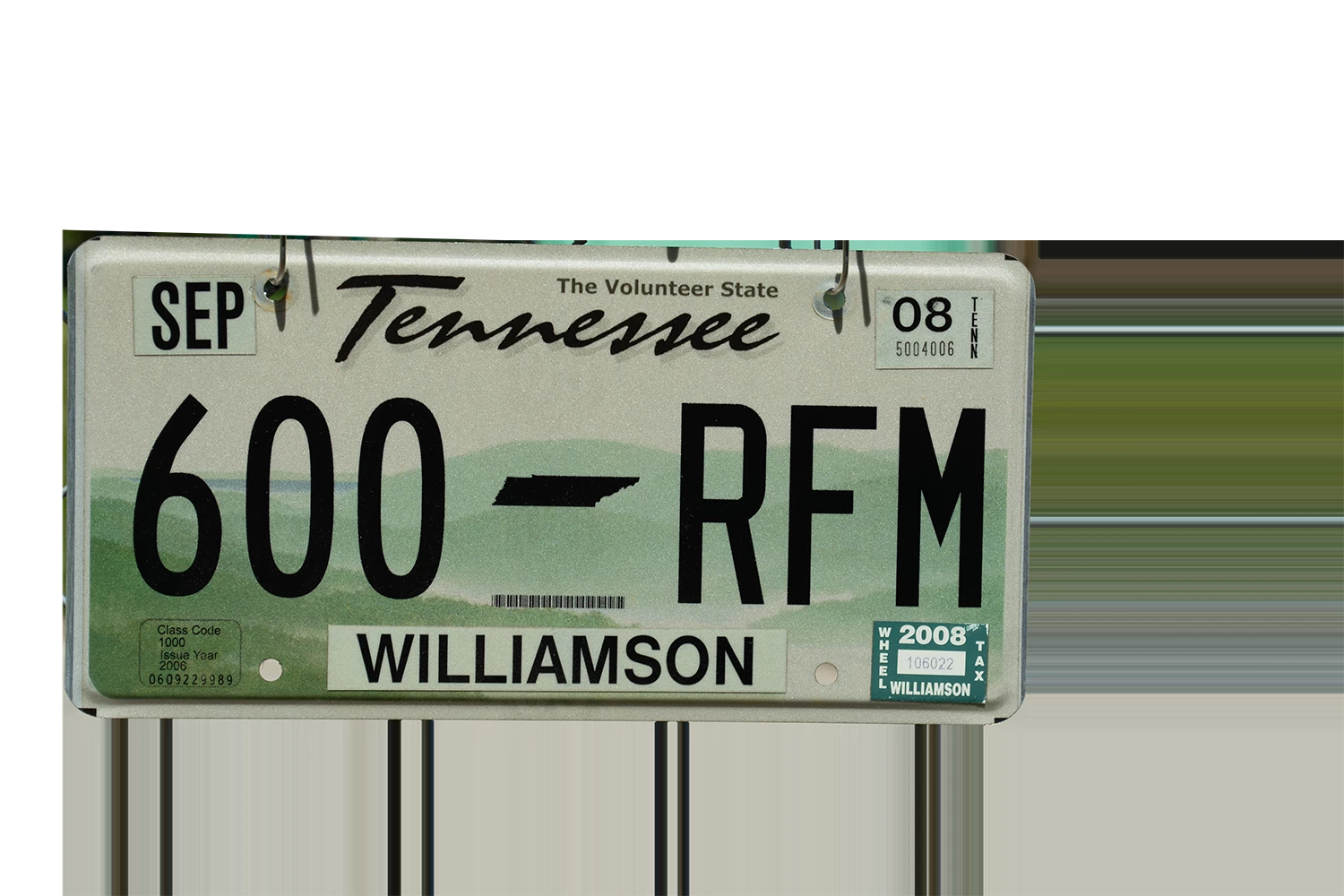

 

This topic has been closed for replies.

11 replies

Rikk Flohr_Photography
Community Manager
November 23, 2020

Thanks for the info. I will try to reproduce.

Rikk Flohr: Adobe Photography Org
FuturamaFry
Participating Frequently
November 23, 2020

@Rikk

I would add PNG to that as well as I've imported PNG files and tried to export them larger and it exhibited the same error. So - 

Exporting as a PNG larger than the original size exhibits the error. 

I don't know if it's important but I think there is a threshold of enlargement as well. When I was troubleshooting I could successfully export if the enlargement was small - when I enlarged the large side form 6,000 p to 7,000 p it did fine, but going up to 8,000 p the error was there. That has been my experience anyway. 

There should be a vid of the CSR attempting to correct the issue via my computer - Case number: ADB-16432718-F5M0 - if that's helpful and you run in those circles. I can't imagine it's all that exciting...


Rikk Flohr_Photography
Community Manager
November 23, 2020

So to recap:

Tiff/PSD with Transparent Backgrounds

Exported at larger than original size exhibit this behavior. 

Is that correct?

Rikk Flohr: Adobe Photography Org
Bob Somrak
Legend
November 20, 2020

This is definitely a bug.  The only thing I use PNG files for in LR are Identity Plates and Watermarks so haven't noticed it. 

M4 Pro Mac Mini. 48GB
FuturamaFry
Participating Frequently
November 20, 2020

I found that as well, I think it takes longer because it's adding all that extraneous data to the file. I'm relieved that someone else was able to duplicate the problem - proof that I am, at least, not crazy.

Bob Somrak
Legend
November 20, 2020

Strange, I did a couple other photos and they both exhibit the problem so I got one good result out of 3!!

BTW, PNG files seem like they take a LOT longer to export than they should.   They take longer in Photoshop but in Lightroom they take an extraordinary amount of time to export.  

M4 Pro Mac Mini. 48GB
FuturamaFry
Participating Frequently
November 20, 2020

What version of Lightroom Classic did you use and what were your export settings?

Bob Somrak
Legend
November 20, 2020

Works fine for me on macOS 10.15.7

M4 Pro Mac Mini. 48GB
FuturamaFry
Participating Frequently
November 19, 2020

I should also say, Lightroom Classic 10.0 being used on a Mac running Big Sur though it was also happening before I upgraded the OS on the Mac. It was not happening before I upgraded Lightroom Classic.

FuturamaFry
Participating Frequently
November 19, 2020

Yes. I start with this image from within Lightroom. It's an NEF file.

From within Lightroom I "edit in photoshop" to remove the background. The example I initially posted was a quick and dirty version I did with customer service. When I've finished removing the background from around the plate as well as the bolt holes I save it, then go back to Lightroom. Once in Lightroom I export as a PNG, sRGB color space, 8bits/component. I enlarge the Long Side to 12,000 pixels with a Resolution of 300.
This same thing happens with images that already have the backgrounds removed as well. The image below had a transparent background, was imported into Lightroom with a transparent background and upon export, enlarging the image by 1000 pixels, it rendered this way: