

johnrellis
Legend
October 24, 2015

P: Flickr publish service incorrectly handles multi-word keywords in 2015.2.1

  • October 24, 2015
  • 28 replies
  • 779 views

The LR Flickr publish service in CC 2015.2.1 / OS X 10.10.5 is causing Flickr to handle improperly multi-word keywords.

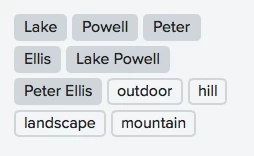
For example, if you publish a photo with the keywords "Peter Ellis" and "Lake Powell", Flickr will show four keywords attached to the photo: "Peter Ellis", "Peter", "Ellis", "Lake Powell", "Lake", "Powell". This is incorrect.

However, these methods do not exhibit the incorrect behavior:

- Publishing to Flickr with CC 2015.1.1 and the LR Flickr publish service.
- Publishing to Flickr with CC 2015.2.1 and the Friedl Flickr publish service.
- Exporting to the desktop from CC 2015.2.1 and then uploading to Flickr via the Web browser.

All these methods result in Flickr showing just the keywords "Peter Ellis" and "Lake Powell". Thus, the bug is specific to the Flickr plugin in CC 2015.2.1.

In all cases the export settings were the default plus these: Include All Metadata, Remove Person info unchecked, Remove Location Info unchecked, Write Keywords As Lightroom Hierarchy checked.

At least three others have reported this problem:

https://forums.adobe.com/thread/1980380 (majbadger)
https://forums.adobe.com/thread/1984212 (Bill Ingalls, NASA HG PHOTO)
https://forums.adobe.com/thread/1986323 (SyrinxGC)

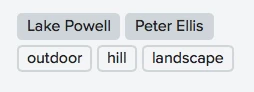
Screenshot of correct Flickr keywords:

Screenshot of incorrect Flickr keywords:
This topic has been closed for replies.

28 replies

majbadger
Participating Frequently
November 17, 2015
Will this update fix the memory issues too? Will this update somehow allow me to correct the previously uploaded keywords? Since I went back to 2015.1.1, LR is approximately 1 million times faster than 2015.2.1. I don't want to update if I am just going to have to go revert again. Thank you.
Legend
November 17, 2015
This issue should be corrected by the Lightroom CC 2015.3/6.3 which is available today.

Details here: http://blogs.adobe.com/lightroomjourn...
majbadger
Participating Frequently
November 8, 2015
One additional note, photos keyworded and added to albums in 2015.2.1 are properly keyworded on Flickr after publishing with 2015.1.1, not surprising I would assume.
majbadger
Participating Frequently
November 8, 2015
I suppose so. I guess I will pass the time editing and publishing the rest of my backlog and hope that when the next version/fix is out, it addresses this issue too. Thanks for the helpful suggestions. Maybe it will lead to a better fix down the road.
johnrellis
Legend
November 7, 2015
Unfortunately, this might be a nasty side effect of the bug, with the current photos left in a bad state from which you can't recover. That is often the nature of bugs.
majbadger
Participating Frequently
November 7, 2015
I just tried adding a new keyword to the same photo in 2015.1.1, republished, and....nothing. This is odd, since I previously successfully added a keyword to a 2015.2.1 photo via 2015.1.1. In the course of removing all keywords via 2015.1.1 and then the bogus keywords via Flickr, now I can't do anything with keywords in 2015.1.1 that translates to Flickr.

There has to be a way to fix photos previously published with 2015.2.1. I uploaded somewhere around 1500 photos with 2015.2.1...argh.
majbadger
Participating Frequently
November 7, 2015
Well, I tried that and now I really have no idea what is going on.

To recap, I have a photo originally uploaded with 2015.2.1 and subsequently was republished with 2015.1.1 with no keywords in LR but still bogus keywords on Flickr. I deleted the keywords on the Flickr photo page using the 'x' next to each tag (a pain by the way since the 'x' moves when you hover over a tag). Back in LR, I added the proper keywords and republished. Now, there are NO keywords on the photo on Flickr! This is bananas...
johnrellis
Legend
November 7, 2015
"I don't understand how after removing all tags in LR, Flickr still shows the incorrect tags."

If you delete the bogus keywords on Flickr proper and then republish from LR 6.1.1 / CC 2015.1.1, do the bogus keywords stay away? That would be really painful to do for all the bogus keywords.

I believe the LR publish service and the Flickr API use a unique identifier that persists for a published and republished photo. Perhaps because of the bug in LR 6.2 / CC 2015.2, Flickr is not clearing the bogus keywords associated with the photo associated with the unique identifier.
majbadger
Participating Frequently
November 7, 2015
Yeah, sorry. I edited/republished before your previous comment.

Then I tried removing all tags and republished. Looked on Flickr and saw that all the correctly parsed tags were removed and the incorrectly parsed versions of the tags are still there (e.g., instead of "state", "park" and "state park", the keywords now show as only "state" and "park"). Then I readded the keywords and republished again. Both the correct and incorrect keywords are there.

I don't understand how after removing all tags in LR, Flickr still shows the incorrect tags.
johnrellis
Legend
November 7, 2015
"I suppose a virtual copy is essentially a new photo". Right.