

johnrellis
Legend
October 24, 2015

P: Flickr publish service incorrectly handles multi-word keywords in 2015.2.1

  • October 24, 2015
  • 28 replies
  • 779 views

The LR Flickr publish service in CC 2015.2.1 / OS X 10.10.5 is causing Flickr to handle improperly multi-word keywords.

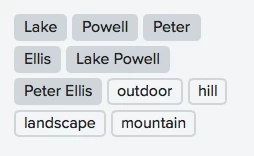
For example, if you publish a photo with the keywords "Peter Ellis" and "Lake Powell", Flickr will show four keywords attached to the photo: "Peter Ellis", "Peter", "Ellis", "Lake Powell", "Lake", "Powell". This is incorrect.

However, these methods do not exhibit the incorrect behavior:

- Publishing to Flickr with CC 2015.1.1 and the LR Flickr publish service.
- Publishing to Flickr with CC 2015.2.1 and the Friedl Flickr publish service.
- Exporting to the desktop from CC 2015.2.1 and then uploading to Flickr via the Web browser.

All these methods result in Flickr showing just the keywords "Peter Ellis" and "Lake Powell". Thus, the bug is specific to the Flickr plugin in CC 2015.2.1.

In all cases the export settings were the default plus these: Include All Metadata, Remove Person info unchecked, Remove Location Info unchecked, Write Keywords As Lightroom Hierarchy checked.

At least three others have reported this problem:

https://forums.adobe.com/thread/1980380 (majbadger)
https://forums.adobe.com/thread/1984212 (Bill Ingalls, NASA HG PHOTO)
https://forums.adobe.com/thread/1986323 (SyrinxGC)

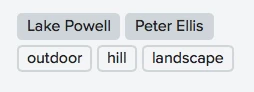
Screenshot of correct Flickr keywords:

Screenshot of incorrect Flickr keywords:
This topic has been closed for replies.

28 replies

johnrellis
Legend
November 7, 2015
"actually editing the photo and republishing." That's different than removing the keywords -- did you try that?
majbadger
Participating Frequently
November 7, 2015
Also tried, actually editing the photo and republishing. Still no luck. All previously uploaded keywords remain incorrect. Then I made a virtual copy (not sure what this is exactly) and published that, all keywords are properly uploaded. I suppose a virtual copy is essentially a new photo, so perhaps not surprising that its keywords were properly uploaded.
johnrellis
Legend
November 7, 2015
That suggests removing the keywords, republishing, adding the keywords, republishing. Painful, but you wouldn't lose stats and comments.
majbadger
Participating Frequently
November 7, 2015
Actually, I just tried that. The dummy keyword is properly uploaded. All previously uploaded keywords remain incorrect.
johnrellis
Legend
November 7, 2015
What if you add a dummy keyword to the photos and then republish again? It may be that Flickr is being "smart" and noticing that the republished photo hasn't changed, so it doesn't reload the keywords.
majbadger
Participating Frequently
November 7, 2015
Contrary to the original post, I still experience this bug in 2015.1.1 with a caveat (see below). I rolled back LR to 2015.1.1 to fix terrible memory problems that began a week or so ago as well as a new bug (for me) in which LR would only publish 3 photos at a time to Flickr which began happening 3 days ago.

My point, in this thread though, is that I republished (with 2015.1.1) some photos with the improperly separated keywords from being published with 2015.2.1 and they are still improperly separated after republishing. Photos that were NOT previously published with 2015.2.1 have the proper keywords when published for the first time with 2015.1.1. As an example, I had a photoset of 30+ photos. I published with 2015.2.1. Only 3 were uploaded. I quit LR, uninstalled, resttarted PC, installed 2015.0, and then 2015.1.1. I published the rest of the photoset - all of those keywords are correct. I republished the first 3 photos with no other changes - these keywords are not correct.

Is this something that would be fixed with a potential update? Or is there another way to properly parse the keywords? For all previously published photos with incorrectly parsed keywords, would I have to delete the photosets and reupload as new with 2015.1.1 or with a new update? I hope that is not the only option since I would lose all stats, comments, etc.
Participating Frequently
October 26, 2015
Thanks, John.

-Ben
majbadger
Participating Frequently
October 24, 2015
I am experiencing this problem as well. I first noticed it when I went from using LR5 on a Win7 machine to LRCC on a Win10 machine. Behavior is exactly as described in the above post.