



ouiouiphoto
Known Participant
November 7, 2023

P: GPU used even if you deactivate it when exporting and confirm to LrC not to use it

  • November 7, 2023
  • 15 replies
  • 3594 views

Dear all


Windows11

LrC 13.0.1


Step to reproduce. 


1) Activate GPU. Select several photos with development. Export them. Look at your resource monitor for GPU
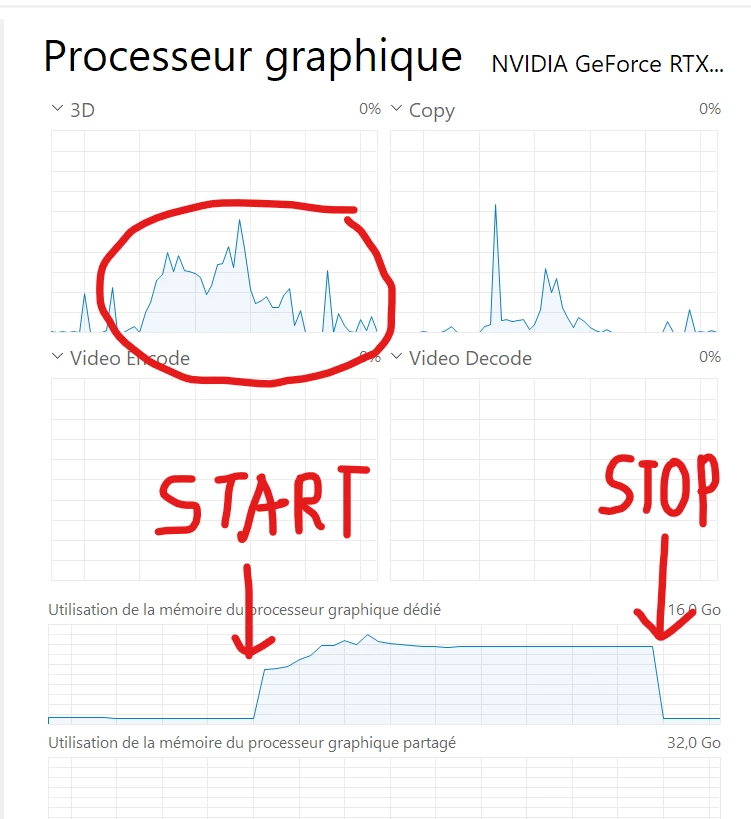
 

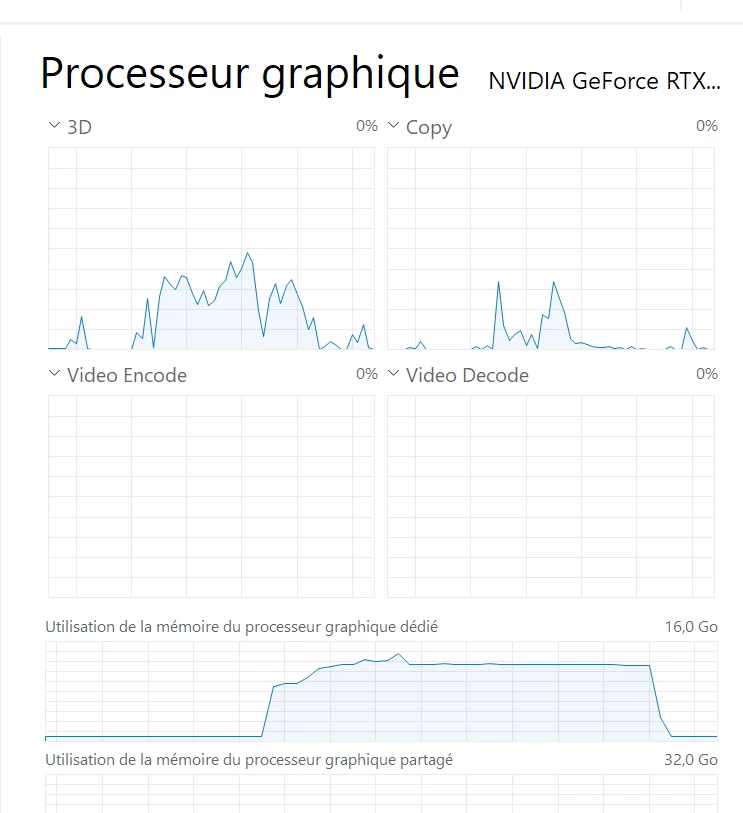
2) Deactivate GPU. Restart Lightroom. Select the same photos. Launch the same export 


3) A warning message tells you that the GPU is deactivated and ask you if you want to activate to speed up export. Press cancel to keep it deactivated. Look at you resource monitor for the GPU. The GPU and GPU memory is used anyway
 

 Kind regards

This topic has been closed for replies.

15 replies

johnrellis
Legend
May 1, 2024

@SYNDICATE Rob, "The difference in export speed is just so staggering on my machine from 12.5 to v13 that I can't ignore it, with my average weekend export often topping 20k images."


You've posted in a thread about a bug that was fixed many months ago and very likely unrelated to your issue. Please start a new thread about your issue, including full details and full output from the command Help > System Info.

Participant
May 1, 2024

20k sorry. And permanent lol.

Participant
May 1, 2024

I'm starting to think a permanant rollback to 12.5 might be in my future, but that obviously creates some conflict with needing to access existing v13 catalogs.

The difference in export speed is just so staggering on my machine from 12.5 to v13 that I can't ignore it, with my average weekend export often topping 2k images.

Inspiring
December 23, 2023

I reported an equal bug already in October and it was ignored!

Participating Frequently
December 14, 2023

Issue seems to be fixed now, thanks

johnrellis
Legend
December 14, 2023

In LR 13.1, I observe correct behavior: The GPU is not used for exporting raws when Preferences > Performance > Use Graphics Processor > Use GPU For Export is unchecked.

Rikk Flohr_Photography
Community Manager
Community Manager
December 14, 2023

Greetings all,


Updates for the Adobe Photography Products have been released.  The December 2023 updates contain an update for this issue. 

If you do not see the update in your Creative Cloud Application, you can refresh it by hitting [Ctrl/Cmd]+[Alt/Opt]+[ R ].

Note: It may take up to 24 hours for your update to be available in your Creative Cloud app.


Thank you for your patience.

Rikk Flohr: Adobe Photography Org
Participant
December 11, 2023

I don't disagree, just odd seeing 0% on GPU stats

EnergyPhotos
Known Participant
December 11, 2023

Basically i believe this means GPU is used. And you have the same bug, 
You have same export speeds (more or less) regardless if use select GPU or NOT.

If GPU wasn't used you should see CPU usage close to 100% (or 90% if you have a bottleneck in HDD for example) and GPU usage close to 0%.
If GPU is used, the normal is to see both CPU and GPU around 30%.

so in version 13.x your speeds are basically the same regardless if you use GPU or not, and CPU usage is ~25% this indicate that this setting makes no changes. 
While in version 12.x this setting gave you almost 15-20% speed boost. (46sec vs 55sec) 

Participant
December 10, 2023

Interestingly enough, my GPU isn't being used at all on v13.0.x regardless of acceleration on/off. v12.5.1 was fine.

5900x, rtx 2080, 980 pro, 64gb RAM @ 3600.

Times to export 100 images to ssd:
v13.0.1 GPU OFF - 1:41.96 (20% avg cpu 55 deg)
v13.0.2 GPU OFF - 1:41.81 (24% avg cpu 55 deg)
v12.5.1 GPU ON export- 47.07
v12.5.1 GPU IP only - 53.46
v12.5.1 GPU FULL OFF - 53.24
v12.5.1 GPU FULL ON - 46.9
v13.0.2 GPU FULL ON - 1:39.93
v13.0.2 GPU FULL OFF - 1:40.39
v13.0.2 GPU FULL ON - 1:40.76