

Paul Tansley
Known Participant
October 20, 2013

P: - Green Previews in Filmstrip after Sync

  • October 20, 2013
  • 46 replies
  • 1791 views

Noticed this problem a few time now with the latest update 5.2 on OSX.

When I sync some frames in the film strip, some of the frames that have been synced show up with a green preview. Image attached to demonstrate this. The white balance gets reset to some bizarre figure. The original that the images were synching from was set to Auto WB. So no idea why the program decides to change it. Clearly a bug, this has happened quite a few times now.
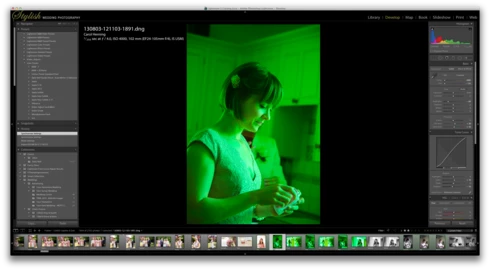
This topic has been closed for replies.

46 replies

cindeecollette
Participating Frequently
February 5, 2014
Simon, I can share the catalog with you via dropbox. Can you give me your email so I can share the link with you?
cindeecollette
Participating Frequently
February 5, 2014
I haven't changed a thing in the develop module to the videos that turn green....nothing to reset. I just imported another video and it turns green while playing. They are not green in iMovie or playing on the desktop - just Lightroom.

You want me to create a catalog with a single video that turns green then export it and post it somewhere? Not sure what you by "Please it the download url to sic hen AT adobe DOT com"?
Adobe Employee
February 1, 2014
If so, could you export a catalog with a single video that turns green and post the exported catalog with the video somewhere that I can download and check it out? Thanks. Please it the download url to sichen AT adobe DOT com.
Adobe Employee
February 1, 2014
Does it help if you go to library module, select the videos that turn green and reset the develop settings that applied to the video and see the green cast went away?
cindeecollette
Participating Frequently
January 31, 2014
I updated the 60 photos in the collection for the slideshow. They still played green. The movie that I mentioned was taken and imported last Friday. I think my Lightroom had already been updated to 5.3. Sorry.
MadManChan2000
Adobe Employee
Adobe Employee
January 31, 2014
Hi Cindee,

Weird. What happens if you take a still image (one that is showing up green in Slideshow) and in Library choose the menu option Library -> Build 1:1 Previews ...

Basically I'm wondering if there is a stale preview image leftover from running an earlier version of Lr (e.g., 5.2) that had the "green" problem, and I'd like to see if the issue still persists after forcing Lr to update its internal image previews.
cindeecollette
Participating Frequently
January 31, 2014
Yes, they are all normal. The are normal everywhere, except when I play or preview the slideshow. I exported what I prepared and it was normal. I also imported a movie and when playing it was green. I exported it and back to normal.
MadManChan2000
Adobe Employee
Adobe Employee
January 31, 2014
Cindee, for the images that are showing up green, can you please go to Develop and make sure the WB is set to a normal value (e.g., not 2000/-150).
cindeecollette
Participating Frequently
January 31, 2014
I have Lightroom 5.3 and am still getting the green images when playing a slideshow or a movie. The pictures go from normal to green just like above.
Inspiring
November 24, 2013
Solved by updating to LR5 RC3!!!

Thank you very much.