
Paul Tansley
Known Participant
October 20, 2013

P: - Green Previews in Filmstrip after Sync

  • October 20, 2013
  • 46 replies
  • 1791 views

Noticed this problem a few time now with the latest update 5.2 on OSX.

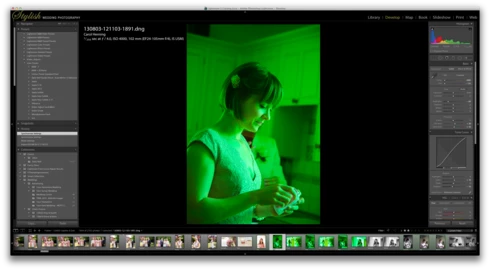
When I sync some frames in the film strip, some of the frames that have been synced show up with a green preview. Image attached to demonstrate this. The white balance gets reset to some bizarre figure. The original that the images were synching from was set to Auto WB. So no idea why the program decides to change it. Clearly a bug, this has happened quite a few times now.
This topic has been closed for replies.

46 replies

Inspiring
November 24, 2013


Good evening
I'm evaluating LR5 considering buying a license to move from LR4. I previously had LR3 and it's my favorite RAW editor and picture collection manager.
I use a MBP 13' and moved from LR3 to LR4 months ago with no problem, but now I experience an issue that makes me wonders if it's worth buying the license to LR5 or not.
The catalog I used in LR4 was converted to LR5 and ONLY in some folders the preview icon and the picture itself of some raw pictures delivers now a strong green cast. When the previsualizations are calculated you can check how the cast its delivered one by one!
The pictures were shot with a Olympus OMD EM5 and remains in the original catalog with no change. In additions, some others pictures with the same camera remains intact in the new catalog. You can see some pictures below.
Please Help!
Best regards

In LR5


In LR4, the same pictures,

Inspiring
November 14, 2013


Two things just happend in Camera Raw 8.2.0.94 that i need some help with. I ́m using Photoshop CS6 (Mac Pro).

1. Exposure slider jumps back to zero when i try to make any other changes

2. Camera Raw can no longer recognize lens profiles from either of my leneses using D800 & D4
MadManChan2000
Adobe Employee
Adobe Employee
November 8, 2013
Hi folks,

This problem should be taken care of in the Release Candidate (RC) version of Lightroom 5.3, available here:

http://labs.adobe.com

See here for more details:

http://blogs.adobe.com/lightroomjournal/
Inspiring
November 6, 2013
I've had the same problem with photos turning green after syncing from a photo set to Auto WB. I have however found a workaround that at least has worked for me. If I perform the sync again it changes all the green WB photos back to auto, correcting the color.
November 6, 2013
No problem!!!
Participant
November 6, 2013
Thanks Katie!
November 6, 2013
Hey Jason - in my workflow, it only does the green if you sync from Auto WB. If you tweak it just a bit (you can even move it back where it was), it won't turn your images green. An easy fix until they fix the bug!
Participant
November 6, 2013
When?? I'm on a deadline and this bug has drastically slowed down my work.
MadManChan2000
Adobe Employee
Adobe Employee
November 6, 2013
Yup. This will be fixed.
Participant
November 6, 2013
I'm having the exact same issue. It is doing the green gel after syncing multiple photos and when I copy and paste develop settings. Here's some screen shots-
Source photo


Example photo after sync


This is the setting of the photo which was synced from-


This is the settings causing it to turn green after the sync-