

Paul Tansley
Known Participant
October 20, 2013

P: - Green Previews in Filmstrip after Sync

  • October 20, 2013
  • 46 replies
  • 1791 views

Noticed this problem a few time now with the latest update 5.2 on OSX.

When I sync some frames in the film strip, some of the frames that have been synced show up with a green preview. Image attached to demonstrate this. The white balance gets reset to some bizarre figure. The original that the images were synching from was set to Auto WB. So no idea why the program decides to change it. Clearly a bug, this has happened quite a few times now.
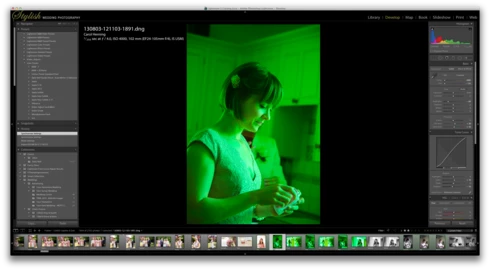
This topic has been closed for replies.

46 replies

November 5, 2013
Thanks, Eric! Y'all rock!
Paul Tansley
Known Participant
November 5, 2013
That's excellent to hear. Thank you for letting us know Eric. Having good communication between the end users and the makers is fantastic. We don't complain because we want to, we complain in the hope that the product will be improved. So when it is, that's just great. We all win.

Superb stuff
Hampshire Wedding Photographer / Documentary Wedding Photographer
MadManChan2000
Adobe Employee
Adobe Employee
November 5, 2013
Hi Paul and Katie,

I believe we've identified the underlying cause and should have a fix available soon. Thanks to both of you for providing info and details. I should emphasize that the fact that you provided your screenshots was very helpful (even critical) to finding the problem.
MadManChan2000
Adobe Employee
Adobe Employee
November 4, 2013
Yup, that would make sense. Thanks Katie.
November 4, 2013
I have an image that is doing it to. I ran it through ALL of the WB options. It only does it when WB is set to Auto. It does fine on every other WB setting. (So, probably I was wrong on my original answer to that question! I probably synced it on WB Auto, but since then played with it)
MadManChan2000
Adobe Employee
Adobe Employee
November 4, 2013
Ok thanks, Paul and Katie. I think the main clues I've gathered (which are common to both your cases) are:

1. you're always syncing Auto WB from the source image to the other images
2. in some cases, the target images have their WB popup menus set to Custom (instead of Auto), and the temp & tint values are set all the way to the left (temp=2000, tint=-150) which is what is producing the very strong green result

We'll keep looking internally for the problem, but this is a helpful start.

Any other patterns you can find ... please let us know. Thanks.
November 4, 2013
I've played with it a little bit, and it's only doing the green thing when I have "Auto" WB the image. It doesn't do it if the WB is Custom. And it only does it sometimes on some images. That's the hard part. Sorry...Hope that helps
November 4, 2013
I did a Sync All (option command s)...so yes. I had adjusted white balance, as well as a lot of other things! Probably: Exposure, Contrast, Highlights...pretty much everything in the Basic Panel. I also adjusted the sharpening.
Paul Tansley
Known Participant
November 4, 2013
Hi Eric - in response to your earlier question regarding reading from the Metadata. I import the images onto my MacBook Pro. They are assigned a WB of "As Shot". The files are then transferred to the iMac. The problem has only been seen on the iMac, but that's not surprising as that is where I do most of my editing. I do minor editing on the MBP.

So far as I know, the image in question would have had an As Shot WB when imported, so that would have been the Metadata setting. Not Auto.

Sorry that probably doesn't help much. But at least I know the problem has been acknowledged and is being looked into. If it happens again, I'll post as much detail as I can.

Paul
Hampshire Wedding Photographer / Documentary Wedding Photographer
MadManChan2000
Adobe Employee
Adobe Employee
November 4, 2013
Katie, does it ever happen when you have the WB on the "source image" set to something besides Auto? For example, if you have it set to Custom or to Daylight, or something else? Thanks.