
Paul Tansley
Known Participant
October 20, 2013

P: - Green Previews in Filmstrip after Sync

  • October 20, 2013
  • 46 replies
  • 1791 views

Noticed this problem a few time now with the latest update 5.2 on OSX.

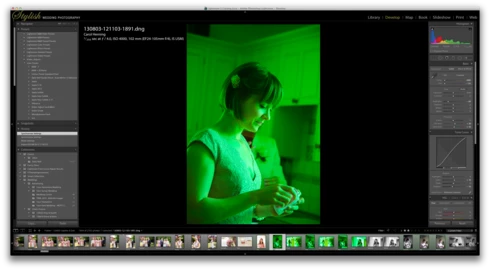
When I sync some frames in the film strip, some of the frames that have been synced show up with a green preview. Image attached to demonstrate this. The white balance gets reset to some bizarre figure. The original that the images were synching from was set to Auto WB. So no idea why the program decides to change it. Clearly a bug, this has happened quite a few times now.
This topic has been closed for replies.

46 replies

November 4, 2013
It just did it again, and I did have the WB to Auto. 😉
November 4, 2013
No, actually. I tried Auto WB first, and didn't love it, so I fiddled with it. So the source image was actually Custom.
MadManChan2000
Adobe Employee
Adobe Employee
November 4, 2013
Ok thanks. And to be clear ... you changed the WB of the "source" image to Auto, and then you tried to sync this to the other images -- is that right?
November 4, 2013
Yessir. It never did this before I upgraded to 5.2
MadManChan2000
Adobe Employee
Adobe Employee
November 4, 2013
Thanks Katie -- and you are using version 5.2 of Lightroom, is that right?
November 4, 2013
I'm sure it will do it again - it's been pretty frequent today. So, let me know if there is some other screen shot that might help.
November 4, 2013
I had done no other processing. All are straight from import. Let me know if you have any other questions!
MadManChan2000
Adobe Employee
Adobe Employee
November 4, 2013
Hi Katie -- do you recall if you had done any other processing or steps with this image before you synced the WB? We're actively trying to track down the issue, and any clues you and Paul (or anyone else) can provide would greatly help.

Thanks!
Eric
November 4, 2013
I'm having the same problem. I shot these with a Nikon D3S in RAW format.
MadManChan2000
Adobe Employee
Adobe Employee
November 4, 2013
Thanks for the update, Paul. I noticed in your screenshot that for this image (the one that became green), the second-from-top history state is named "From Metadata". Do you recall what you did during that step?

Thanks.
Eric