
Paul Tansley
Known Participant
October 20, 2013

P: - Green Previews in Filmstrip after Sync

  • October 20, 2013
  • 46 replies
  • 1791 views

Noticed this problem a few time now with the latest update 5.2 on OSX.

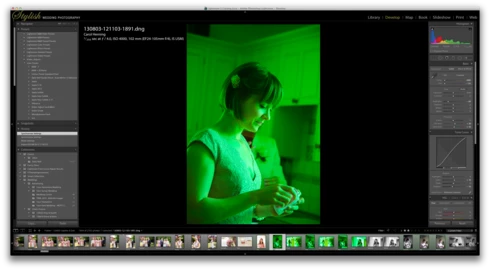
When I sync some frames in the film strip, some of the frames that have been synced show up with a green preview. Image attached to demonstrate this. The white balance gets reset to some bizarre figure. The original that the images were synching from was set to Auto WB. So no idea why the program decides to change it. Clearly a bug, this has happened quite a few times now.
This topic has been closed for replies.

46 replies

Paul Tansley
Known Participant
November 3, 2013
Hi Eric

So, has happened today. As you can see in the screen grab below. In the history, the white balance was set to "As Shot" in all previous steps. Only on the last Synchronise Settings step was it changed to a Custom setting.I synced 4 frames, the original plus 3 others either side. It was synced from the 4th frame which had Auto White Balance set. The other 2 went to Auto WB as expected, this one went green with the settings shown. Go figure.

Hampshire Wedding Photographer / Documentary Wedding Photographer
Paul Tansley
Known Participant
November 1, 2013
Sorry Eric, I don't know the answer to that one. I really can't remember what the previous white balance was. Next time the issue occurs, I will check by going back in the files history.
Hampshire Wedding Photographer / Documentary Wedding Photographer
MadManChan2000
Adobe Employee
Adobe Employee
November 1, 2013
Paul, a follow-up question for you: When you are syncing the (auto) WB from the source image to the other images in the selection, do the target images have other image settings already? That is, have you previously adjusted (in Develop) the other images? Or, is the act of syncing the WB the first thing that you do (before editing the other images)?

This may seem like an odd question, but the order in which certain operations are applied can make a difference in whether the bug manifests or not.

Thanks,
Eric
Kelly Castro
Adobe Employee
Adobe Employee
October 31, 2013
Thanks Paul. We're looking into it.
Paul Tansley
Known Participant
October 31, 2013
They are Canon 5D3 files. Converted to DNG's in LR5.2 via the Convert to DNG menu option.

It's not a problem with the file though. I think that's probably irrelevant. As the issue is not repeatable on the same file. It's an issue that just appears - randomly, when I sync files. Its doesn't always happen. Maybe 5% of the time if that. But it does re-occur on a fairly regular basis. As I said before, clicking in the Dev module's history, one step back, one step forward, or simply redoing the sync produces the correct preview.
Hampshire Wedding Photographer / Documentary Wedding Photographer
Kelly Castro
Adobe Employee
Adobe Employee
October 31, 2013
Hi Paul,

Can you please provide some additional information on this issue (which camera model was used to shoot the photos? How were they converted to DNG?)

Once I have this info I'll see if I can reproduce the problem, but I may need to ask you to provide a file that displays the issue.

Thanks,
Kelly