

johnrellis
Genius
June 13, 2019

P: HEIC photos import with Metadata Status: Changed On Disk

  • June 13, 2019
  • 13 replies
  • 501 views

When HEIC photos from an iPhone are imported, they immediately have Metadata Status: Changed On Disk. Editing the photos changes the status to Conflict Detected.The incorrect status prevents metadata changes from being written to the .xmp sidecars when the option Automatically Write Changes Into XMP is enabled.

To reproduce:

1. Download and unzip these sample photos: https://www.dropbox.com/s/h9xwwlk11d3jdcc/heic-metadata-bug-2019-06-13.zip?dl=0

2. Import the photos into LR using the import option Add.

3. Wait a few seconds and notice the metadata status changes to Changed On Disk:
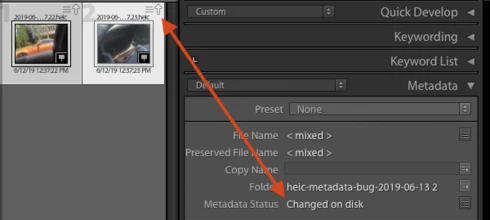


Tested on LR 8.3.1 / Mac OS 10.14.5 / Iphone 7 / Ios 12.1.4

This topic has been closed for replies.

13 replies

Participant
August 14, 2019
Looks like it's working with 8.4. Thanks!
Participating Frequently
August 13, 2019
Thank you very much.
I imported HEIC with 8.4 and can confirm that now it's fine.
Kind regards.Michael 
Rikk Flohr_Photography
Community Manager
Community Manager
August 13, 2019
Lightroom Classic 8.4 was released today and contained a fix for this issue. Please update to 8.4 and verify that you are no longer seeing the issue. Thank you!
Rikk Flohr: Adobe Photography Org
Inspiring
July 17, 2019
Any updates on when the fix will be rolled out?
Smit K
Community Manager
Community Manager
July 4, 2019
We have been able to reproduce this bug on both macOS and Windows. We are working on this.
Smit | Lightroom Team
PhilBurton
Inspiring
July 4, 2019
Have you been able to reproduce this bug on Windows?
Inspiring
July 2, 2019
I have also encountered this issue as described in the original post. It is annoying to have to address this issue for every imported photo. Please prioritize a fix to correct this bug. 
Known Participant
June 30, 2019
just to add another datapoint, I have the same issue and it is reproducible just by taking a photo on my iPhone, adding it to CC on my phone and letting it sync to ClassicI
Participating Frequently
June 14, 2019


Here are the steps to reproduce the issue:
Install Lightroom Classic 8.3 on macOS 10.14.5
Create a catalog
Import a photo
The photo will have the “Metadata Was Changed Externally” icon
 
Here are the steps to restore the expected behavior:
Install Lightroom Classic 8.2 on macOS 10.14.5
Create a catalog
Import a photo
The photo will not have any warning icon
 
Please correct the bug 8.3 to show the correct behavior of 8.2
Smit K
Community Manager
Community Manager
June 14, 2019
We have been able to reproduce this and loggeg a bug for the same.

Thanks,
Smit
Lightroom Classic
Adobe
Smit | Lightroom Team