


Known Participant
October 16, 2023

P: Histogram behavior in out of range areas

  • October 16, 2023
  • 21 respuestas
  • 3345 visualizaciones

Lightroom Classic 13.0, macOS Ventura 13.6


Lightroom 13 introduced new histogram style purportedly to accomodate HDR but the new style makes it difficult to actually use histogram to determine areas in gistogram free of data and settong white/black levels correctly.

This all being discussed to death in this post https://community.adobe.com/t5/lightroom-classic-ideas/p-reinstate-version-12-histogram/idi-p/14157437 which was moved to ideas preseumably because it asks to reinstate v12 histogram. It is also being discussed here https://www.alex-kunz.com/new-features-in-lightroom-classic-13/

I now rephrase the request for bugfix - fix the new histogram in v13 to make it show gaps in highlights and blacks clearly (similarly to the way v12 one did where it can be done with ease).

The demonstration of the differences between old style and new style where 1-1.5 stop free part of histogram in highlights can clearly be seen in v12:
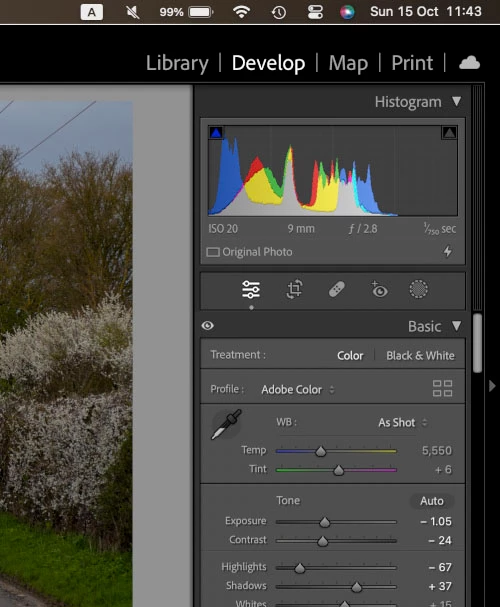
and not so clearly in v13
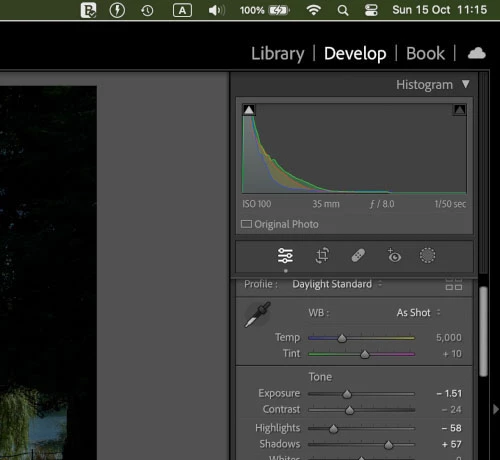
Este tema ha sido cerrado para respuestas.

21 respuestas

Known Participant
December 24, 2023

@C.Cella 


> Few minimal changes for a better UI.


Totally agree

C.Cella
Inspiring
December 23, 2023

The white HRD segments could have been placed outside of the Histogram to allow total readability and the vertical lines could have been less opaque.


Few minimal changes for a better UI.


C.Cella
Inspiring
December 23, 2023

@Alexey Danilchenko I suggest to uncheck the "Show HDR Region Labels" option to gain bit of space in the histogram.


The bottom white bars liger on unfortunately.


Known Participant
December 23, 2023

@C.Cella 


Just tested it on some image and it is even worse. This is roughly the size I see it on my screen and those underlying bars in histogram make my eye bleed trying to see the edge of it. Usability - 0 again. Thankfully SDR mode is fixed without any of those bars underneath. I hohestly don't know what purpouse they server apart from osbcuring the histogram view o if they so imporant somhow then those bars can be displayed above/on top of historam to prevent messing wih it.


Known Participant
December 23, 2023

@C.Cella 


> BUT one can tell when the histogram ends in HDR


Not really when your luminance (white on histogram) is the one that sticks out. Also not in the the size of my histogram window on 14" MacBook screen - you need histogram to be pretty large to see those tiny differences with that HDR mode underlying white bar. Mainly because that underlying bar in HDR mode is the same colour (that bar is totally pointless IMO). This is something I don't understand - does any of the LR developers actually use their product at all?

C.Cella
Inspiring
December 22, 2023

@Alexey Danilchenko 


The HDR UI is obscuring the histogram below significantly, the stops liens are too opaque, BUT one can tell when the histogram ends in HDR.


.


Known Participant
December 22, 2023

This is HDR mode

Known Participant
December 22, 2023

The HDR mode whould not be that hard to fix - just don'tunderline the histogram with any lines (I see zero point in that) of if it is trulu servibg some purpouse, it should be different colour from any histogram ones that makes histogram itself stand out. That is not that difficuklt to achieve.

Known Participant
December 22, 2023

Thanks in non HDR mode it is fixed. However in HDR mode there is still a white line that goes under the whole histogram and again obscures the real end/beginnibg of it. I wonder whether anyone at Adobe QA team actually tests this from usability prospective?

Known Participant
December 14, 2023

This looks fixed. The histogram is much quicker and easier to use now. Thanks!