
Participating Frequently
February 5, 2021

P: ISO Adaptive Presets and Color Grading

  • February 5, 2021
  • 14 replies
  • 1281 views

Me: Any clue why my newly built Lightroom preset - that has color grading selected when created - doesn’t actually apply color grading to images when selected? My color grading only presets work just fine, but not ISO adaptive ones. Adobe, fix this please. 


From AdobeCare: Hi Dave, thanks for the heads up. Has this preset ever worked since you created it? Would you mind reviewing the process of creating an ISO adaptive preset in Lightroom Classic and see if that helps? See: helpx.adobe.com/lightroom-clas… Thanks, ^AK


Me: Thanks - this is a new one, so never worked. I have several other ISO adaptive presets (made before Color Grading) and they all still work fine (but with no color grading). I was finally getting around to making one with Color Grading included. I do have Color Grading only presets that work (not adaptive). Reviewing now


Me: Reviewed, that’s exactly what I did. Images from ISO 320/800/1600/3200/6400, checked that the only difference between them was the sharpening and noise settings otherwise all other settings (used in the preset selection) were identical.


From AdobeCare: Hi Dave, it would really help if you can share your feedback on our community: feedback.photoshop.com/photoshop_fami… Since this issue might need a review from our product developers, share the preset file with your post so that our engineers can look into it. Thanks, ^AK


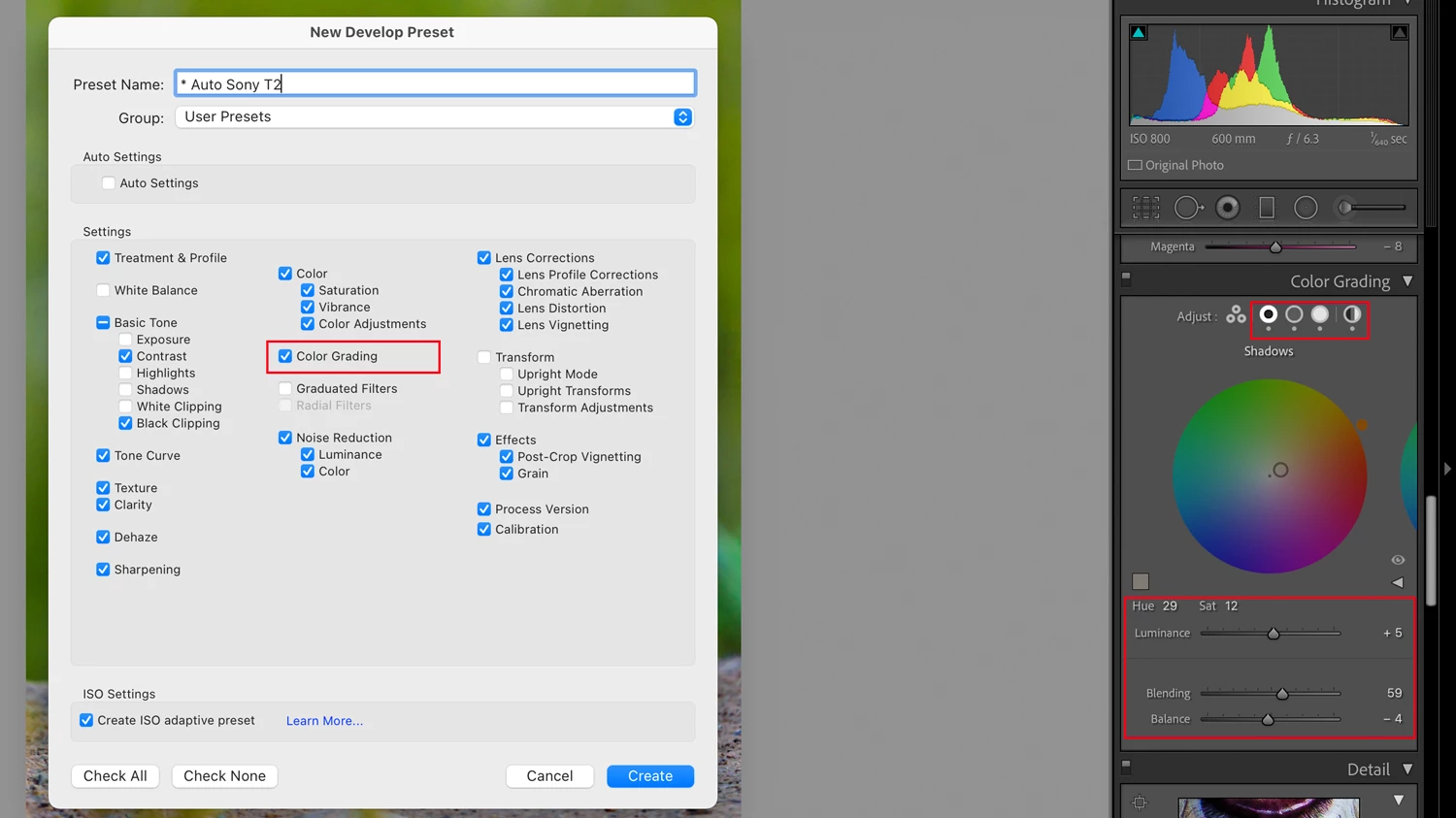
Here is a screen shot of building the preset. You can see the title, that Color Grading is selected, and what Color Grading is set (and all of the images in the adaptive preset selection had the same Color Grading. 
 

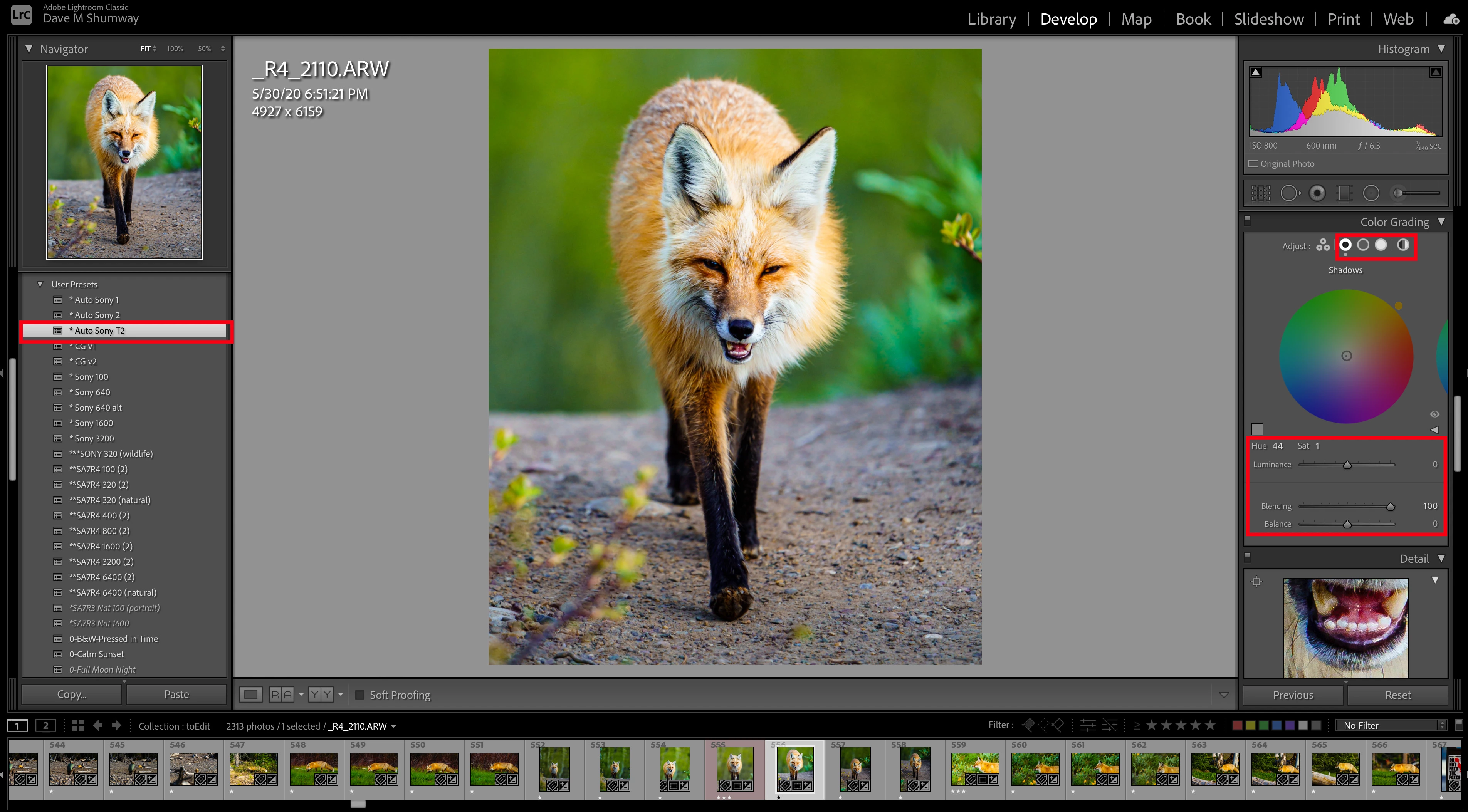
Then you can see when I apply it: (all setting other than Color Grading come through just fine)
MacOS 11.2 (2.4GHz 8-core i9, 64GB Ram, Radeon 5600M 8GB, 2TB SSD) Full Creative Cloud running Adobe PS Lightroom Classic 10.1.1 with Camera Raw 13.1. I thought I had noticed this a month or two ago, before upgrading to OS11.2, but I was distracted with other projects so I ignored testing it at the time. 

This topic has been closed for replies.

14 replies

VOANRAuthor
Participating Frequently
June 8, 2021

@Rikk Thanks, that’s great news. Really will speed up my editing. 

Rikk Flohr_Photography
Community Manager
June 8, 2021

Greetings,

Updates to Camera Raw, Lightroom Classic and the Lightroom Ecosystem products for Desktop, Mobile and Web, were released today and contain a fix for this issue.

Please refresh your Creative Cloud application and install your update when it becomes available. Thank you for your patience.

Rikk Flohr: Adobe Photography Org
johnrellis
Legend
April 7, 2021

This bug report is marked as "Acknowledged" and has been entered into Adobe's internal bug tracking.  Adobe rarely indicates when they plan on fixing a bug, unfortunately.  This bug report will get updated whenever it does get fixed. 

Bob Somrak
Legend
April 4, 2021

I agree Dave that this is still an issue.  I should be an easy fix.

M4 Pro Mac Mini. 48GB
VOANRAuthor
Participating Frequently
April 4, 2021

Even with the latest update this is still an issue. Adobe, are you reading these, got any plans to fix this? 

VOANRAuthor
Participating Frequently
February 9, 2021

That’s correct - even though they made a check box for color gradingin the dialogue. 

VOANRAuthor
Participating Frequently
February 9, 2021

Exactly - never assumed Color Grading would be adaptive, but it should apply as a non adaptive. They made a check box for it and everything 🤣

Bob Somrak
Legend
February 9, 2021

@Rikk 

Correct Rikk

When you create an ISO Adaptive Preset some settings are not included in the ISO Adaptive section of the preset which is expected. An example is Tone Curve. When you create the preset, the Tone Curve data is included in the NON ISO Adaptive section and appears to be derived from the Most Selected photo which seems like a good design. Unfortunately, it looks like when you have Color Grading set on the Most Selected photo the Color Grading data is not included in the ISO Adaptive preset anywhere even though you can select Color Grading in the dialog. I didn't expect it to be in the ISO Adaptive section but I expected it to be in the NON ISO Adaptive section somewhere. This to me is an inconsistent design/glitch/bug.

M4 Pro Mac Mini. 48GB
Rikk Flohr_Photography
Community Manager
February 9, 2021

Do I have this correct?

If the ISO-Adaptive Preset box is checked, the Color Grading portion of the preset is not applied.

If unchecked the Preset behaves normally?

Rikk Flohr: Adobe Photography Org
Inspiring
February 5, 2021

OK, mais c'est ici que nous emnmène l'aide de Adobe depuis LrC.... Donc il faut que les ingénieurs de Adobe contrôlent ce point.

Yves Crausaz, Suisse, retraité actif dans le monde de la photo et des arts graphiques.