

johnrellis
Legend
April 28, 2015

P: JPEG format tripping up other programs

  • April 28, 2015
  • 63 replies
  • 1918 views

Lightroom CC writes JPEGs in an atypical layout that trips up other programs. While they appear to be strictly conforming to industry standards, the unusual layout has caused problems for at least two users: one who had problems uploading photos to real-estate services, and another whose own software tripped over the layout.

LR writes the APP1 header as: TIFF header, 114 unused bytes, ExifIFD, IFD1, IFD0. Whereas Photoshop CC uses a more traditional layout: TIFF header, no unused bytes, IFD0, ExifIFD, IFD1. Here's an Exiftool dump of the beginning of a LR JPEG:
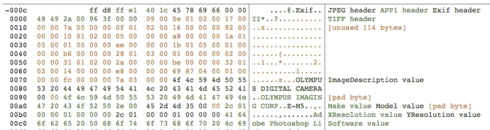
And here's a dump of the beginning of a Photoshop JPEG:

I've tested LR JPEGs with 12 Mac and Windows programs and 2 online services, all of which read them just fine:

Mac: Preview, Photoshop CC 2014, ColorSync Utility, Firefox, Chrome, Lattice, Paintbrush, Safari, Word
Windows 8.1: File Explorer Preview, Irfanview, Paint, Windows Photo Viewer
Online services: Flickr, Zenfolio

Even though LR's JPEGs may be strictly conforming, if it wrote the JPEGs without the unused header bytes and it put IFD0 immediately after the TIFF header, as Photoshop does, then there would be fewer problems with other programs choking on LR's JPEGs.

This topic has been closed for replies.

63 replies

Participant
October 7, 2015
Ah, good. Then I don't need to upgrade to 6.2. Thanks for the correction, John.
johnrellis
Legend
October 7, 2015
This bug was actually fixed in 6.1.1 / CC 2015.1.1. The release notes accidentally listed it under 6.2.
Participant
October 7, 2015
Well, not exactly solved for a lot of users. 6.2 has a new dumbed-down import mechanism that a lot of users will not like, so upgrading to 6.2 isn't an option for them.
Participating Frequently
October 5, 2015
This has been fixed in Lightroom 6.2, which is available today.

Thanks,
Ben
Malone545
Participating Frequently
September 22, 2015
So far, the only major difference I see in the exif is that Photoshop CC exports a EXIF version of 0221 and Lightroom CC exports a EXIF version of 0230.

The Sony Playstation site says that the PS4 media player supports JPEG's that are Exif 2.21 compliant. Perhaps version 2.30 (Lightroom CC) just does not work with the Sony software yet. The PS4 media player is about 4-5 months old.

The Playstation 3 supports more files types although it too says that JPEG's must be Exif 2.21 compliant. However it displays the Lightroom CC jpeg's with an EXIF version of 0230 with no obvious issue.

I will post to the Playstation support site to see if there is any resolution/workaround.

I may never be able to get rid of my Playstation 3 at this rate.

Thanks.
johnrellis
Legend
September 22, 2015
I think the difference in XMP Toolkit versions is unlikely to be the cause.
Malone545
Participating Frequently
September 22, 2015
Yes, I noticed the lack of metadata too (in Exiftool). I also noticed that the non-viewable ones (created via Lightroom) use a XMP Toolkit from 5/21/2014, whereas the viewable one (created via Photoshop) use a XMP Toolkit from 3/30/2015. Could that be significant?

I will go back to Lightroom and check my export settings again. Thanks for your help.

I really want this to work as I need to see these images on both a PS3 and a PS4 from a server.
johnrellis
Legend
September 22, 2015
I looked at those sample images using the free Exiftool. The "not viewable" pics have almost no EXIF or XMP metadata, which is why Google+ doesn't show any metadata. Also, the low-level format of the not-viewable pics looks clean and doesn't exhibit the problems that were caused by the bug reported in this thread.

How did you create the not-viewable pics? With LR's Export? If so, and you want metadata other than copyright to be incuded, you'll need to set Metadata > Include: All Metadata in the Export settings.

Since I don't have access to a PS 4, I won't be able to directly troubleshoot the incompatibility. But I suggest exporting some pics from LR with all metadata and seeing if that works around the problem.
Malone545
Participating Frequently
September 22, 2015
The Friedl plugin did not work for me either, although I do have an earlier 2015 version of it.
Malone545
Participating Frequently
September 22, 2015
I confirmed the Lightroom release - 2015.1.1 Release, Camera Raw 9.1.1