

johnrellis
Legend
Apr 28, 2015 3:20 AM UTC
Released

P: JPEG format tripping up other programs

Lightroom CC writes JPEGs in an atypical layout that trips up other programs. While they appear to be strictly conforming to industry standards, the unusual layout has caused problems for at least two users: one who had problems uploading photos to real-estate services, and another whose own software tripped over the layout.

LR writes the APP1 header as: TIFF header, 114 unused bytes, ExifIFD, IFD1, IFD0. Whereas Photoshop CC uses a more traditional layout: TIFF header, no unused bytes, IFD0, ExifIFD, IFD1. Here's an Exiftool dump of the beginning of a LR JPEG:
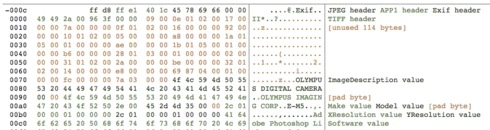
And here's a dump of the beginning of a Photoshop JPEG:

I've tested LR JPEGs with 12 Mac and Windows programs and 2 online services, all of which read them just fine:

Mac: Preview, Photoshop CC 2014, ColorSync Utility, Firefox, Chrome, Lattice, Paintbrush, Safari, Word
Windows 8.1: File Explorer Preview, Irfanview, Paint, Windows Photo Viewer
Online services: Flickr, Zenfolio

Even though LR's JPEGs may be strictly conforming, if it wrote the JPEGs without the unused header bytes and it put IFD0 immediately after the TIFF header, as Photoshop does, then there would be fewer problems with other programs choking on LR's JPEGs.

This topic is closed to new replies. Start a new post to keep the conversation going.

63 replies

Malone545
Participating Frequently
Sep 22, 2015 12:45 AM UTC
I uploaded some photos here: https://goo.gl/photos/FvxRP9yYbtan42S88

The first 3 are non-viewable in the PS4. The last one is viewable.

I noticed that the non-viewable ones do not show metadata even in Google+, but the viewable one shows the metadata.
Translate
Malone545
Participating Frequently
Sep 22, 2015 12:35 AM UTC
Another update...

The jpeg's that are not viewable in Playstation 4 are viewable in Playstation 3.
Translate
johnrellis
Legend
Sep 21, 2015 11:51 PM UTC
The problem was fixed in 2015.1.1, and yours is the only report of it not being fixed. So I suspect it may be some other issue.

Triple-check that you in fact are running CC 2015.1.1 by doing Help > System Info. The CC upgrade process has fooled many people into thinking they had the most recent version.

If you do have 2015.1.1, why don't you upload a sample pic that the Playstation 4 chokes on to Dropbox or similar and post the link here. I can put it under the microscope to see if anything looks fishy.
Translate
Malone545
Participating Frequently
Sep 21, 2015 11:03 PM UTC
Just my 2 cents...

I tried to export jpeg's from Lightroom CC/2015.1.1 to load onto my Playstation 4 and the jpeg's were not viewable.

After reading this thread, I exported jpeg's from Photoshop CC, and my Playstation 4 was able to display them properly.
Translate
Inspiring
Aug 5, 2015 6:13 PM UTC
With Lightroom 6.1.1. and Wordpress 4.2.4 / Media Library Assistant 2.13 all Data are in place.
Translate
johnrellis
Legend
Jul 31, 2015 11:43 PM UTC
This problem appears to be fixed in LR 6.1.1 / CC 2015.1.1.
Translate
Inspiring
Jul 23, 2015 3:51 AM UTC
Now there are thousands of pictures on Flickr and Wikimedia sites all with a few fields of malformed metadata. It seems both Adobe and the PHP community, whomever is responsible, have little interest in addressing this.
Translate
Inspiring
Jun 30, 2015 7:53 AM UTC
30000k fix worked for me too.
Translate
Inspiring
Jun 30, 2015 2:34 AM UTC
Any updates to this issue? This is infuriating that it wasn't fixed in 2015.1. This worked fine in 5.x and 4.x
Translate
Participating Frequently
Jun 27, 2015 6:50 PM UTC
Same here. Fortunately the workaround that John R. Ellis describes works with Picasa too.
Translate