

johnrellis
Legend
April 28, 2015

P: JPEG format tripping up other programs

  • April 28, 2015
  • 63 replies
  • 1918 views

Lightroom CC writes JPEGs in an atypical layout that trips up other programs. While they appear to be strictly conforming to industry standards, the unusual layout has caused problems for at least two users: one who had problems uploading photos to real-estate services, and another whose own software tripped over the layout.

LR writes the APP1 header as: TIFF header, 114 unused bytes, ExifIFD, IFD1, IFD0. Whereas Photoshop CC uses a more traditional layout: TIFF header, no unused bytes, IFD0, ExifIFD, IFD1. Here's an Exiftool dump of the beginning of a LR JPEG:
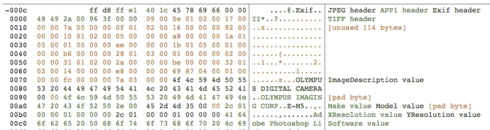
And here's a dump of the beginning of a Photoshop JPEG:

I've tested LR JPEGs with 12 Mac and Windows programs and 2 online services, all of which read them just fine:

Mac: Preview, Photoshop CC 2014, ColorSync Utility, Firefox, Chrome, Lattice, Paintbrush, Safari, Word
Windows 8.1: File Explorer Preview, Irfanview, Paint, Windows Photo Viewer
Online services: Flickr, Zenfolio

Even though LR's JPEGs may be strictly conforming, if it wrote the JPEGs without the unused header bytes and it put IFD0 immediately after the TIFF header, as Photoshop does, then there would be fewer problems with other programs choking on LR's JPEGs.

This topic has been closed for replies.

63 replies

Participating Frequently
May 26, 2015
I have the same problem with LR6. When I import JPGs to WordPress, camera EXIF field is missing in the Wordpress Library
johnrellis
Legend
May 17, 2015
It would be nice to get feedback from Adobe on this. However, I think it's best to avoid discussions about the meaning of the word "bug" and speculations on what was intended and focus on what LR's customers want.

As explained above, LR 6 strictly conforms with the industry standards, while PHP exif_read_data(), along with other applications, does not. As a practical matter, however, I think nearly all LR's customers expect LR to export JPEGs and TIFFs in a format that nearly all widely used software can read. Previous versions of LR met that expectation, but LR 6, in our opinion, does not. That is, while LR 6 conforms with the de jure standards, it does not conform with de facto practice.

The more evidence we can collect on that point (by having people come here to vote and add details of their experience), the more likely that Adobe will prioritize the issue.
Participating Frequently
May 17, 2015
Thanks, I'll give it a go, but this is a workaround, not really a fix. Would be nice to hear something official and find out whether this was an intended change and if the problem lies with the PHP library reading the EXIF info or if this is indeed a bug in LR. Seems it could be either since Windows/Mac reads the data correctly.
Participating Frequently
May 17, 2015
Please see the last message above your entry
Participating Frequently
May 17, 2015
Participating Frequently
May 15, 2015
My website has started showing incomprehensible strings in EXIF data display fields since upgrade to LR6 too. Not cool! Any idea when this might be fixed???
Participating Frequently
May 15, 2015
I'm using 5.6.8 and since upgrade to LR6 my EXIFs are messed up on my site!
Participating Frequently
May 14, 2015
For the "Bugs in the LR 6.0.1 EXIF-Data" (here, I wrote about the problem: https://forums.adobe.com/thread/1835290) now we use "Jeffrey’s “Metadata Wrangler” Lightroom Plugin" as workaround - with these settings:


Link to Jeffrey: http://regex.info/blog/lightroom-good...
Known Participant
May 14, 2015
Some other users reporting issues relating to exported files and metadata:

http://www.dpreview.com/forums/thread...
johnrellis
Legend
May 14, 2015
Here's another person whose Android app(s) on a Sony Xperia phone and tablet can't read metadata in LR-exported JPEGs:

https://forums.adobe.com/message/7544...