March 17, 2012

P: Keyword options no longer available in LR4

  • March 17, 2012
  • 87 replies
  • 1784 views

When one has a keyword hierarchy:

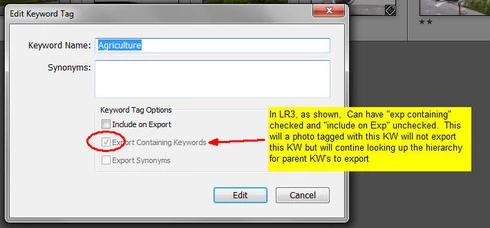
In LR3, one could skip a level in selecting which keywords are exported. For example in the hierarchy A, B, C (where A is top parent) one could set A=Include on export, B=Do not include on Export + Export Containing, and C=Include on Export + Export Containing. In this way, on a photo with only keyword "C", on export we'd have A and C but not B.

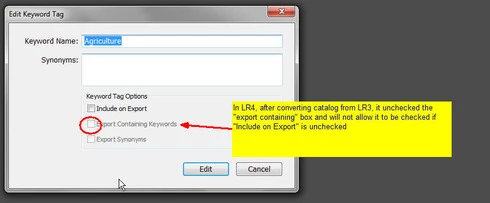
In LR4 all my LR3 keywords that had this pattern were changed during catalog conversion and I can no longer set this pattern. Turning off "Include on Export" now turns off "Export Containing" and "Export Synonyms" rather than leaving them alone as in LR3.

This is a HUGE problem for me as I have my entire keyword hierarchy (over 3,000 KW's) designed to allow skipping levels. In addition, I have cases where the actual Keyword is for my workflow and convience but but the synonym is what I want exported (not the actual KW) which I can also no longer seem to do.

See screen shots below


This topic has been closed for replies.

87 replies

October 3, 2012
Thank you. I have been using LR4.2 since it was first made available as a RC (Releas Candidate) and the Keyword Fix present in this release has been a life saver (one I reverted my KW's back to "normal" from the Kludgie work around I had to implement after installing 4.0.

Thanks again for listening to your user community and taking action on this item

Dan
Participating Frequently
October 3, 2012
Great work, Lightroom team! 🙂
Community Manager
October 3, 2012
This issue has been fixed in Lightroom 4.2.

Thanks,
Ben
September 7, 2012
Hi Howard,

You do realize the Adobe fixed this probem in LR4.2 RC (RC = Release Candidate) which you can download and use? In order to make everyone happy, they introduced a bit of logic when you edit the attributes of a KW. If, the "Export KW" had been on and you turn it off, then it unchecks the other two (nod to the privacy concern). However, once "Export KW" is off, then you can turn on either or both of the other two, giving us back the same capability we had prior to relase 4.0.

In yoour example, in the 4.2RC version you are able to have your Railway -> type -> Manufacturer -> Model -> Sub-group hierarchy in place but on export of a photo that just has the sub-group KW attached you can get Railway -> Manufacturer -> Model -> Sub-group included on the exported photo (note that the "Type" KW is not exported but "Railway" is). I think this is what you were after.

Dan
howardl75312101
Participant
September 7, 2012
Jostein, that is exactly how I feel about the issue - you've worded it more concisely than I could ever attempt to on my own. It is a great solution.
howardl75312101
Participant
September 7, 2012
I have this similar problem and believe the issue has to do with LR3 users who are not-very-clever. If they believe a keyword parent should NOT be exported, then that keyword should NOT be in that hierarchy in the first place. For example, using the file-path in the footer of a document would expose the naming structure of your file which is very obvious. They should use Collections for that purpose.

The problem with this issue in LR4 is now for people who have very detailed, structured sets of images, it is now very difficult to maintain a useful keyword vocabulary.

In my case, I have images of equipment and engineering related items. For example, I will have keyword parent-child groups like 'Railway', 'Type', 'Manufacturer', 'Model', 'Sub-Group Number'.

I do not want Keywords 'Type', for that means nothing by itself, but excluding this will not include 'Railway', which is means a lot.

To me, this 'bug' is really a defect in the masses' way of thinking...
howardl75312101
Participant
September 7, 2012
I have this similar problem and believe the issue has to do with LR3 users who are not-very-clever. If they believe a keyword parent should NOT be exported, then that keyword should NOT be in that hierarchy in the first place. For example, using the file-path in the footer of a document would expose the naming structure of your file which is very obvious. They should use Collections for that purpose.

The problem with this issue in LR4 is now for people who have very detailed, structured sets of images, it is now very difficult to maintain a useful keyword vocabulary.

In my case, I have images of equipment and engineering related items. For example, I will have keyword parent-child groups like 'Railway', 'Type', 'Manufacturer', 'Model', 'Sub-Group Number'.

I do not want Keywords 'Type', for that means nothing by itself, but excluding this will not include 'Railway', which is means a lot.

To me, this 'bug' is really a defect in the masses' way of thinking...
Participating Frequently
August 31, 2012
Greaaaaaaaaaaat !

Many thanks, Adobe !

Just ordered LR 4 and will be upgrading as soon as I get it.

Thanks, guys !
Community Manager
August 28, 2012
I don't know... do you promise not to shoot the messenger? ;-)

-Ben
August 28, 2012
Thanks Ben,

If you hear that this "fix' for some reason will not be in the LR 4.2 produciton release can you please alert this thread?

Thanks -- Dan