March 17, 2012

P: Keyword options no longer available in LR4

  • March 17, 2012
  • 87 replies
  • 1803 views

When one has a keyword hierarchy:

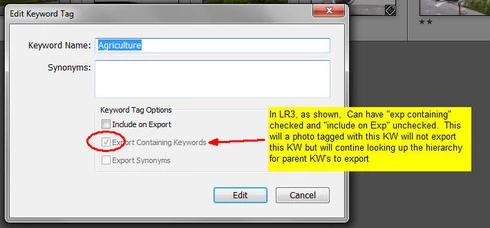
In LR3, one could skip a level in selecting which keywords are exported. For example in the hierarchy A, B, C (where A is top parent) one could set A=Include on export, B=Do not include on Export + Export Containing, and C=Include on Export + Export Containing. In this way, on a photo with only keyword "C", on export we'd have A and C but not B.

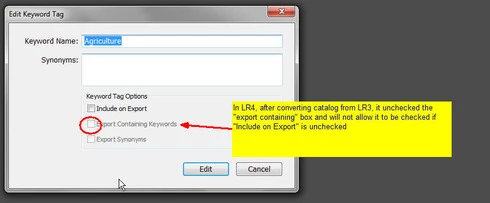
In LR4 all my LR3 keywords that had this pattern were changed during catalog conversion and I can no longer set this pattern. Turning off "Include on Export" now turns off "Export Containing" and "Export Synonyms" rather than leaving them alone as in LR3.

This is a HUGE problem for me as I have my entire keyword hierarchy (over 3,000 KW's) designed to allow skipping levels. In addition, I have cases where the actual Keyword is for my workflow and convience but but the synonym is what I want exported (not the actual KW) which I can also no longer seem to do.

See screen shots below


This topic has been closed for replies.

87 replies

Participating Frequently
August 28, 2012
We generally don't mark these forum threads as resolved until the fix is available in a final release (not just an RC), since it's always conceivable we could encounter some horrendous bug, or similar disaster, that would force us to remove the fix from the final release.

But having said that, yes, this is fixed in the 4.2 RC. When you uncheck "Include on Export" the other two checkboxes also uncheck (a nod to the privacy concerns), but they do not gray out, and can be re-checked. The three checkboxes now operate independently of each other.

Thanks,
Ben
August 28, 2012
I concur.

Yeahhhhhhhhh Adobe. I just installed LR 4.2RC and the keyword export functionality has been restored to the way it worked in versions prior to 4.0. Not only that, but Kewords where I had "Include on Export" turned off and one or both of "Export Containing Keywords" and "Export Synonyms" turned on in LR3 prior to upgrading to LR4 have now reverted back to what they were in LR3. I did not have to do anything other than install LR 4.2RC and my old KW's had reverted to their prior (LR3) settings. This is wonderful!

The only work I need to do is deal with KW's I've added (or modified?) since converting to LR4 and then undo all the work around KW changes I've made since moving to 4.0.

Thanks Adobe!
Participating Frequently
August 28, 2012
Sweet! I didn't have to reconvert the library. All the keyword settings were intact, minus the one or two I messed around with to try and work around the issue initially. Thanks Adobe!
Inspiring
August 28, 2012
LR 4.2 RC http://labs.adobe.com/technologies/li...
I don't know how your LR 3 Library will work with an Release Candidate (RC)
Participating Frequently
August 28, 2012
Where can I find 4.2 RC? I'm assuming I have to re-convert my LR3 library to get the per keyword options to carry over? When I initially converted with 4.0, it looked like they all got forced to "valid" options.
Inspiring
August 28, 2012
I've just installed the new Adobe LR 4.2 release candidate and it finally seems to fix our problem! Under "Bugs Corrected in the Lightroon 4.2 Release Candidate" one of the bugs (yes they call it a "bug") are: "Parents and synonyms of “do not export” keywords also do not export." With my tests so far it seems to WORK!! Have anyone els tested 4.2 RC ??

I need to test it more to be convinced it is fixed, but it looks promising. Thanks to Adobe for taking this problem serious!
August 7, 2012
Randolf,

If I understand the scenario In your example you have a parent KW of “People” and within that you have subordinate KW’s of “family” and “Idiots”. Then you export both photos. Evidently on KW’s “Family” and “Idiots” you have “export this KW turned off which in LR3 keeps the "export containing" turned on and in LR4 turns "export containing" off. So in in LR3 when you export Photo_1 and Photo_2 you get keywords “George” and “People” but in LR4 you just get "George". Then it seems you re-import the renamed edited photos.

In LR3 each one will have keywords “People” and “George” – of course losing the fact that one of the George’s was a family member and one was an idiot as you chose not to include that knowledge when you exported. In addition, since the same KW “George” is used to identify two different people (one a family member and one an idiot) when you re-import LR has no way of knowing that these are two different things so puts them both in a single "George". This seems to work in a common sense and logical manner.

However, in LR4 everything you said also happens but you also lose the fact that George is a is a member of the “People” set.

So far I don’t see your point as to why the LR4 version is preferable as it seems to loose information (i.e. "People") that I assume you wanted to keep where as LR3 kept it?

When you re-import your edited images, what is your desired result? If you want the re-imported images to have the exact same KW’s as the originals, then neither LR3 nor LR4 will do that unless you allow them to export “Idiot” and “Family” which then exposes you to revealing that information if you happen to export those photos for external use.

Dan
Inspiring
August 7, 2012
I 100% agree with you Jean-Pol
Known Participant
August 7, 2012
Well.... I just came across this topic by chance -- and I think, Adobe is damned right as it is now in LR4:

Forget about the privacy concerns as explained by Ben for the moment.

The real issue is data integrity:

Imagine, you have the following keywords and photos assigned to them:

people|[family]|George : photo_1
people|[idiots]|George : photo_2

Now, you don't want to let the world know that the first George is a member of your family nor that you don't like the second one.

You export both photos as photo_1_edit and photo_2_edit, do some edits in a third party program, and then re-import them to LR. Now your catalog will look like this:

people|[family]|George : photo_1
people|[idiots]|George : photo_2
people|George : photo_1_edit photo_2_edit

Do this with a few thousend photos in a deep hierarchy, and you know what you have done, and what you have to do. And you will be convinced that you don't know what you do.
Participating Frequently
June 21, 2012
I have the exact same use case as Jason which worked in Lightroom 3. I use full names for keywords and list first names and nick names as synonyms and then only export the synonyms. Please restore this behavior from Lightroom 3.

Proposal: Don’t make ‘Include on Export’ and ‘Export Synonyms’ mutually exclusive.