March 17, 2012

P: Keyword options no longer available in LR4

  • March 17, 2012
  • 87 replies
  • 1803 views

When one has a keyword hierarchy:

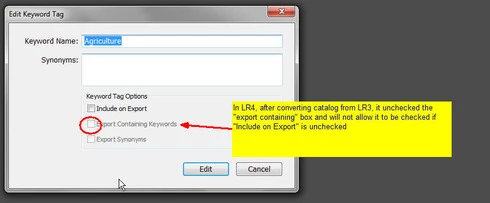
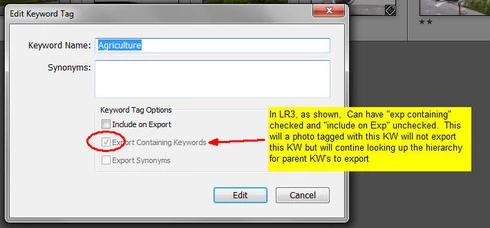
In LR3, one could skip a level in selecting which keywords are exported. For example in the hierarchy A, B, C (where A is top parent) one could set A=Include on export, B=Do not include on Export + Export Containing, and C=Include on Export + Export Containing. In this way, on a photo with only keyword "C", on export we'd have A and C but not B.

In LR4 all my LR3 keywords that had this pattern were changed during catalog conversion and I can no longer set this pattern. Turning off "Include on Export" now turns off "Export Containing" and "Export Synonyms" rather than leaving them alone as in LR3.

This is a HUGE problem for me as I have my entire keyword hierarchy (over 3,000 KW's) designed to allow skipping levels. In addition, I have cases where the actual Keyword is for my workflow and convience but but the synonym is what I want exported (not the actual KW) which I can also no longer seem to do.

See screen shots below


This topic has been closed for replies.

87 replies

Participating Frequently
June 20, 2012
I wish Lr 4.x to reinstate the keyword functionality of Lr 3.6 !

Haven't bought Lr 4 yet, so I'll put my money where my mouth is, but I sure hope Adobe will listen !
john beardsworth
Community Expert
Community Expert
June 20, 2012
So does Aperture have this "useful keyword functionality"? I'd love to know where. And when you apply a bottom level keyword, does Aperture infer that its top level "grandparent" keyword should also be applied? If so, I can't figure it out. Or do Aperture keywords have synonyms? Maybe I've missed something there too, but be careful what you wish for.....
Inspiring
June 20, 2012
Jean-Pol - Very good question!
I'm also moving to Aperture soon if the keyword functionality in LR4 is not getting better again (or as it was in LR3.6)....
Participating Frequently
June 19, 2012
Well. well, well ... are we going to recover our most useful keyword functionality or are we to drop Lr and go Aperture ?
Participating Frequently
June 4, 2012
"Dear moderator(s): Please change the status of this thread from “Not a problem” to “Under consideration” or “Not planned”. Leaving it marked “not a problem” is needlessly antagonizing customers."

Agreed.

-Ben
Inspiring
June 3, 2012
Hi Gerald

I agree 100%. This is a PROBLEM for many photographers. I "downgraded" back to LR 3.6 for some weeks when I found this keyword structure changes, but since I need to develop raw-files from D4 and D800 I have to use the LR 4.1. I really don't like it, but I have to or move to Aperture...

ADOBE : please give us the same keyword functionality as in LR 3.6 in the LR 4.2 version!
johnrellis
Legend
June 2, 2012
Dear moderator(s): Please change the status of this thread from “Not a problem” to “Under consideration” or “Not planned”. Leaving it marked “not a problem” is needlessly antagonizing customers. Jeffrey Tranberry (Adobe Customer Advocate) said it was under consideration as of two months ago.

This thread was marked “not a problem” because of ambiguity over the meaning of “problem” in this feedback forum. To users, “problem” clearly means any aspect of the application that is causing them frustration, inability to complete some task, inefficiencies, lost work, etc. When users submit feedback here, they typically use that meaning when marking their posts “problems”.

But at least one moderator here appears to think “problem” should be defined more narrowly, from a software developer’s perspective – the application isn’t working the way the product team intended it. Developers typically call this a “bug”. The moderator marked this thread “not a problem” using this developers’ definition.

Since this is a forum for users to communicate with Adobe, it would seem more practical to use the definition of “problem” as it's commonly understood by users and, indeed, how it is typically used in the hundreds of posts here marked “problem”. The moderators could insist on using the narrower definition, but that is likely just to lead to the bad feelings evidenced in this thread.
Participating Frequently
June 2, 2012
WTF!!! Just came across this unwanted behaviour in LR4 - when were we going to be told? And, I think the 'reason' given by Adobe is rubbish. They have *broken* the keywording by removing functionality, dumbing it down ... by all means try to help people, but DON'T BREAK THINGS to do it!

We had the power to request what we wanted, and now Adobe has reduced the functionality in the program, and then tells us that it's 'not a problem' ...

CORRECTION. IT IS A PROBLEM

As so often before, I find Adobe's arrogance breathtaking.

Please please please - rethink your behaviour and let the program work again the way it used to, that gave us more flexibility.

And, in the future, please do not again alter our keyword metadata (or any other data we have put into the system) without telling us.
Participating Frequently
May 19, 2012
This feature change is a fundamental problem for me. I want my keywords to export exactly as they did. I spent quite a bit of time making my keyword hierarchy produce what I needed, exactly what I needed.

Could we please have a general option "Legacy keyword hierarchy functionalities" ?

Adobe, you cannot simply leave this as it is.
April 29, 2012
Hi all, I looked at the "idea request" posted by John and found that it only addresses the "Synonym" portion of this problem. So I added another "idea Request" to address the "skip level" problem (which for me is more significant, although the synonym issue is also problematic)

The URL for my post is http://feedback.photoshop.com/photosh...

Thaks -- Dan