March 17, 2012

P: Keyword options no longer available in LR4

  • March 17, 2012
  • 87 replies
  • 1803 views

When one has a keyword hierarchy:

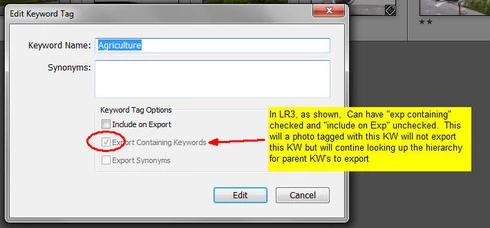
In LR3, one could skip a level in selecting which keywords are exported. For example in the hierarchy A, B, C (where A is top parent) one could set A=Include on export, B=Do not include on Export + Export Containing, and C=Include on Export + Export Containing. In this way, on a photo with only keyword "C", on export we'd have A and C but not B.

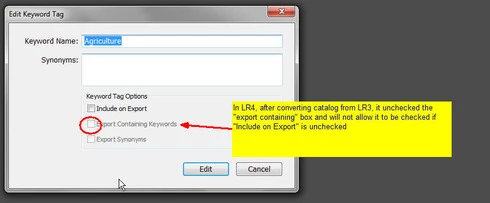
In LR4 all my LR3 keywords that had this pattern were changed during catalog conversion and I can no longer set this pattern. Turning off "Include on Export" now turns off "Export Containing" and "Export Synonyms" rather than leaving them alone as in LR3.

This is a HUGE problem for me as I have my entire keyword hierarchy (over 3,000 KW's) designed to allow skipping levels. In addition, I have cases where the actual Keyword is for my workflow and convience but but the synonym is what I want exported (not the actual KW) which I can also no longer seem to do.

See screen shots below


This topic has been closed for replies.

87 replies

April 29, 2012
Probably a good idea to keep both alive. There's a lot to be said about the "squeeky" wheel syndrome.
Inspiring
April 29, 2012
Oops...sorry John, I hadn't noticed!
Inspiring
April 29, 2012
For those of you that think we should do as Lee Jay suggested above, I started and idea thread two days ago here :

http://feedback.photoshop.com/photosh...

*someone replied and referenced this thread actually
Inspiring
April 29, 2012
It's "not a problem" by-definition since it was reported as a bug (red exclamation point) when in reality it was done on purpose.

My suggestion is to let this thread die and instead start a feature-request thread ("idea" - yellow light bulb) asking for a version of one of the solutions offered above to be implemented, and reference this thread from that one.
Participating Frequently
April 29, 2012
Thanks John and Dan for keeping this thread alive. Fingers crossed Adobe still reads it too... 🙂
April 28, 2012
I agree, let's see if Adobe agree's 😉
johnrellis
Legend
April 28, 2012
It's unfortunate the moderator marked this a "Not a problem", since it clearly is a problem for many people, and it understandably and needlessly annoys them.

Topics in this forum can be marked with a number of statuses; here's my understanding of the relevant ones:

Not a problem -- the user has reported a problem but in fact there is an adequate solution or product feature that the user wasn't aware of.

Under consideration -- Adobe is considering the idea or problem solution but hasn't made a decision yet.

Not planned -- Adobe understands what the user's issue is but has decided not to address it in the foreseeable future.

Based on Jeffrey Tranberry's response last month, "The team is looking to see if both the old behavior and the new behavior can be supported", it would seem that "Under consideration" would be a more appropriate status.
April 28, 2012
Jeffery, Benjamin,

Can you please provide an update from Adobe on this serious problem? Just marking it "Not A Problem" is quite annoying as it is certainly a serious problem that is cuasing a lot of people a great deal of time, effort, frustration, and major degradation to the efficiencies of our workflow. Every time I look at this thread and see "Not a Problem" in bright yellow on the header it makes my blood boil.

I know that Adobe feels making this change improved "privacy" protection. However, at some point Adobe must weigh the cost of any change against the percieved benefit. After all, if you REALLY want to to eliminate privacy concerns, then remove the ability to export photos from LR altogether. That would certainly quell all possibility of privacy breaches, but it would also render the product totally useless.

Each "improvement" of any sort must be weighed against the cost of that improvement in terns of usability and functionality. Is the percieved benefit worth the cost in those terms? I think it's obvoius that in the case of these Keywords the cost to your customers is much greater than the percieved benefit of improved privacy.

What makes this so frustrating is that there are several approaches proposed in this thread which would address the privacy concern, would not be all that costly to implement and would still allow your customers to make full use of LR's keywording without time consuming manual work arounds or the purchasing of 3rd party software that may or may not solve the problems.

Can you please remove the "not a problem" tag on this thread and let us know what Adobe is doing to address the issue?

Thanks -- Dan
April 28, 2012
Yes that is my experience as well. This method does seem to work with new photos though. If you go to Flickr extras in plugin extras to resend metadata you can send new keywords as tags but metadata wrangler won't work with this tool.
Participating Frequently
April 27, 2012
i was uploading a modified photo, not a new photo. I tried unchecking the explicitly send keywords option and then it didn't send any new keywords with the photo. I added a new keyword that was set to include on export and it showed up in the exif data but not as a tag.