March 17, 2012

P: Keyword options no longer available in LR4

  • March 17, 2012
  • 87 replies
  • 1803 views

When one has a keyword hierarchy:

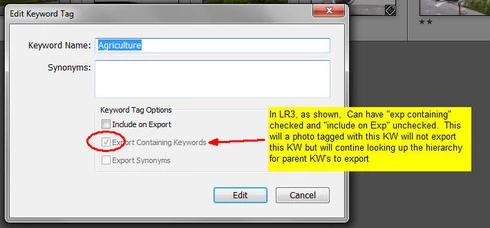
In LR3, one could skip a level in selecting which keywords are exported. For example in the hierarchy A, B, C (where A is top parent) one could set A=Include on export, B=Do not include on Export + Export Containing, and C=Include on Export + Export Containing. In this way, on a photo with only keyword "C", on export we'd have A and C but not B.

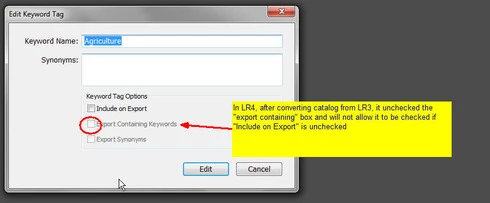
In LR4 all my LR3 keywords that had this pattern were changed during catalog conversion and I can no longer set this pattern. Turning off "Include on Export" now turns off "Export Containing" and "Export Synonyms" rather than leaving them alone as in LR3.

This is a HUGE problem for me as I have my entire keyword hierarchy (over 3,000 KW's) designed to allow skipping levels. In addition, I have cases where the actual Keyword is for my workflow and convience but but the synonym is what I want exported (not the actual KW) which I can also no longer seem to do.

See screen shots below


This topic has been closed for replies.

87 replies

April 27, 2012
With Jeffrey's Export to Flickr Plugin if you uncheck the explicitly send keywords from lightroom's database box in the metadata management section of the service settings this seems to result in metadata wrangler stripping keywords from newly uploaded photos.

April 27, 2012
I have also run into some issues using this work around to export to Flickr. I have not been able to strip the keyword when exporting with the default plugin but I have had success with stripping keywords when exporting new photos with Jeffrey's Export to Flickr Plugin. No luck with modified photos though. Not sure how our settings are different though.
Participating Frequently
April 27, 2012
This doesn't help with tagging when exporting to Flickr. Metadata Wrangler does affect the keywords written in the Exif data, so my private keyword is stripped out of there, but it still shows up as a tag in Flickr.

Note that I'm publishing to Flickr using Jeffrey's Export to Flickr Plugin with a Publish Service. The tags are controlled by the "Flickr: Metadata Export" section in the service settings, and don't obey the Metadata Wrangler filtering. So all I can do is enable or disable creating tags from all of the keywords.
April 27, 2012
I think I have found a possible work around to this problem. For all the keywords you don't want to export you can recheck the include on export box and instead identify them with a proceeding or trailing character. I surrounded keywords in the middle of a hierarchy with "~"s (ex. ~birds~). This symbol results in the keywords being sorted to the end of keyword lists as ~ comes after most letters and symbols in an alphabetic sort. For stem keywords I used a single trailing ~ so as not to interfere with keyword entry or search.

This process can be done quickly with empty keyword hierarchies by exporting the keyword list and using search and replace as keywords that will not be exported are surrounded with []. This method will not work with an existing hierarchy as reimporting the keyword list will create numerous duplicate keywords without photo assignments. You could try Keyword Consolidator but this may be more work then simply altering the keywords manually. Even for a manual sort the keyword list can be used to more easily identify the keywords that you have selected not to export.

With these identifying characters, you can then use Jeffrey’s “Metadata Wrangler” plugin to strip keywords during export. In the export window under the optional metadata wrangler tab added by the plugin there is an option to strip keywords during export. This blank allows the use of wildcards which can then be used to strip the keywords that you don't want to export (ex. ~*~ or *~ to strip the keyword with the identifiers I use above).

Hope this helps,
Adam

Inspiring
April 27, 2012
I don't see the issue with privacy. Even though it is grayed out, it is very obvious the boxes are checked. I was actually happy when I first discovered it would do that. Needs to come back.
April 25, 2012
No solutions have come forth from Adobe and I really don't understand why they don't seem to taking this problem all that seriously. Perhaps they are, but I have not seen any updates from them on this thread in quite some time. Maybe now that PS CS6 is released they can free up someone to implement one of the solutions proposed - or at least let us know they're working on it and intend to provide a solution.

As for a work around, there are really none that are satisfactory that I know of.

There are really two problems caused by Adobe's change.

1) Can't export synonyms without also exporting the actual keyword (which many times is not desired). The only workaround I know of is to take one or your synonyms and make it the actual KW instead, which, of course totally screws up your hierarchy sort order.

2) Can't skip a level in the string of parents that get exported. This one too does not really have an acceptable work around, however it does have a complicated, prone to error and difficult to maintain work around. Let's say you have a hierarchy of A > B > C > D > E, and if a photo is tagged with E, you want E, D, and B exported, but not A or C. To do this you would have to:
1) Set A and C to "do not export"
2) Set E (and optionally B & D) to "Export Containing"
3) Tag each photo that used to have juste E, with B as well (E brings along D).
Of course remembering where the breaks are in each hierarchy is a real pain. To aid with this, I renamed "A" to "A (NO EXP)" and "C" to "C (NO EXP)" so that when I add a KW to a photo using the Keyword List pane, I can visually scan up the tree and also click the check box on parent KW's that are above any that have the "(NO EXP) phrase.

Yeah I know it's a real pain and is a giant move in the wrong direction in terms of stream lining workflow (which of course is what LR is supposed to be all about), but untill Adobe steps up to this problem it's the best I can come up with.

PS - if this thread goes quiet, Adobe may think it's no longer an issue. So if you're reading this and feel that Adobe should address it, it would be good to hear from you.

Dan
April 25, 2012
Has anyone found a serviceable workaround to this problem?
March 30, 2012
How dissappointing
Participating Frequently
March 30, 2012
No, no changes to keywording were made in the 4.1 release candidate.

-Ben
March 30, 2012
Were any of these issues addressed in the 4.1 release candidate that is now available?