March 17, 2012

P: Keyword options no longer available in LR4

  • March 17, 2012
  • 87 replies
  • 1803 views

When one has a keyword hierarchy:

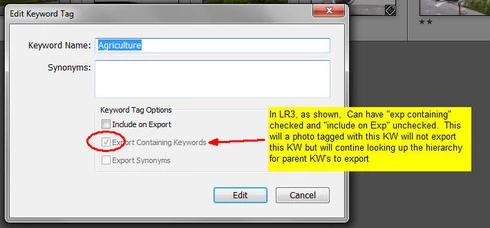
In LR3, one could skip a level in selecting which keywords are exported. For example in the hierarchy A, B, C (where A is top parent) one could set A=Include on export, B=Do not include on Export + Export Containing, and C=Include on Export + Export Containing. In this way, on a photo with only keyword "C", on export we'd have A and C but not B.

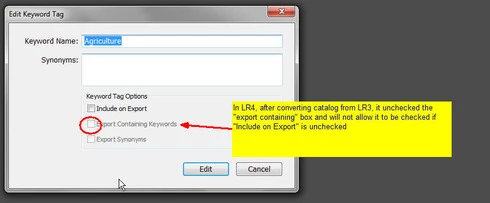
In LR4 all my LR3 keywords that had this pattern were changed during catalog conversion and I can no longer set this pattern. Turning off "Include on Export" now turns off "Export Containing" and "Export Synonyms" rather than leaving them alone as in LR3.

This is a HUGE problem for me as I have my entire keyword hierarchy (over 3,000 KW's) designed to allow skipping levels. In addition, I have cases where the actual Keyword is for my workflow and convience but but the synonym is what I want exported (not the actual KW) which I can also no longer seem to do.

See screen shots below


This topic has been closed for replies.

87 replies

Participating Frequently
March 21, 2012
John is correct, this was a defect in Lightroom 3, which prompted a lot of complaints. I understand that it can be frustrating when a behavior you'd found a use for is changed, whether or not that behavior had been intentional. We're always very cautious about fixing bugs that some people may actually like. 🙂 In this case, however, we considered it pretty important to fix this issue because it was a potential privacy concern. Most people expected that when they set a keyword to "do not export" that it's synonyms and parents would also not export, and the fact that they sometimes did meant that you could unintentionally reveal certain keywords to an outside audience (clients, the internet, etc.), which was potentially embarrassing, or worse.

Thanks,
Ben
Inspiring
March 21, 2012
My comment was only meant to suggest that many people considered the previous odd behaviour (check export, check export synonyms, uncheck export) unintuitive at best. The behaviour always seemed kludgy, as if it was a side-effect of some other change.

Of course, the problem is that if it was a kludge it can easily be reverted by accident.

The problem is that this interface is not a simple set of checkboxes -- as you have noticed, there is some observer feedback going on that creates a bit more of a complicated interface.

Or there was a decision to not persist what was considered bugwards compatible behaviour. No one really knows.

Personally, I'm hoping that this was an oversight, and that eventually we will have a way to maintain full keywords, but have substitutions for exporting. At the very least Adobe doesn't generally like to violate the principle of least surprise, which is definitely the case here.

We'll continue to merge problem reports here, as more and more people are seeing that keywords on export are not what they were in Lr3.
Inspiring
March 21, 2012
In LR 4 there seems to be a problem under the "Edit Keyword Tag" box. It is not possible to not include keywords on export, but export containing keywords and synonyms (this is possible in LR3). You have to Include the keywords or none at all. This is a BIG problem when you have thousands of hierarchy keywords, where some keywords in the structure should be exported and some not.

In LR 3 this was not a problem, so maybe this is a bug??

Inspiring
March 21, 2012
This is also a BIG PROBLEM for me since I'm selling hierarchy structured Keyword lists containing ten thousands of keywords, which worked perfect in LR3 and LR2.5. In LR4 I loose many of the exported keywords since it's not possible to "Export Containing Keyword". I hope will be fixed very fast since it's a big step backward from the LR3 version
March 18, 2012
Be that as it may, it's a pretty bad pracitce to remove functionality in a new release that people may have come to rely upon. Being able to mix and match the 3 options (include on export, export containing, and export synonyms) is great feature and adds tremendously to the funtionality of the product. I use virtually all combinations of these three items for different situations and right now am hard pressed to figure out a way to acomplish the same thing with in LR4 that I had with LR3.

Not only that, but now I'm faced with hours of work just to get back to a state where the same keywords are exported for an image in LR4 as were exported for the same image in LR3 - and to get to maintain that state will probably require clicking several keywords up the hirerarchy chain whereas in LR3 I only had to click the lowest level keyword and the parent took care of themselves (some included, some not).

What is really infuriating is that when you toggle "include in export" off, LR4 saves the settings of the other two someplace before it unchecks them. Then replaces puts them back if you once again if you check the "Include on export". I'm sure the fix is really quite simple - just dont clear those two check boxes when the top one is turned off. All the rest of the code should still work the same.

For me, this is a giant leap backwards in ease of use, funtionality, and usefulness.

Dan
Inspiring
March 18, 2012
Yeah, I noticed this, too. I think the Lr3 behaviour was unintended, and was considered a defect by many.