March 17, 2012

P: Keyword options no longer available in LR4

  • March 17, 2012
  • 87 replies
  • 1803 views

When one has a keyword hierarchy:

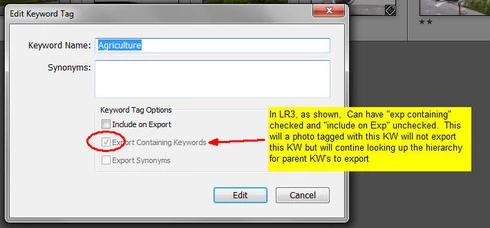
In LR3, one could skip a level in selecting which keywords are exported. For example in the hierarchy A, B, C (where A is top parent) one could set A=Include on export, B=Do not include on Export + Export Containing, and C=Include on Export + Export Containing. In this way, on a photo with only keyword "C", on export we'd have A and C but not B.

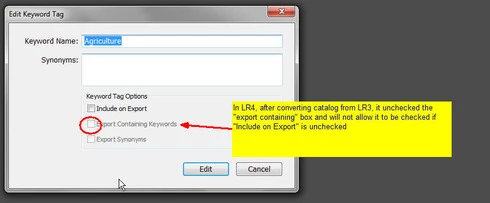
In LR4 all my LR3 keywords that had this pattern were changed during catalog conversion and I can no longer set this pattern. Turning off "Include on Export" now turns off "Export Containing" and "Export Synonyms" rather than leaving them alone as in LR3.

This is a HUGE problem for me as I have my entire keyword hierarchy (over 3,000 KW's) designed to allow skipping levels. In addition, I have cases where the actual Keyword is for my workflow and convience but but the synonym is what I want exported (not the actual KW) which I can also no longer seem to do.

See screen shots below


This topic has been closed for replies.

87 replies

Participating Frequently
March 22, 2012
John, It would also be helpful if you don't presume to know what other people understand and not. I can perfectly empathise with your position that this function has created an awkward situation for some users. However the current situation has demonstrated Adobe's solution creates as many problems as it fix, and is therefore disqualified from being called an improvement. You are absolutely correct that "Adobe need to consider how people are actually using LR". Those who apply hierarchical keywords correctly are not "actually using LR" any less than others.

Btw, your suggestion above to have another checkbox saying "export children" is interesting. I see a a parallel to how file access rights are managed in operating systems.
john beardsworth
Community Expert
Community Expert
March 22, 2012
It would be more helpful not to distort when you paraphrase.... Frankly, "amateurs" are often professionals in their own fields and are very often more "professional" than those who just earn their living from photography. So let's dump the "for amateurs" stuff, please.

The fact is that people have been using keywords for a range of non-standard purposes (eg just today I read a post elsewhere where a "pro" adds a keyword "Out of focus") and I've given you one root cause. Adobe need to consider how people are actually using LR before deciding whether a bug is not to be fixed and is to be converted into a feature.

Adobe employees have the word "employee" beneath their icon.
Participating Frequently
March 22, 2012
Thank you for pointing out what you thought I "fail to understand", John. If you read my post again you might see that's exactly what I too pointed at by my reference to Microsoft Word. There will always be users who misapply functionality. It is then the user that compromise his privacy; not the software maker.
So appparently, why Adobe cuts the hand of those who use their software as intended, at the benefit of those who don't; that's still the only thing "fail to understand".

That's why I call for better reasons from Adobe for putting a large number of Lightroom users in a very awkward situation, and I still don't think it's too much to ask.
Inspiring
March 22, 2012
John - So LR4 is now intended for "photographers" who don't know what should be in their keywords. What a silly answer (or a silly upgrade)! Are you answering as an Adobe employee or just guessing what the Adobe Team has done. In my eyes they have made a bug, not fixed a bug.

If the Keyword Options in LR3 is a big problem for amateurs, why can't Adobe make info videos about how to use keywords, how to include / exclude keywords and how to build hierarchy keyword lists (or where to buy them). This is not very difficult or complicated to understand.

If this "bug fix" in LR4 is intended for amateurs who don't know much about keywords, I recommend Adobe to offer a LR4 PRO version for photographers who know what kind of keywords they should use (IPTC standards) based on the LR3 keyword option (with bug). To be honest - I think this "bug" in LR3 is brilliant for large hierarchy keyword lists !!
john beardsworth
Community Expert
Community Expert
March 22, 2012
What you fail to understand is that because Lightroom fails to offer custom fields, users are stuffing into keywords all sorts of information that doesn't belong there (under any interpretation of IPTC standards). So privacy is a valid concern. Users need to be able to quickly shut off exporting of such workflow or internal keywords, and fixing the bug has achieved that.
Participating Frequently
March 22, 2012
Dear Adobe, here represented by Benjamin,

The argument about hierarchical keywords being a "potential privacy concern" doesn't smell good. Taking a function away from users who know how to apply it, because less competent users screw up, is at best a lame defence. A good parallell would be the provision for metadata in Word documents, where the same liability has been present for more than a decade. Cases exist where sensitive data has leaked through this functionality too. Yet most users of those metadata would be outraged if Microsoft just removed the option for "potential privacy concerns".

If you guys made this decision intentionally, it surely must be rooted deeper than that. If you didn't, which I think is the case, the argument is a sorry signal to send. Defensive, non-committal, and seeding speculation rather than ending it.

I would like to request a better answer, please.

On the technical side, I can't help but wondering if the real reason is that the programming code needs a larger overhaul than Adobe wanted to shell out for in the update to version 4.

From looking at the syntax of controlled vocabularies (CVs) to be imported in Lightroom, I would say that it's rather fragile, using special ASCII characters and indentation to organise the terms. To restructure this to use XML, for example, would require a fair bit of programming. It may possibly also require a database restructuring, for all I know.

On the other hand, that's really where I wish Adobe would go. My wish, and call it a feature request if you like, is that Adobe could abandon its proprietary way of denoting keyword hierarchies all together and concentrate on the IPTC Dublin Core recommendations. In XMP files, keywords are duplicated (if the option "write keywords as LR hierarchy" is turned on) between the blocks containing Adobe's own system, and adhering to the Dublin Core.

Adobe could very well keep a proprietary structure, but shaped more akin to the dc: structure, with a syntax that could be enriched with tons of functionality through XML attributes, and a hierarchy established simply by nesting XML elements.

In particular, I dream of life cycle management of CVs. Take scientific classification of species for example. Most nature photographers would love to have a keyword hierarchy adhering to taxonomic classification. Scientists do however rearrange taxonomical hierarchies occasionally. Species may be transferred from one branch of the hierarchy to another, and receive new latin names to match. I imagine a way of managing metadata that can take such changes in a CV in its stride. Functionality like cross-referencing of terms, setting terms as deprecated to avoid assignment to new images while retaining them in old ones, and bulk reclassification. Maybe also a separate tool, akin to the Lens Profiling Tool, to manage the vocabularies separately.

But please don't answer this by just a "thank you for your thoughts". You really need to come forward with a better explanation for the current conundrum.
john beardsworth
Community Expert
Community Expert
March 22, 2012
The Include on Export setting is fundamentally too blunt to hope to satisfy two conflicting needs. Rather than restore the buggy behaviour and p off the group of users who do want the parent keyword to control its children, perhaps what is needed is a second check box "Export Children"? This would mean the parent keyword might be set so it itself will not export, but its child keywords would be.

But this needs a lot of care, and I can't see it being resolved quickly. Apart from issues such as top-down control and privacy, users could get themselves into trouble with different settings at different levels.

I've always thought hierarchical keywords are more trouble than they're worth!

John
Inspiring
March 22, 2012
Hi Benjamin

Maybe LR3 had some defects, but it worked very well with hierarchy keyword lists, of serious keywording. I'm selling keyword lists containing up to 80.000+ keyword and now LR4 have messed it up! I think this is not very serious for a company like Adobe.

I recommend to make an option in Lightroom Preference to keep the possibilities like in LR3, where it worked very well.

I am a professional photographer and I have promoted and arranged LR classes for many years, but now I feel that Adobe is doing something very bad. For me and my clients this is a problem.

The main advantage of Lightroom regarding Aperture and other programs is the great keywording features in LR3...

I really hope Adobe is taking this issue serious and don't file it as "not a problem". I'm getting quite frustrated about this issue.

OJL
March 22, 2012
Benjamine,

Thanks for your reply, but unfortunatly you got it wrong this time.

I can't imagine that you smart folks at Adobe can't figure out a way to word the 3 chhoices (check boxes) that make it clear what is going on and thus avoid the "Privacy" issue you allude to. Perhaps a warning pop up when you uncheck the "include on export" box while still having one or both of other check boxes turned on, Something like "Warning, you are excluding this keyword from export but your settings still allow synonyms and/or parent keywords to be exported. Click 'Continue' to leave the other two options as set, click 'clear' to turn off Export Synonyms and Export Containing Keywords" In this warning pop up you can even have text explaining your "privacy" concern That should not be too difficult compared to all the other wonderful things you've been able to program into LR.

If Adobe felt this "privacy" issue was so important that they just had to fix it, why didn't this change show up in one of the dot releases? After all privacy along with security has been a hot topic in the past several years and this capability you turned off in LR4 has probably been there since at least release 3.0 and perhaps even 2.0 or before. Evidently the "privacy" issue you refer is a pretty minor concern to let it stay in the code for so long before deciding all of a sudden to remove the functionality that a fair segment of your loyal users have come to rely on.

Don't just leave us hanging here with a cumbersome and time consuming workflow due to reduced functionality by marking this problem as "Not a Problem". This is a huge problem! Do the right thing and come up with a win-win sloution such as I suggest in the first paragraph that covers your privacy concern and at the same time allows us to use the functionality we've come to rely on

Dan
March 22, 2012
This is related to a prior post concerning Keyword options that are no longer available in LR4

It seems that during the converson of my LR3 catalog to LR4, it changed things such that I don't get the same kewords exported in LR4 that I did in LR3. This is a huge issue for me that was not apparent during the LR4 Beta. I have over 2500 keywords in my KW List, all are very well organized and used on over 24,000 images. So, I am pretty upset that Adobe decided to change the rules and alter which Keywords export for any particular photo.

Here's what they did. In LR3, it was entirely possible to have "Export Containing Keywords" and/or "Export Synonyms" turned on (checked) while "Include on Export" was turned off (unchecked). This is a great feature and I used it regularly in two situations. One situation is where I have a multilevel hierarchy and I want to not export one or more of the keywords in mid hierarchy. For Example, in the hierarchy: "Location -> North America -> United States -> Western States -> California -> San Francisco", If I have a photo tagged with KW "San Francisco", on export in LR3 I'd get keywords "San Francisco", "California", "CA" (synonym of California), "United States", "USA" (syn of United States) and "North America". I would not get "Western States" (or it's synonyms) or "Location". After converting to LR4, this image only gets "San Francisco", "California" and "CA". It no longer exports "United States", "USA" or "North America".

In another example, I have a hierarchy for the age group of my models. My keywords are such that the age groups display in LR in ascending order. "00-01 Baby", "02-05 toddler", "06-12 Youth", "13-20 Teenager", Etc. Each of these has synonyms. For example, "00-01 Baby" has "baby", "child" and "Infant" as synonyms. "03-05 Toddler" has "toddler" and "Child", etc. I had it set in LR3 such that only the synonyms would export (not the actual KW name). So a photo with the "00-01 Baby" keyword would export with "Baby" and "Child". Now, after catalog conversion to LR4 I get no keywords exported for this hierarcy at all.

What happened is this. During catalog conversion if the "Include on Export" was unchecked in LR3 (as it was for "Western States" and all of my age groupings) the the conversion ignored the LR3 state of the other two check boxes and forced them to be unchecked.

These are only two examples but represent quite a few instances of the same problem, and to be honest, this is quite terrible. What makes it worse is that in LR4 there is now no way to skip a level in a hierarchy without having to remember to also assign the keyword just above the one I want to skip in additon to the one at the bottom of the hierarchy. And, I have no idea how to simulate my age group pattern where I need just the synonyms to export but not the keyword itself short of making all the synonyms into KW's and then having to assign several of them to each photo (and remember which onces go with each group).

Geez, I thought new releases were supposed to make workflow easier not harder. I guess I got that wrong. I sure do hope that Adobe sees the pain and aguish this has cuased and sees fit to not change these check boxes during catalog conversion and in LR4 itself remove the automatic uncheking and graying out of the "Export containing keywords" and "Export sysnonyms" when the "Include on Export" is unchecked. In the mean time, even though I really love the new Develop Module changes, and the Map module, this keywording problem out weighs those new features and I've gone back to LR3.

Dan