March 17, 2012

P: Keyword options no longer available in LR4

  • March 17, 2012
  • 87 replies
  • 1803 views

When one has a keyword hierarchy:

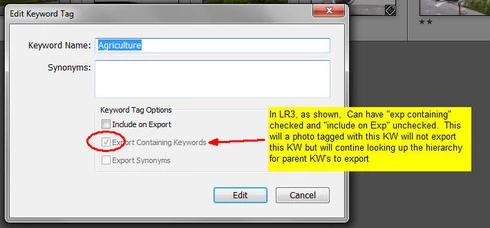
In LR3, one could skip a level in selecting which keywords are exported. For example in the hierarchy A, B, C (where A is top parent) one could set A=Include on export, B=Do not include on Export + Export Containing, and C=Include on Export + Export Containing. In this way, on a photo with only keyword "C", on export we'd have A and C but not B.

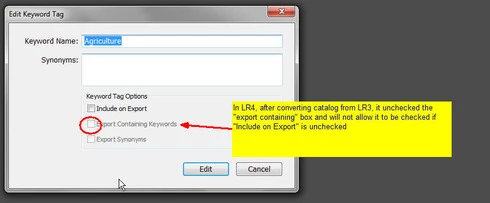
In LR4 all my LR3 keywords that had this pattern were changed during catalog conversion and I can no longer set this pattern. Turning off "Include on Export" now turns off "Export Containing" and "Export Synonyms" rather than leaving them alone as in LR3.

This is a HUGE problem for me as I have my entire keyword hierarchy (over 3,000 KW's) designed to allow skipping levels. In addition, I have cases where the actual Keyword is for my workflow and convience but but the synonym is what I want exported (not the actual KW) which I can also no longer seem to do.

See screen shots below


This topic has been closed for replies.

87 replies

Inspiring
March 23, 2012
It s not a god policy to change something that works well. In this case a lot of peopel use keywords lists, and when they earlier could choose what to be exported ore not, in L4 they cant do it anymore. Today in L4, the old keyword list has to be rewritten! A lot of work for many peopel! this can not be the goal for Adobe...
Participating Frequently
March 22, 2012
Dorin,
The plural form works best as keyword because a search for "bird" will make hits on both "bird" and "birds". if you use the singular form and search for "birds", you get no hit at all. English is pretty nice that way; there are only a few exceptions, like goose/geese for example.

Btw, using plural for group names and singular for species names seems kinda logic to me... 🙂
Inspiring
March 22, 2012
Dorin

Some like the keywords in both Singular and Plural. In this example the exported keywords are in singular, but it's easy (at least in LR3) to change some of the non-exported plural keywords, so they also will be included in the export.

NB: This is only an example to show the problem with LR4, not an example of best practice in keywording.

OJL
dorin_nicolaescu
Inspiring
March 22, 2012
No, I was not talking about tabs.

Why write, for example, Birds twice — Birds in plural, then Bird in singular as synonym? Isn't just Bird (without synonyms) enough?
Inspiring
March 22, 2012
Dorin
.......... = TAB
I had to write it like this because this feedback-site don't show TAB-separated fields correct.

The imported TXT-file with keywords for Lightroom is TAB-separated

OJL
dorin_nicolaescu
Inspiring
March 22, 2012
What are all those plurals for?
Why not just make it lke this?

[BIRDS_of_the WORLD-vENG10D]
........Wildlife
................Bird
....................... Gamebird
................................Grouse
....................................... Ruffed Grouse
................................................{Phasianidae}
................................................{Bonasa umbellus}
Inspiring
March 22, 2012
@ Benjamin

I agree that keywording in LR3 was not perfect, but still the best keywording software available on the market. In fact the use of hierarchy keywords list in LR has been my main reason why I have used LR since LR1.5. Most of my image editing is done in Photoshop + Nik Software.

I also agree that keywording in Lightroom has some limitations and potential confusions (if you don't know what you are doing). For my commercial keyword lists I have written keywords in large spreadsheets and developed (together with a programmer) a software for convert CSV-files to Lightroom-friendly UTF-8 txt-files (which are imported into LR).

The last 5 years I have worked hundreds of hours making hierarchy keyword lists, mainly for nature photographers and in norwegian language: http://www.naturfokus.com/webshop-no/... and now I'm done with some advanced Keyword lists for all the birds in the world: http://www.naturfokus.com/webshop-en/... (was planned to be released this week). These keyword lists with up to 80.000+ different keywords (for 14.474 different bird species) worked perfect in LR3 and in the LR4 Beta, but not good with LR4.

The structure of the imported txt-file in my system is like this:

[BIRDS_of_the WORLD-vENG10D]
........Wildlife
................[Birds]
....................... {Bird}
....................... [GAMEBIRDS]
............................... {Gamebird}
................................[Grouses]
....................................... {Grouse}
....................................... Ruffed Grouse
................................................{Phasianidae}
................................................{Bonasa umbellus}

........ = TAB (this feedback site don't show TAB right)
[ ] - not exported keywords
{ } - synonyms

What's visible in Ligthroom LR3 and LR4 for this example is:

BIRDS_of_the WORLD-vENG10D
........Wildlife
................Birds
........................GAMEBIRDS
................................Grouses
........................................Ruffed Grouse

If you select keyword "Ruffed Grouse", the following keywords will be exported in LR3: Wildlife, Bird, Gamebird, Grouse, Ruffed Grouse, Phasianidae and Bonasa umbellus, which is what my clients want to have.

In LR4 only 3 keywords will be exported with this list: Ruffed Grouse, Phasianidae and Bonasa umbellus which is not good at all.

To get all the desired keywords I have to redesign the Keyword lists to this structure:

[BIRDS_of_the WORLD-vENG10D]
.......[Wildlife]
................[Birds]
........................[GAMEBIRDS]
................................[Grouses]
........................................Ruffed Grouse
................................................{Phasianidae}
................................................{Bonasa umbellus}
................................................{Wildlife}
................................................{Bird}
................................................{Gamebird}
................................................{Grouse}

This is in my opinion back to the stone-age, and Synonyms like Wildlife and Bird will be written 14.474 times (under each keyword for bird specie) instead of 1 or a few times. The user may not easy activate or dis-activate a keyword, but have to do it under each of the 14.474. If one word is misspelled I or my clients have to correct it hundreds or thousands of times. You can still call it a "Hierarchy" based keyword list, but it's a big step backward.

The open structure in LR3 was brilliant for making advanced keyword lists.

My questions for you or someone else in the Adobe team:

1. Did Adobe know about this issue in LR4 for advanced keyword lists, or was it a big surprise Adobe as for me and many other photographers?

2. Why is this page filed as "Not a problem". Does the Adobe Team not understand the problems with advanced Keyword lists in LR4?

My recommendation: Make the system open (as in LR3), but make it clearer for the user what to do or not for the keywords you want / don't want to be exported.

Best regards
Ole Jørgen
Inspiring
March 22, 2012
@2422803,

I was afraid of this. Unfortunately, I also used the bugwards compat behaviour to allow for tagging substitutions (e.g., my daughter is tagged with her full name, but her internet nickname(s) is/are exportable). My bad, as I knew the Lr3 behaviour was probably a bug -- greying out set controls is an obvious warning sign! It was pretty clear I was relying on a kludge.

I'm going to think hard about a solution, but I'm pretty sure that a possible solution will use Friedl's Metadata Wrangler, which is a pretty tight piece of kit. I think it has an ill-used (by me) regex tag substitution panel that should fit the bill. I urge others to look a this plugin if they are heavily invested in keywords. (It also happens to fix a MacRoman conversion problem in some unicode chars in keywords on some Macs, but that is a different story. I suppose I should check to see if Lr 4 has fixed that yet.)

I think it is worth mentioning two things:

1. This change didn't change the tags as they are applied to photos in the catalogue, or the list of keywords.

2. This change does change metadata on the keywords (or is that meta-metadata?) that has the effect of suppressing keywords as they are applied to renditions.

As for (2), we have a situation where keywords were not leaked in renditions. In cases like this, where difficult decisions have to be made, it is always better to err on the side of safety.

So, it isn't completely the end of the world. Just another step closer to the heat-death of the universe.
john beardsworth
Community Expert
Community Expert
March 22, 2012
I tend to feel Adobe have made the right call that helps more people, but I don't pretend it's ideal for those who are purist about what belongs in keywords (which would include me) and also structure them in hierarchies (which I don't) and took advantage of the LR3 behaviour. I'd be pretty surprised if any real fix like "export children" change or keyword sets (my idea - an equivalent to collection sets) happened quickly though. That's just being realistic about the pace of change.

I'm not sure there's an obvious way forward for those who took advantage of the old behaviour. Can these do-not-export parent keywords be identified and killed after LR export? For instance, some people use ~ as a prefix for these keywords so an export post processing filter could manipulate them via Exiftools. Horrible, and only possible if there's a prefix or some other hook, but the plugin community might be able to fill that gap.
March 22, 2012
I got an email reply on this thread from john beardsworth but can't seem to find it in the discussion so will do a general reply.

John says "......privacy is a valid concern. Users need to be able to quickly shut off exporting of such workflow or internal keywords, and fixing the bug has achieved that."

My Reply to John:

In LR3 users had an easy way to "quickly shut off exporting" by just unchecking three boxes in the same pop up rather than just one. I understand that there may have been some confusion whereby some uninformed users assumed that unchecking the "include on export" box stopped everything. I am not opposed to a change to eliminate this confusion or make the LR4 behaviour the default. However, eliminating confusion, or even making the default be "the more restrictive action" is a far cry from removing valuable functionality altogether.

In this thread we have seen suggestions that would satisfy both sides of this discussion. For example:

1) Provide a catalog preference such as "Allow 'export synonyms' and 'export containing' keywords to remain active on keywords when 'include on export' is deactivated' " (default = unchecked). This would protect the newbies who don't understand the options and just want to use the top check box while at the same time allow more experienced users to take full advantage of the funtionality from LR3

2) When turning off "Include on Export" on a keyword, pop up a warning dialog box if either of the other two options ("Export Synonyms" or "Export Containing") are turned on. In this new pop up, explain the risk and allow the user to either leave or turn off one or both of the other two options. Here again the default would be to "turn them off" (LR4 Behaviour) but allow them to stay on (LR3 Behaviour).

I can even live with the LR3 to LR4 catalog conversion opting for the LR4 behaviour but it would be nice to create some sort of log as to which KW's were affected so we could go back and fix them (once you provide a way to do so) - or, even better, give us an option when converting an LR3 catalog to LR4 as to which behaviour we desire.