
Known Participant
May 26, 2019

P: Keywords transferring from laptop to desktop - existing keywords do not transfer

  • May 26, 2019
  • 24 replies
  • 561 views

I use a laptop when travelling.  I have exported the keyword list from my desktop to the laptop.

I added a new photo onto the laptop with the keywords"barkblur' and 'persontest".  They show on the laptop keyword list.  'barkblur' is an exisiting keyword and shows in the folder structure. Whilst 'persontest' a new keyword shows outside the folder structure.
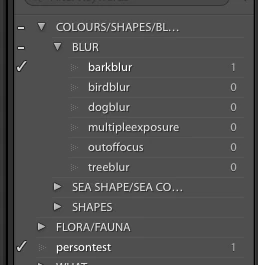
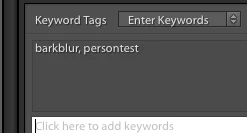


I then selected the folder and chose export as catalog and ticked export negative file and include available previews. and saved it to an external hard drive as TEST. Then copied the TEST exported catalog folder to my desktop computer.

On the desktop the only one of the keywords show on the photo - 'persontest' only and not 'barkblur'. Person test is a new keyword and bark blur is an exisiting keyword.


Image is not available


 IN the keyword list the 'barkblur' numbers have not increased and the 'persontest" which is the new keyword does show.


Image is not available


I hope someone can help with this. Thank you

This topic has been closed for replies.

24 replies

Bel BacAuthor
Known Participant
June 5, 2019
Thank you very much
Victoria Bampton LR Queen
Community Expert
Community Expert
June 4, 2019
I can reproduce it with Belinda's catalog. It's not barkblur that's going missing, it's the COLOURS SHAPES BLURS parent keyword, even when that's renamed to something simple. Bugged as LRD-4201240
Victoria - The Lightroom Queen
johnrellis
Legend
May 29, 2019
I've run out of ideas about what's causing this behavior or how to work around it -- sorry.
Bel BacAuthor
Known Participant
May 29, 2019
Hi John 
I wonder how you are going looking into this.
Thank you
Belinda
Bel BacAuthor
Known Participant
May 27, 2019
Preferences > Treat '/' As A Keyword Separator checked or unchecked? - they are unchecked on both the laptop and desktop.

I removed the test image.
I changed the keyword to "COLOR SHAPES BLUR" (replacing /'s with space). 
I imported the image again and added keywords barkblur and persontest.

Below is the keyword list on the laptop


I then exported the catalog to my thumbdrive. Unplugged it and put it onto my desktop.
I opened the lrcat from the thumbdrive and this is the keyword list


and this is the keyword window still with the ' working' in grey


johnrellis
Legend
May 27, 2019
Some more troubleshooting steps:

1. On your laptop LR, is the setting Preferences > Treat '/' As A Keyword Separator checked or unchecked?

2. On your desktop LR, is the setting Preferences > Treat '/' As A Keyword Separator checked or unchecked?

3. In your laptop LR's Keyword List, right-click the keyword COLOR/SHAPES/BLUR and do Edit Keyword. Change the name of the keyword to "COLOR SHAPES BLUR" (replacing /'s with space). 

4. Export the folder as a catalog as you've been doing.

5. Open that exported catalog in your desktop LR (don't import it into the main catalog yet). 

6. Do you see "barkblur" in the Keyword List?  Do you see "Working..."?
johnrellis
Legend
May 27, 2019
That "working" in the Keywording panel is also worrisome.  I assume it never goes away. In other contexts, that has been a symptom of underlying bugs.
Bel BacAuthor
Known Participant
May 27, 2019
Entire window of Lightroom from the lrcat thumbdrive


Close up of the keyword window showing 'working' in it


Screenshot of the folders in the Thumbdrive - note I only am able to import the lrcat and nothing else.

johnrellis
Legend
May 26, 2019
"And the keyword box next to the image has a greyed out "working" in it."

That's interesting. How about a screenshot of the entire LR window, including the "working" message?  That could provide additional clues.
Bel BacAuthor
Known Participant
May 26, 2019
I will screenshot 3 images: I hope these are clear.
Keyword list laptop


Keyword list on thumdrive - i did export as catalog - save to external hard drive and ticket export negative file and include available previews.  Then I transferred the thumbdrive to my desktop and opened the lrcat from the thumbdrive.

This is the keyword list:


And the keyword box next to the image has a greyed out "working" in it.

Then when I import from the thumbdrive to my desktop using Import - another catalog into my Lightroom desktop I get this keyword list


and this in the keyword field


So it looks like something in the export process from the laptop to the thumbdrive?  Shall i send you the screenshots of the process that I do?
Thank you
Belinda