
Known Participant
May 26, 2019

P: Keywords transferring from laptop to desktop - existing keywords do not transfer

  • May 26, 2019
  • 24 replies
  • 567 views

I use a laptop when travelling.  I have exported the keyword list from my desktop to the laptop.

I added a new photo onto the laptop with the keywords"barkblur' and 'persontest".  They show on the laptop keyword list.  'barkblur' is an exisiting keyword and shows in the folder structure. Whilst 'persontest' a new keyword shows outside the folder structure.
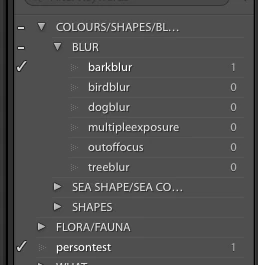
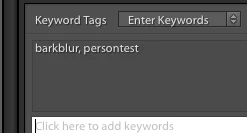


I then selected the folder and chose export as catalog and ticked export negative file and include available previews. and saved it to an external hard drive as TEST. Then copied the TEST exported catalog folder to my desktop computer.

On the desktop the only one of the keywords show on the photo - 'persontest' only and not 'barkblur'. Person test is a new keyword and bark blur is an exisiting keyword.


Image is not available


 IN the keyword list the 'barkblur' numbers have not increased and the 'persontest" which is the new keyword does show.


Image is not available


I hope someone can help with this. Thank you

This topic has been closed for replies.

24 replies

johnrellis
Legend
May 26, 2019
In a previous post, you showed the Keyword List of the thumbdrive catalog, and it didn't show "barkblur", "birdblur", or any of the other keywords under BLUR?

https://feedback.photoshop.com/photoshop_family/topics/keywords-transferring-from-laptop-to-desktop-...
Bel BacAuthor
Known Participant
May 26, 2019
Hi John  the last screen shot shows this. This is after I have imported into my desktop Lightroom.  

When I transfer the catalog from the laptop to the desktop I use a thumbdrive.  Below is the screen shot when I open the lrt cat on the thumbdrive before I import it into my desktop Lightroom.  I also have screenshots of all the steps that I do when transferring the catalog if you need to see them.


johnrellis
Legend
May 26, 2019
When you open the catalog you exported, what does the Keyword List look like?
Bel BacAuthor
Known Participant
May 26, 2019
Dear John

We seem to be narrowing this down, thank you for  your reply so far. I tried it again and same results


These are the keywords I assigned to the image


This is the keyword list on the laptop


This is the keyword when exported to the desktop


And the keyword list


Regards
Belinda


johnrellis
Legend
May 26, 2019
Note that in the screenshot of the Keyword List of the exported catalog, BLUR is a leaf keyword (no child keywords) -- it has the number 0 following it, and its expand triangle is greyed out. That is, LR has put COLOR/SHAPES/BLUR > BLUR into the exported catalog but not the leaf keyword "barkblur".  

Normally, LR only puts that part of the keyword hierarchy into the exported catalog that is actually assigned to the exported photos.  So the fact that BLUR is included but not its child "barkblur" strongly indicates there's some kind of bug.

I tested whether the keyword attribute Include On Export affects which keywords are placed in the exported catalog -- it doesn't. 

So I agree with Johan, try this again, with a single, different photo assigned the the two keywords "barkblur" and "persontest".  Do both keywords make it into the exported catalog? Provide a screenshot of the Keyword List panel of the exported catalog.
JohanElzenga
Community Expert
Community Expert
May 26, 2019
The screenshots clearly show that they are both assigned.
-- Johan W. Elzenga
Participating Frequently
May 26, 2019
Only the keywords that are assigned to the photo's that are in the exported catalog are exported.
JohanElzenga
Community Expert
Community Expert
May 26, 2019
A test of one test sample is no test. I would suggest you first try this again, because this is not normal behavior.
-- Johan W. Elzenga
Bel BacAuthor
Known Participant
May 26, 2019
When I transferred the catalog over I used a thumb drive.  I just opened the thumb drive lrcat and the keywords show as below.  So this makes me think that the keywords already in the folder structure do not export to the Test Catalog.?
Participating Frequently
May 26, 2019
Yes but we don't know if this happend at export or import