
Inspiring
March 26, 2019

P: Library filter panel stops showing number of images in each category

  • March 26, 2019
  • 22 replies
  • 692 views

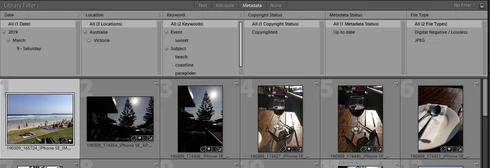
I noticed recently that the Library filter panel stops showing the number of images in each category after some period of usage. In the attached screenshot you can see that there are no numbers against any of the metadata values. I can't work out how long it takes for them to stop showing but it appears to be anywhere between 5 and 20 minutes or so.

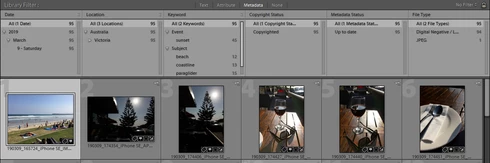
Normally, the total number of images is shown to the right of each value (second screenshot). When I first start my cataloguing session, the numbers are clearly visible. At some point in the session I realize they have gone.

I know that this did not happen until recently because I rely upon those numbers to conduct my key-wording. I suspect the problem has come in with the last Lightroom update.

To restore the numbers I have to exit and then return to Lightroom, as shown in the second screenshot.

Can you please resolve this problem as it does compromise the cataloguing/key-wording workflow?

No numbers:

Numbers re-appear after restarting LR:
This topic has been closed for replies.

22 replies

Inspiring
August 17, 2019
Hi Rikk,

I can confirm that the bug has been fixed from my end. If I follow the steps I outlined 5 months ago, the image counts in the Library Metadata Filter no longer disappear. My configuration is LR Classic 8.4 on Windows 7 - Home Premium Edition. Thank you!

Inspiring
August 14, 2019
hi rikk, thus far have seen no recurrence of the bug on my win 10 home - build 18362.
thx
Todd Shaner
Legend
August 13, 2019
Rikk, it's fixed on both my Windows 7 system and Windows 10 system version 1809 build 17763.
Rikk Flohr_Photography
Community Manager
August 13, 2019
Lightroom Classic 8.4 was released today and contained a fix for this issue. Please update to 8.4 and verify that you are no longer seeing the issue. Thank you!
Rikk Flohr: Adobe Photography Org
Inspiring
May 17, 2019
Hi, confirmation only: this bug is still prevailing in LR Classic 8.3 on win 10
kelleykphoto
Participant
May 11, 2019
Thanks for merging this in. I looked yesterday before opening my report but couldn't find anything. I'm glad we've confirmed the issue is not just on my computers, and was introduced with LR 8.0 on Windows machines.
Participating Frequently
May 11, 2019
I noticed this too the other day. Reproduced here on Windows Professional 10 (ver 1809) x64 system; Lightroom Classic ver 8.2.1 on Dell XPS 15 laptop.
johnrellis
Legend
May 11, 2019
Another confirmation: The recipe above produces the bug on my LR 8.2.1 on Windows 10 but not on Mac OS 10.14.3.
kelleykphoto
Participant
May 11, 2019


I often use the image counts with the Library Metadata Filter. Today I noticed that if I resize the window so it's not full screen, or if I make the panels on the side larger, the counts disappear. I'm on a large screen (2560x1440), so even if LR isn't maximized, there should be plenty of room to display these numbers. But the columns don't seem to be resizing correctly and the numbers are getting cut off. In the screenshot below, you can see where the numbers are getting cut off, even with lots of room available. If I make the screen any smaller, they disappear completely.

Todd Shaner
Legend
April 3, 2019
Thanks Smit!