
Inspiring
March 26, 2019

P: Library filter panel stops showing number of images in each category

  • March 26, 2019
  • 22 replies
  • 692 views

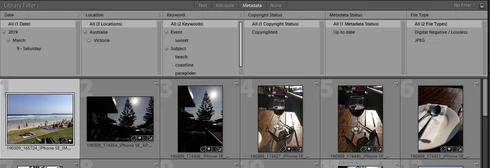
I noticed recently that the Library filter panel stops showing the number of images in each category after some period of usage. In the attached screenshot you can see that there are no numbers against any of the metadata values. I can't work out how long it takes for them to stop showing but it appears to be anywhere between 5 and 20 minutes or so.

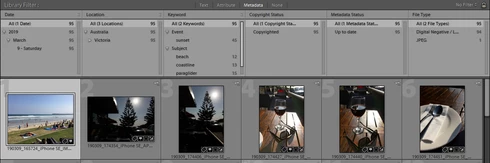
Normally, the total number of images is shown to the right of each value (second screenshot). When I first start my cataloguing session, the numbers are clearly visible. At some point in the session I realize they have gone.

I know that this did not happen until recently because I rely upon those numbers to conduct my key-wording. I suspect the problem has come in with the last Lightroom update.

To restore the numbers I have to exit and then return to Lightroom, as shown in the second screenshot.

Can you please resolve this problem as it does compromise the cataloguing/key-wording workflow?

No numbers:

Numbers re-appear after restarting LR:
This topic has been closed for replies.

22 replies

Smit K
Participating Frequently
April 3, 2019
Hi,

Thanks for sharing the details on reproducing this bug. I have been able to reproduce the issue. Bug has been logged as well.

Thanks,
Smit
Lightroom Classic CC Team
Adobe
Smit | Lightroom Team
Todd Shaner
Legend
March 31, 2019
I've filed a problem report for this issue with Adobe Engineering.
Jerry Syder
Inspiring
March 31, 2019
Same as Todd’s. Windows 10 1809, LR 8.2
Inspiring
March 31, 2019
Thanks Johan, Todd and Robert.

Given your observations it looks like the issue may be specific to Windows rather than MacOS.

My configuration is LR Classic 8.2 on Windows 7 - Home Premium Edition. Todd confirms the issue exists even on Windows 10, so it appears to be more generic than my Windows 7.

Jerry Syder, what is the LR/OS configuration where you replicated the issue?
Bob Somrak
Legend
March 30, 2019
Same as Johan. I cannot reproduce it on Mac 10.14.4 and Lr8.2
M4 Pro Mac Mini. 48GB
JohanElzenga
Community Expert
Community Expert
March 30, 2019
I cannot reproduce this on MacOS Mojave and Lightroom Classic 8.2.
-- Johan W. Elzenga
Todd Shaner
Legend
March 30, 2019
I can confirm the same behavior on my Windows 10 version 1809 system with LR 8.2.
JohanElzenga
Community Expert
Community Expert
March 30, 2019
Adobe never comments on future developments. They may confirm that they are working on a fix, but not when that fix will be ready.
-- Johan W. Elzenga
Inspiring
March 30, 2019
Thanks Jerry for confirming it is not an issue with my local installation.

Agree that closing the panel again after step 3 will reveal the numbers again. and so on toggling back and forth. But if I want to work with the panel open, which I do most of the time, I have to go through the tedious steps I mentioned previously to reinstate the numbers.

I don't recall seeing this behaviour in the past, i.e. I would have noticed. So my guess is that the recent update has broken something that got past Adobe's regression testing.

Rikk, can you please advise when this defect will be addressed?
Jerry Syder
Inspiring
March 30, 2019
I can reproduce this. However, when I close the panel again after step 3, the numbers reappear, then disappear again when I open it. Basically, if you toggle back and forth with the panels, they numbers reappear and disappear continuously.