
Inspiring
March 26, 2019

P: Library filter panel stops showing number of images in each category

  • March 26, 2019
  • 22 replies
  • 692 views

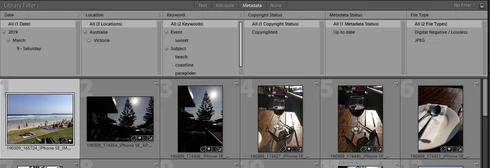
I noticed recently that the Library filter panel stops showing the number of images in each category after some period of usage. In the attached screenshot you can see that there are no numbers against any of the metadata values. I can't work out how long it takes for them to stop showing but it appears to be anywhere between 5 and 20 minutes or so.

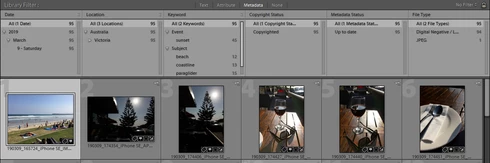
Normally, the total number of images is shown to the right of each value (second screenshot). When I first start my cataloguing session, the numbers are clearly visible. At some point in the session I realize they have gone.

I know that this did not happen until recently because I rely upon those numbers to conduct my key-wording. I suspect the problem has come in with the last Lightroom update.

To restore the numbers I have to exit and then return to Lightroom, as shown in the second screenshot.

Can you please resolve this problem as it does compromise the cataloguing/key-wording workflow?

No numbers:

Numbers re-appear after restarting LR:
This topic has been closed for replies.

22 replies

Inspiring
March 30, 2019
Thanks Rikk.

I tried resetting the preferences as you described but this did not fix the problem.

I did finally realize what was setting it off though. It occurs whenever I hide either the right or left panels to make more room. When I restore those panels, the numbers disappear from the filter panel. See the sequence and screen shots below.

Restarting LR will bring the numbers back. Another trick is to change the filter. The numbers will then re-appear. I can then restore the filter I was working with and the numbers will stay.

This is clearly a bug.

TO REPRODUCE THIS ERROR:

1. Numbers for each value in each filter column are visible. I'm using the Default Columns filter here provided by LR. You can see the right-hand set of panels are open, e.g. histogram.


2. I've now hidden the right-hand set of panels by clicking the little arrow at the right edge of the screen. I do this occasionally to make more room for viewing images. You can still see the numbers in the filter panel.


3. Now I've restored the right-hand set of panels by clicking the little arrow at the right edge of the screen. You can see I've restored the layout to the same as it was in the first screenshot. However, you can see that the numbers have now disappeared.


Rikk Flohr_Photography
Community Manager
March 26, 2019
Frank, 

I haven't seen that here on my Mac or Windows systems. You may have an issue on your local installation. I would recommend a preference file reset.

A Preference File will survive a Lightroom uninstall/reinstall. Sometimes weird behavior is corrected/cured by resetting the preferences. 

Reset Procedure:

1. Close Lightroom.
2. Hold down [Alt/Opt]+[Shift] while restarting Lightroom. 
3. Overwrite the Preferences when prompted by the dialog.
4. Close Lightroom.
5. Restart Lightroom.

Does the bad behavior return after resetting the preferences?
Rikk Flohr: Adobe Photography Org