Todd Shaner
Legend
July 27, 2020

P: Library Preview Zoom Interpolation Changed

  • July 27, 2020
  • 22 replies
  • 1059 views

Lightroom Classic  9.3 Library Preview Zoom interpolation type has been changed to nearest neighbor. Nearest neighbor interpolation uses a simpler and faster algorithm that can create "jaggies" and other artifacts in the image. Presumably this was done to reduce preview building time, but don't know. I checked LR Classic 8.4 and Camera Raw 12.3 (most current) and they
both appear to use bicubic or bilinear interpolation, which does not exhibit the artifacts seen with nearest neighbor interpolation.

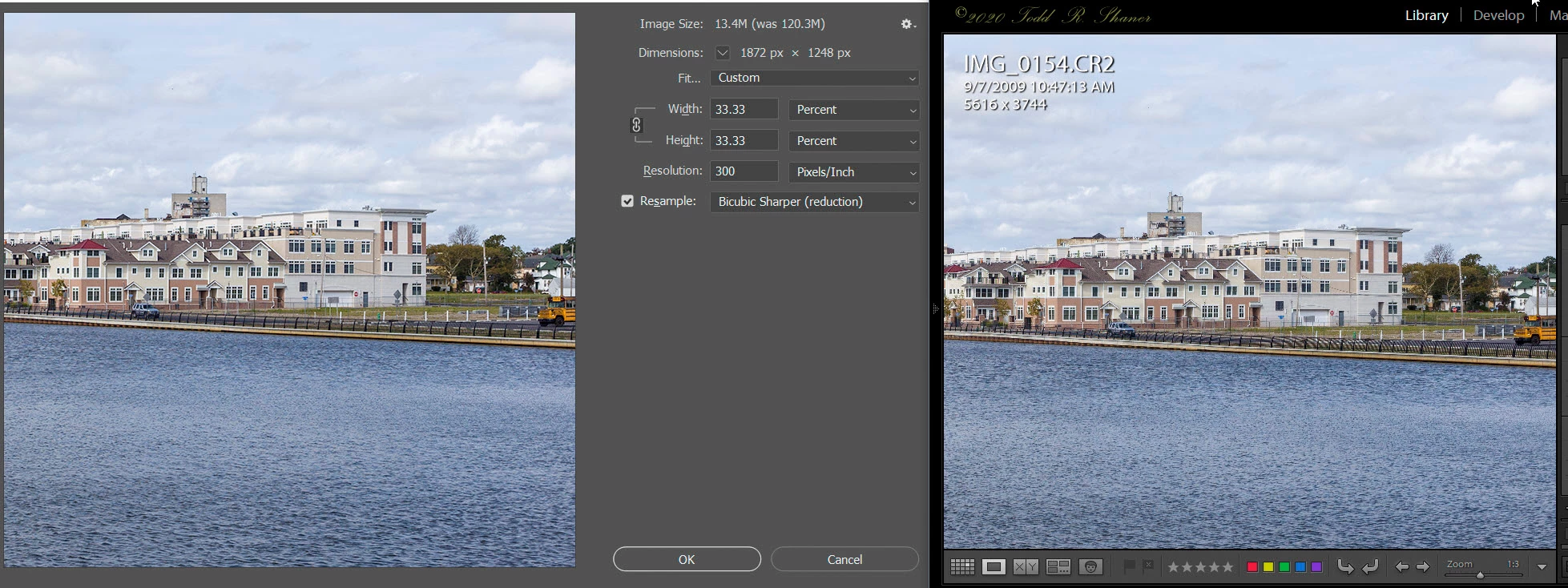
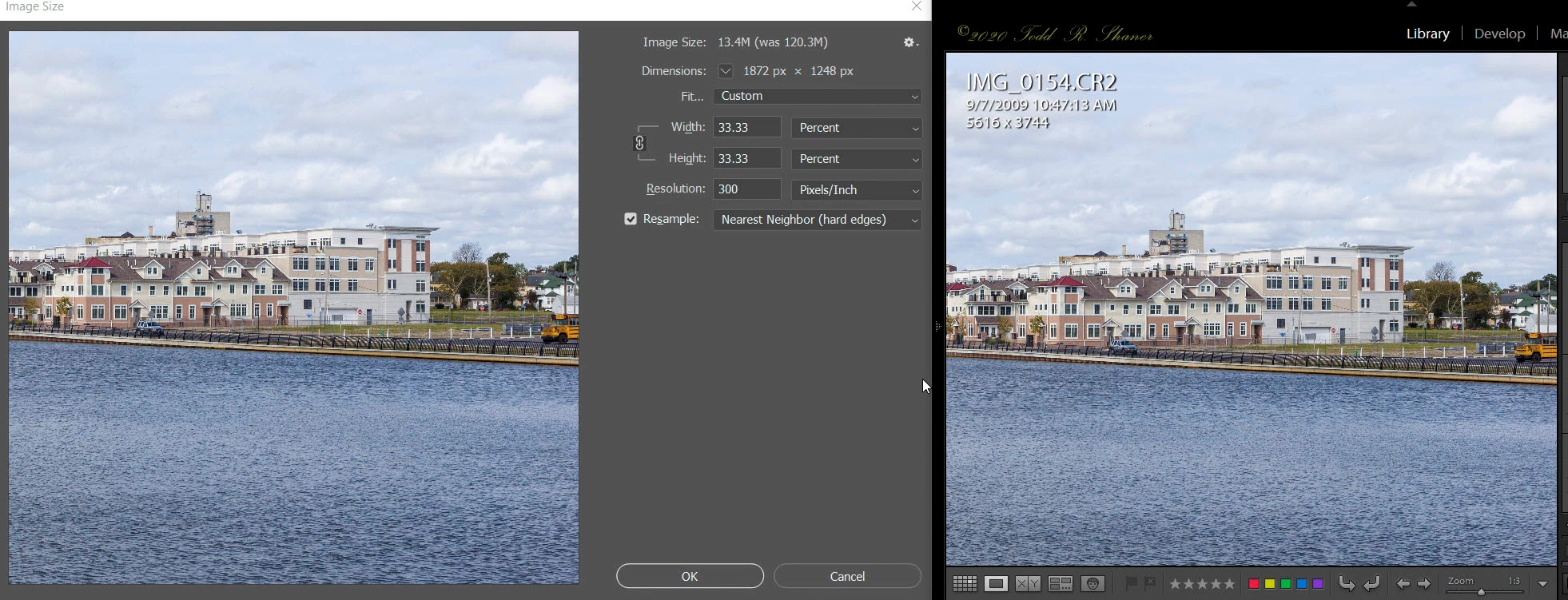
What this means is that the ALL of the Library Zoom view settings less than 1:1 may exhibit artifacts with certain image files that appear as edge "jaggies' or moire' patterns. This makes them less useful for evaluating the image detail at Zoom settings of resized export and print output. Here are examples using Lightroom Classic 9.3 showing PS Image Size panel with 33.33% (1:3 Zoom) image resizing using Nearest Neighbor (top screenshot) and Bicubic Sharper (bottom screenshot) Resample algorithms.

Observe the moire' pattern artifacts in the black fence at the center of the below picture when using nearest neighbor resizing. The bicubic sharper resizing in the 2nd screenshot does not exhibit these artifacts. I also checked PS Image Size Bilinear Resample and it does not exhibit the artifacts. LR Classic 9.3 Develop module doesn't exhibit these artifacts indicating it may  have been changed to bilinear Zoom resizing.
 
Summary
Adobe should at the very least use bilinear Zoom resizing in the Library module or return to the original bicubic resample interpolation, which provides the most accurate rendering.

(right-click on images to see full-size)


This topic has been closed for replies.

22 replies

TheDigitalDog
Inspiring
August 13, 2020
It doesn't matter what interpolation algorithm is used for PREVIEWING in Library. It's not accurate and never was. It's built for speed, not precision of viewing the data.

Previews for color, tone and sharpness must be viewed in Develop. The preview architecture, the data used, the color space for previewing is totally different and one must zoom to 1:1 for a proper preview of that data (like sharpening). 

For output (rendering of data) using Export or Open in Photoshop etc, LR uses a unique Adaptive Bicubic algorithm. It's not like anything in Photoshop, it's actually visually better! 

Adobe Photoshop Lightroom resampling is a hybrid Bicubic algorithm that interpolates between Bicubic and Bicubic Smoother for upsampling and Bicubic and Bicubic Sharper for downsampling. Lightroom and ACR uses a adaptive bicubic algorithm: the algorithm parameters are chosen automatically based on the relationship between the original image size and the final image size. These parameters were determined empirically by doing lots of experiments with photos being resampled to common output sizes, such as web-sized images (800 to 1000pixels on the longer dimension), small prints, and big prints. I can see slight improvement over the same resizing using various Photoshop algorithms. 
Author “Color Management for Photographers" & "Photoshop CC Color Management/pluralsight"
Just Shoot Me
Legend
July 29, 2020
Win 10 1909 9.3 LrC.
Vid card is a GeForce GTS 450
Todd Shaner
Legend
July 29, 2020
Thank you *Just Shot Me. What OS LR Classic version are you using? *John R. Ellis does not see the issue on his Mac Pro with OS 10.15.5.

Driver version 388.13. OLD!!!!
I'm using an Nvidia Quadro P2000 GPU with the latest July 16, 2020 driver version 451.77. So it appears to be unrelated to the GPU Model or driver version.
Just Shoot Me
Legend
July 29, 2020
OK with GPU on and 1:3 zoom I see the effect on the fence.
With the GPU off I don't.
Driver version 388.13. OLD!!!!
Just Shoot Me
Legend
July 29, 2020
Did you mean 3:1 Zoom and not 1:3?

I don't see what you are showing. But I'm using a 9 year old computer with a 9+ year old NVidia video card. No more updates for it.
Todd Shaner
Legend
July 29, 2020
One other thing I noticed is that when setting 'Use Graphics Processor' to Off I also had to open and close LR. However, you can see the impact to editing performance without restarting LR. Unchecking just 'Use GPU for image processing' does not stop the artifacting even with a LR restart. So it's the 'Use GPU for Display' setting that's loading something on LR startup that's causing the issue.
johnrellis
Legend
July 28, 2020
Unfortunately, my Windows configuration is a virtual machine running on Mac, which doesn't support use of the GPU, so I can't test this on Windows.
Todd Shaner
Legend
July 28, 2020
Then as I pan the photo at 1:3, the moiré appears only when I'm holding down the mouse.
I noticed the same behavior when I set 'Use Graphics Processor' to Off. It makes sense to use the faster and less accurate nearest neighbor interpolation since the screen needs to be update real-time as you move the image in the window. I'm on Windows 10 so perhaps it's not happening with Mac OS X systems. If something is causing it to get "stuck" in the nearest neighbor panning mode it should be easy for Adobe to fix it.
johnrellis
Legend
July 28, 2020
On my LR 9.3 / Mac OS 10.15.5 / Macbook Pro 2019 / Radeon Pro Vega 20 4 GB, with the GPU enabled, when I zoom from 1:1 to 1:3, I see the moiré patterns fleetingly. Then as I pan the photo at 1:3, the moiré appears only when I'm holding down the mouse. See this screen recording:
https://www.dropbox.com/s/4ntc7pdx0s00gd5/nearest-neighbor.2020.07.28.mov?dl=0

So maybe in normal operation, whenever LR changes the zoom or pans, it uses nearest neighbor to display an initial image quickly. Then after the initial display of a zoom, or after the pan stops, it redisplays with the slower bicubic.  And perhaps that redisplay is getting stuck or not working on your system with the GPU enabled.
Todd Shaner
Legend
July 28, 2020
UPDATE: The issue is not observed when 'Use Graphics Processor' set to Off and LR is closed and restarted.

I updated my Nvidia Quadro P2000 graphics drivers to the latest July 16, 2020 version 451.77, restarted my system and checked again. The issue remains using the latest driver so Adobe has made changes that are not compatible with the Nvidia drivers. Somewhere in the display pipeline the 1:3 Zoom and smaller Library Preview is being scaled using nearest neighbor interpolation. As I mentioned the Develop module preview does not exhibit this issue so it's being applied at the app level and not the display pipeline.

You can download the Canon 5D MKII CR2 I used in the above screenshots to see if your system is affected. Zoom to 1:1 view, wait for the preview to build, and then set the Zoom view to 1:3. Look at the black fence in the center of the picture. If it looks like the top image in the below screenshot your system is affected as well.

https://www.dropbox.com/s/5moo207u90gvjbz/IMG_0154.CR2?dl=0

Lightroom Classic 9.3 Library Module 1:3 Zoom View

(Top GPU Enabled, Bottom GPU Disabled and LR Restarted)