
Participating Frequently
June 20, 2026

P: Lightroom Denoise suddenly stopped working

  • June 20, 2026
  • 127 replies
  • 2602 views

Hi everyone,

I'm having an issue with the latest version of Lightroom CC on a MacBook M5 Pro running macOS Tahoe 26.5.1. (I was experiencing the same problem on 26.5 and decided to update hoping it would fix it, but unfortunately it didn't.)

Since this morning, it's been impossible to to use Noise Reduction, even though my internet connection is working perfectly. I've already updated both Lightroom CC and macOS, cleared the cache, and optimized the catalog, but I keep getting this error screen whenever I try to use Noise Reduction.

Has anyone experienced the same issue or knows how to fix it? Any help would be greatly appreciated. Thanks! 🙏
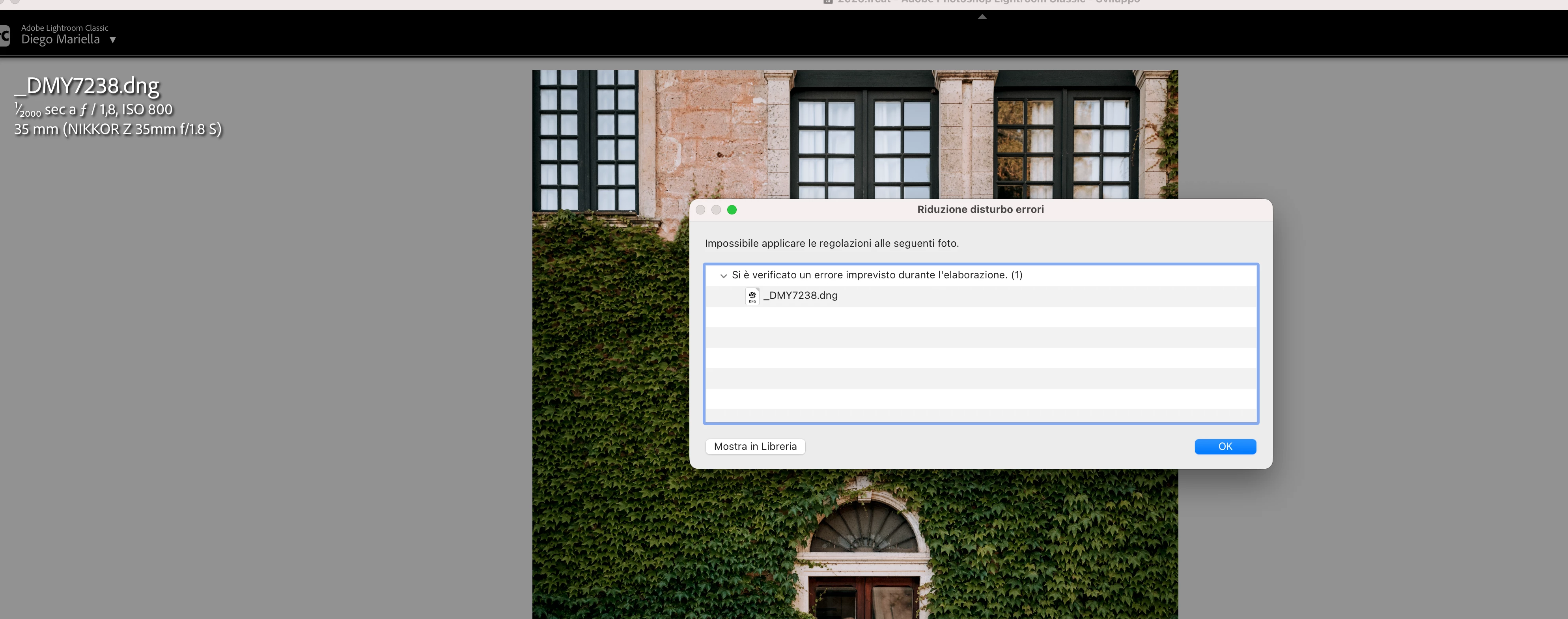
 

    Pinned Reply By Sameer K

    Hi All! Lightroom Classic v15.4.1 is now available for downlaod via the Creative Cloud desktop app with the following critical bug fiixes for the issue reported in this thread and the other: 


    Thanks!
    Sameer K

    127 replies

    Participant
    July 10, 2026

    Currently using Lightroom CC 8.5.1 on a M4 Pro MacBook Pro with macOS 15.7.7 and am experiencing the same issues: denoise settings won’t update or load up despite the app saying “Updated AI settings on one photo” after running the default preset I’m using for import which includes it.

    In addition to that, I tried changing the default import preset and now clicking on the “denoise” checkbox inside the detail panel won’t make it do anything while the checkbox remains empty

    I tried changing performance preferencies but it didn’t change anything. 

    JohanElzenga
    Community Expert
    Community Expert
    July 10, 2026

    This is the Lightroom Classic forum. If you have problems with Lightroom (the cloud version), then post in the appropriate forum, not here.

    -- Johan W. Elzenga
    Participant
    July 3, 2026

    I have the same problem in Lightroom, Denoise works in photoshop but not in Lightroom. I have cleared cache, reset preferences etc and everything else that I or copilot can think of.  Anyone got Amy ideas?

    JohanElzenga
    Community Expert
    Community Expert
    July 3, 2026

    You are not saying what version of Lightroom Classic you are using. That is vital. Update to Lightroom Classic 15.4.1 if you do not use that version already.

    -- Johan W. Elzenga
    Known Participant
    July 1, 2026

    Uninstalled & reinstalled 15.4.1 and denoise is still not working. 


    Лариса21788468ldth
    Participant
    June 25, 2026

    Кнопка «устранить шум» во вкладке «Детали» не работает вообще, сколько не нажимай. Приложение оплаченное, интернет есть, перезагружала несколько раз - бесполезно. Я не могу устранить шум с фото 

    JohanElzenga
    Community Expert
    Community Expert
    June 23, 2026

    Update to Lightroom Classic 15.4.1.

    -- Johan W. Elzenga
    melaninxhalide
    Participant
    June 23, 2026

    I just experienced the same bug. I am using Lightroom Classic version 15.3.1 release and Camera Raw 18.3; I literally just updated to this version two days ago. I am on a Mac using macOS Tahoe 26.4 and the RAW files are from a Sony A7R II. Denoise was working fine prior to updating Lightroom Classic to 15.3.1.

    MarieCole
    Participant
    June 23, 2026

    I’m having the same issue. I’ve read a few forums that others are experiencing this issue with the new release, too. https://www.lightroomqueen.com/community/threads/denoise-an-unexpected-error-occurred-while-processing.54952/


    Anke+Pretorius
    Participant
    June 23, 2026

    When i try to denoise an image it keeps on saying Failed to apply adjustments to the following photos. vAn unexpected error occurred while processing. (1) This is on all the images not just one and on more than one different shoot. This is the first time light-room has sent a pop up like that. Usually when it does not want to denoise is close the app and open it again the it works. Not this time. This is now day 3 

    Peter_zana
    Participant
    June 23, 2026

    Grazie, fortunatamente ieri Adobe ha rilasciato aggiornamento 15.4.1 che ha opportunamente corretto la problematica. Avevo provato ad installare anche la 15.2 ma anche cancellando la cartella CameraRaw il problema persisteva.

    grazie molte del riscontro comunque 

    Participating Frequently
    June 22, 2026

    This popped up suddenly on my MacBook.  I upgraded to LR 15.4.1 and it went away.